I am trying to: Show content from custom fields in the frontend.
Link to a page where the issue can be seen: hidden link
I expected to see: content from custom fields
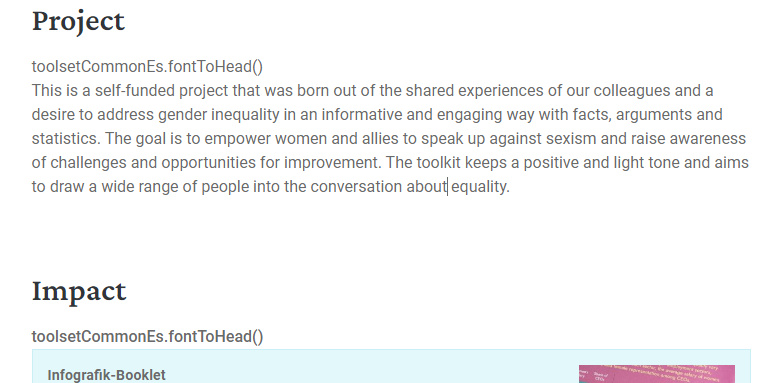
Instead, I got: content from custom fields, but every time "toolsetCommonEs.fontToHead()" is shown before the content.
I recently installed and activated WP Rocket so I assume this causes the issue. But even after turning off JavaScript delayed execution and/or creating exceptions for Toolset, "toolsetCommonEs.fontToHead()" remains visible in the frontend. I tryed clearing caches.
I would like to request temporary access (wp-admin and FTP) to your site to take better look at the issue. You will find the needed fields for this below the comment area when you log in to leave your next reply. The information you will enter is private which means only you and I can see and have access to it.
Our Debugging Procedures
I will be checking various settings in the backend to see if the issue can be resolved. Although I won't be making changes that affect the live site, it is still good practice to backup the site before providing us access. In the event that we do need to debug the site further, I will duplicate the site and work in a separate, local development environment to avoid affecting the live site.
- Please make a backup of site files and database before providing us access.
- If you do not see the wp-admin/FTP fields this means your post & website login details will be made PUBLIC. DO NOT post your website details unless you see the required wp-admin/FTP fields. If you do not, please ask me to enable the private box. The private box looks like this: hidden link
Please, let me know if you need any additional details. Have a nice day.
So far I wasn't able to locate the culprit of the issue.
I'd like to ask permission to make a copy/staging version of your site where I can debug this closely without affecting the live site.
I'll make sure to delete this copy as soon as we get this issue fixed.
I'm afraid of debugging directly on the live site and cause issues to your visitors. Also, it is important to test a different setup as part of the troubleshooting.
If you could reach out to the plugin's author or support, they might be able to find the culprit of the issue off the top and help us find to a fix quicker.
In any case, given the fact that the issue seems to be a compatibility problem between DynamicConditions and Toolset, to pinpoint the exact cause, we need to isolate variables by replicating the issue in a sandbox environment with a fresh copy of WordPress and Toolset.
Here's what is needed to be done:
1- Install Essential Components Only: In the sandbox provided bellow, please install your theme and only the plugins necessary to replicate the issue. Avoid importing the entire site.
Login link: hidden link
2- Set Up the Page and Configurations: Mirror your current setup that's causing the issue, focusing on the usage of the DynamicConditions plugin, we only need the site to be partially replicated up to a point where we can debug this issue.
3- Notify Us Once Done: After replicating the issue in the sandbox, inform us through this ticket so we can proceed with further analysis.
The goal here is to identify if the problem is indeed a compatibility issue, reproducing it in a controlled environment.
We appreciate your cooperation in this matter. Let us know once you've set up the sandbox.
Best,
Mateus
The topic ‘[Closed] "toolsetCommonEs . fontToHead ()" appearing in frontend’ is closed to new replies.