Tell us what you are trying to do?
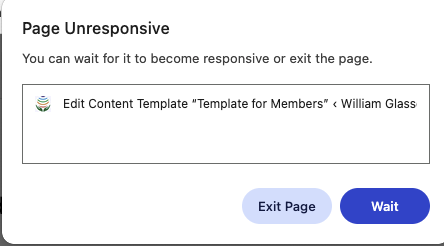
I am trying to use Toolset to edit the Toolset template for a CPT content template. The page is unable to be edited as the page can not be fully loaded. The browser just hangs or give an error with the option to wait or abort.
The following is an excerpt from a conversation with my web server tech support:
The logs also show that Toolset is generating a massive amount of file system activity. It is constantly searching for autoloaders and classmaps for its various modules (Blocks, CRED, and M2M), which is very resource-intensive:
// Toolset searching through deep directory structures for specific components
lstat(".../plugins/toolset-blocks/vendor/toolset/toolset-common/inc/m2m/autoload_classmap.php", 0x7ffd23512b90) = -1 ENOENT (No such file or directory)
lstat(".../plugins/toolset-blocks/vendor/toolset/toolset-common/inc/m2m/CRED_Association_Form_Relationship_API_Helper.class.php", 0x7ffd235109b0) = -1 ENOENT
This repeated searching for files that do not exist (returning ENOENT) happens hundreds of times per second, which is the primary reason the server reports “Insufficient Resources.”
Is there any documentation that you are following?
All I am doing is trying to load a template to edit. Nothing fancy.
Is there a similar example that we can see?
No
What is the link to your site?
The site is under development so you would need direct access to view it. hidden link
I checked the debug information you shared with me and I noticed that you are using latest Toolset plugins.
In order to minimize the cause of the issue and to ensure there is not conflict with the plugin/theme you use:
Could you please try to resolve your issue by deactivating all third-party plugins as well as the default theme to check for any possible conflicts with any of the plugins or themes?
- Do you see any difference when only Toolset plugins active?
The error details you shared is deprecated errors and that will not stop program execution.
In order to minimize the cause of the issue and to ensure there is not conflict with the plugin/theme you use:
Could you please try to resolve your issue by deactivating all third-party plugins as well as the default theme to check for any possible conflicts with any of the plugins or themes?
- Do you see any difference when only Toolset plugins active?
I have deactivated all plugins and switched to the Twenty Twenty-Five theme. Toolset worked as expected.
I reactivated Elementor and Elementor Pro and found that the browser once again experienced delays. The browser would have an error where a pop-up would ask whether to wait or exit the page. Waiting did not seem to help as multiple wait attempts did not bring the page back.
I am running Elementor 3.35.4 and Elementor Pro 3.35.1
That means you have conflict with the Elementor and Elementor pro probabally or there may possibility of theme is also involved.
In order to troubleshoot this issue further I will require a test site where I can review current issue and do primary troubleshooting. if required then I will take duplicator copy of your test site and setup your site on my local machine in order to deep troubleshooting.
*** Please make a FULL BACKUP of your database and website.***
I would also eventually need to request temporary access (WP-Admin and FTP) to your site. Preferably to a test site where the problem has been replicated if possible in order to be of better help and check if some configurations might need to be changed.
I have set the next reply to private which means only you and I have access to it.
Thank you for your help. I have decided to give up on Elementor. I have switched to a Toolset recommended page builder and no longer have the issues I was experencing.