Skip Navigation

[Resolved] Toolset Access not working with WPML anymore

This is the technical support forum for Toolset - a suite of plugins for developing WordPress sites without writing PHP.

Everyone can read this forum, but only Toolset clients can post in it. Toolset support works 6 days per week, 19 hours per day.

Sun Mon Tue Wed Thu Fri Sat
- 7:00 – 14:00 7:00 – 14:00 7:00 – 14:00 7:00 – 14:00 7:00 – 14:00 -
- 15:00 – 16:00 15:00 – 16:00 15:00 – 16:00 15:00 – 16:00 15:00 – 16:00 -

Supporter timezone: Europe/London (GMT+00:00)

This topic contains 3 replies, has 2 voices.

Last updated by Nigel 1 year, 9 months ago.

Assisted by: Nigel.

Author
Posts
#2691576
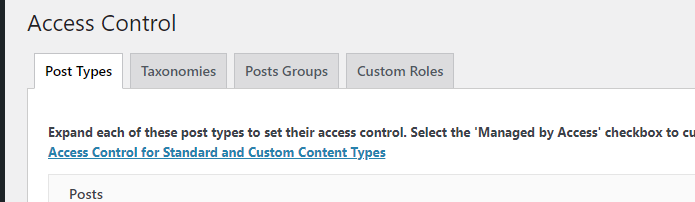
WPML.png
toolset control.png

I am trying to: Allow specific user groups to edit WPML language specific content

Link to a page where the issue can be seen: (only on backend)

I expected to see: A tab for WPML Groups in the Toolset Access Control page

Instead, I got: The tab is missing. It used to be there until a few days ago. All of a sudden it is gone and access control is not working properly anymore, users can not edit the correct content anymore as they used to.

#2691617

Nigel
Supporter

Languages: English (English ) Spanish (Español )

Timezone: Europe/London (GMT+00:00)

Hi there

I tried to reproduce this issue on my local test site using the same plugin versions as you (for OTGS plugins), but I couldn't do anything to make the WPML Groups tab disappear.

Can I ask that you test this with all plugins except for WPML and Access disabled, and if it still a problem, with a default theme like twentytwentyone.

(Note, from your debug info it looks like you updated to the latest version of WPML, but not String Translation.)

Do you still see the problem?

Also, can you confirm, the user is a normal administrator user, or it is a user with a custom role?

#2692012

Hi Nigel,

thanks for your prompt response. It is indeed a very weird issue. We now replicated our full setup locally, including all plugins, database, etc. and locally the issue does NOT occur. We also deactivated ALL plugins except toolset acces and wpml on our staging environment and switchen to twentytwentyfour theme and the bug IS still there.

So it seems related to our server environment in some strange way.

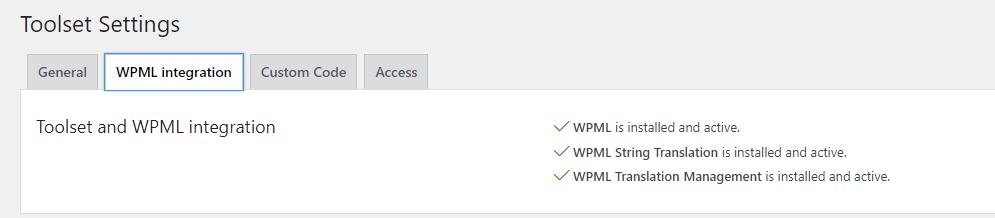
We also found out that when we purge the server cache and reload the Toolset Access controls on the backend, we see the WPML Groups tab again. But only until we reload the page once, then it is gone again. Some further digging leads us to believe that for some weird reason Toolset believes that WPML is not installed. Probably related to some caching. But on the toolset settings page it gives us a green checkmark that WPML is installed and active. So partially toolset correctly recognizes WPML, but not where it actually matters.

I know this is perhaps something we need to figure out ourselves and it is not a toolset fault, since it is working locally, just not on the actual server. But I'm writing you those details in the hope that perhaps you have come across a case like this and have a suggestion what might be the issue to spark our ideas where to look for a fix?

In any case, thanks for your help!
Chris

#2692033

Nigel
Supporter

Languages: English (English ) Spanish (Español )

Timezone: Europe/London (GMT+00:00)

Hi Chris

This is something that is difficult to debug remotely, but I can talk you through some of the code involved in determining whether to display the WPML Groups tab, so that you might be able to debug it yourself in the environment where it is not working to determine why not.

Essentially what happens is that Access simply checks if WPML is active and if it is a modern version (> 3.3) before generating the WPML Groups tab.

The test checks whether $wpcf_access->wpml_installed_groups is true.

By default it is false, but it may be set to true by the function toolset_access_wpml_loaded in types-access/application/models/wpml_settings.php (defined from line 65).

Here is the first part of that function:

	public function toolset_access_wpml_loaded() {
		global $wpcf_access;

		$wpcf_access->wpml_installed = apply_filters( 'wpml_setting', false, 'setup_complete' );
		$wpcf_access->wpml_installed_groups = false;
		$wpcf_access->active_languages = array();
		$wpcf_access->current_language = apply_filters( 'wpml_current_language', null );

		$access_roles = UserRoles::get_instance();
		$role = $access_roles->get_main_role();
		if ( $wpcf_access->wpml_installed ) {
			if ( wpml_version_is( '3.3', '>=' ) ) {
				$wpcf_access->active_languages = apply_filters( 'wpml_active_languages', '', array( 'skip_missing' => 0 ) );
				foreach ( $wpcf_access->active_languages as $lang => $lang_array ) {
					$keys_to_preserve = array( 'code', 'english_name', 'native_name', 'active' );
					$wpcf_access->active_languages[ $lang ] = array_intersect_key( $lang_array, array_fill_keys( $keys_to_preserve, null ) );
				}
				$wpcf_access->wpml_installed_groups = true;

To reach that final line, as well as checking the WPML version number, $wpcf_access->wpml_installed must be true.

Its value is determined by the line

$wpcf_access->wpml_installed = apply_filters( 'wpml_setting', false, 'setup_complete' );

We move to the WPML codebase to see if any callbacks are added to the filter 'wpml_setting'.

That happens on line 371 of sitepress-multilingual-cms/sitepress.class.php, where the wpml_get_setting_filter callback is added.

That callback is defined in sitepress-multilingual-cms/inc/functions.php (line 102), which in turn calls the function wpml_get_setting, defined at line 81 of the same file:

function wpml_get_setting( $key, $default = null ) {
	global $sitepress_settings;
	$sitepress_settings = isset( $sitepress_settings ) ? $sitepress_settings : get_option( 'icl_sitepress_settings' );

	return isset( $sitepress_settings[ $key ] ) ? $sitepress_settings[ $key ] : $default;
}

So, that's where the key test occurs, getting the 'setup_complete' element of the WordPress option 'icl_sitepress_settings'.

Hopefully that can help you identify where something goes wrong, which, as you say, is likely related to the caching on your site.

#2692199

Hi Nigel,

thanks for going out of your way to help us figure this out. The solution was a little different now but I am happy to say that we resolved it. For your information, and perhaps it helps you with another clients issue sometime in the future: the problem originated in a faulty implementation of our redis cache, which we recently activated. We disabled redis cache now and it works smoothly again.

Thanks a lot!