Skip Navigation

[Resolved] shortcode not working at random on template

This support ticket is created 3 years, 8 months ago. There's a good chance that you are reading advice that it now obsolete.

This is the technical support forum for Toolset - a suite of plugins for developing WordPress sites without writing PHP.

Everyone can read this forum, but only Toolset clients can post in it. Toolset support works 6 days per week, 19 hours per day.

Sun Mon Tue Wed Thu Fri Sat
- 9:00 – 12:00 9:00 – 12:00 9:00 – 12:00 9:00 – 12:00 9:00 – 12:00 -
- 13:00 – 18:00 13:00 – 18:00 13:00 – 18:00 14:00 – 18:00 13:00 – 18:00 -

Supporter timezone: America/Jamaica (GMT-05:00)

This topic contains 6 replies, has 2 voices.

Last updated by johanB-4 3 years, 8 months ago.

Assisted by: Shane.

Author
Posts
#2370069

Tell us what you are trying to do?
- I created a custom post type for job applications in our organisation.
On the content template, i use a shortcode for gravityforms that shows the application form:
[gravityform id="17" title="false" description="false" ajax="true"]

Currently, we have 7 job openings posted. The gravityform is showing for 5 job openings, on 2 it just shows the shortcode.
All job openings are created using the same post type and are using the same content template.

Example of not working shortcode (bottom page): hidden link

Example of working shortcode: hidden link

Any ideas on this random behaviour?
Thanks in advance,
Sincerly,
Johan B.

#2370179

Shane
Supporter

Languages: English (English )

Timezone: America/Jamaica (GMT-05:00)

Hi Johan,

Thank you for getting in touch.

Can you let me know did you add this shortcode to ? Was it a classic editor block or shortcode block ?

If it was a shortcode block can you try adding it to the classic editor block and let me know if the problem still persists.

Thanks,
Shane

#2370595
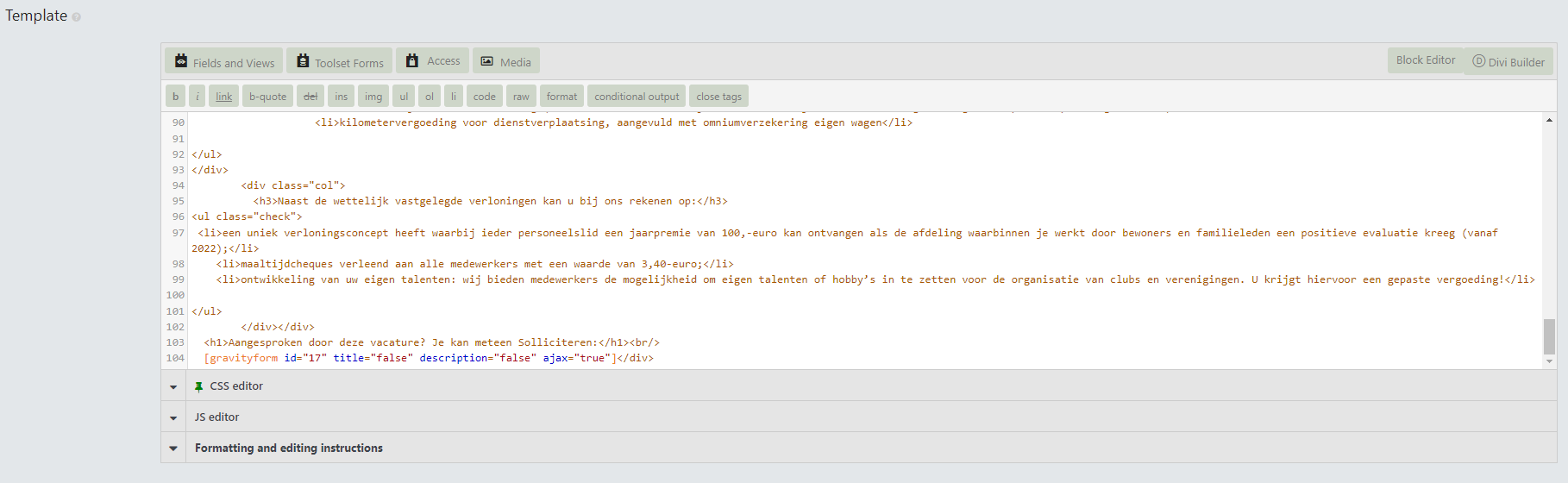
ct-jobs.png

Hi Shane,
Thank you for your response.
I created the content template as html and didn't use any blocks.
See my screenshot. The shortcode for the for is on the last line.

Tips?

#2370851

Shane
Supporter

Languages: English (English )

Timezone: America/Jamaica (GMT-05:00)

Hi Johan,

Thank you for the information.

Given that it works on some pages and not on others could be an indication of caching.

If there is any caching plugin on the site could you try clearing it and trying again.

Thanks,
Shane

#2371131

Hi Shane,
The only caching i'm using is varnish on the webhost.
I cleared that cache, but no luck.

Its weird, very weird.
Any other options? I could give you access to our staging site if that would be an option?

Thanks in advance,
Johan.

#2372015

Shane
Supporter

Languages: English (English )

Timezone: America/Jamaica (GMT-05:00)

Hi Johan,

Yes please provide me with admin access to the site.

I've enabled the private fields for your next response.

Thanks,
Shane

#2373985

My issue is resolved now. Thank you!