Tell us what you are trying to do?
Trying to set a default map view for when an archive has zero items.
currently, the default map view is of a portion of africa. I would like to set it to my specific location even if there are no map markers. Lets say northern California.
Is there any documentation that you are following?
There is none provided.
Is there a similar example that we can see?
Thats what im asking for from you.
What is the link to your site?
cbcpacificpartners.com
Hi there,
I do not see any method to do that with the Map blocks. But if you use the legacy maps method by enabling the legacy more you can add the marker inside "wpv-items-found" shortcode and if there is no item it will show the marker that you want.
To enable the legacy mode:
- Go to "Toolset > Settings > General".
- Find the "Editing experience" section.
- Check the "Show both the legacy and Blocks interface and let me choose which to use for each item I build" checkbox.
- Reload the browser page.
- Go to the newly added "Toolset > Views" menu.
- There you will be able to edit the views.
For more information:
https://toolset.com/course-lesson/enabling-legacy-version-of-toolset-views/
For more information on the shortcode for the marker:
https://toolset.com/forums/topic/center-map-when-no-search-results-are-found/
https://toolset.com/forums/topic/having-the-map-display-after-no-results-found/#post-2033703
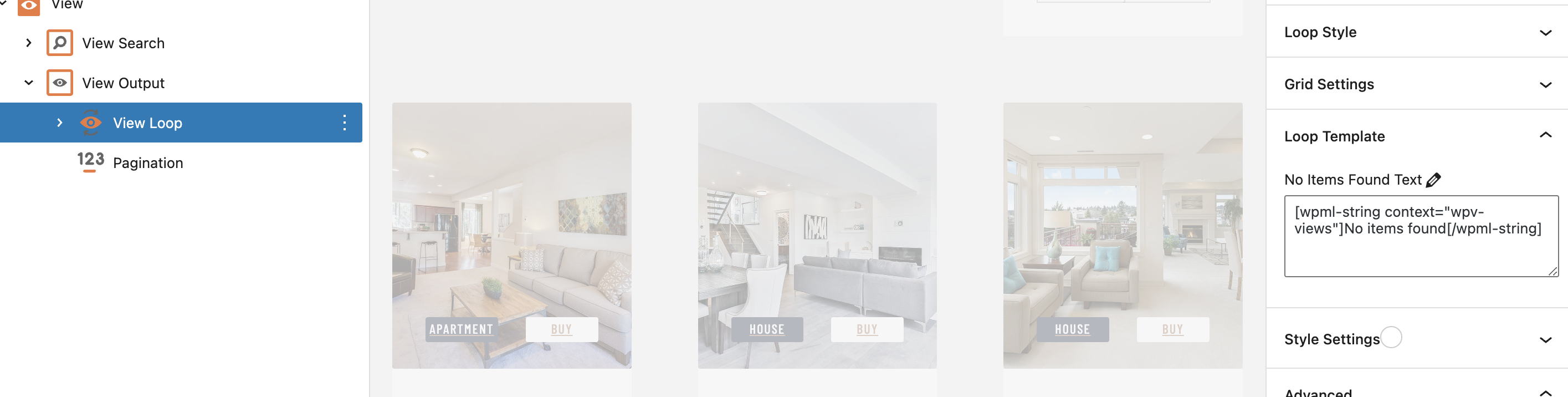
One last thing is that you check the attached screenshot. See if you add the Marker shortcode mentioned above inside the No Items Found Text will it work or not.
Thanks.
Yes it works with blocks too:
hidden link
If you add something that cause no property to show, for example 1 Dollar as the price, the map will show Paris which I set inside the Not Found text by adding this marker shortode:
[wpv-map-marker map_id='map-6' marker_id='marker-no-item' address='Paris, France' marker_icon='none'][/wpv-map-marker]
So Please select the Map block. Fomr the sidebar wite down the ID of the map.
Go to the View Loop block and in the sidebar find the Loop Template option and inside it the No Items Found Text
Add the Marker code below:
[wpv-map-marker map_id='MAPID' marker_id='marker-no-item' address='ADDRESS' marker_icon='none'][/wpv-map-marker]
Replace MAPID with the ID that you have written down in the previous step.
Replace ADDRESS with the address you want to show when there is no item.
Thanks.