Tell us what you are trying to do?
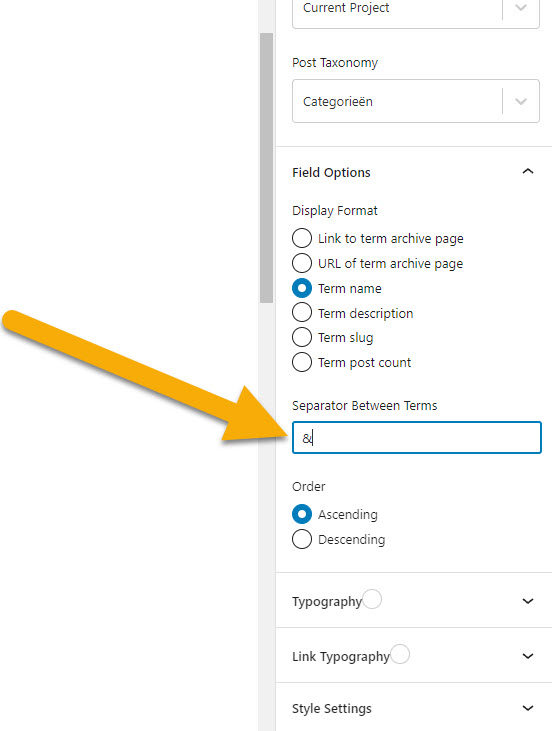
I'm using a view that shows the category term of a taxonomy, some projects (my post type) have two and I've noticed there is a seperator input field. This field however, seems to be stuck at one character and doesn't seem to work right.
- In my best case scenario, i'd like the seperator to be <br> as I want every taxonomy to be on it's own line. It seems impossible to do that this way.
- Second best scenario would be the "&" character, which is possible but it doesn't add a space before and after the character so it doesn't look right.
How am I supposed to get this right? Preferably in the best case scenario, with breaks after each one.
Is there any documentation that you are following?
Not really, checked the support forum though and wasn't able to find anything related.
Is there a similar example that we can see? hidden link
And I've also added some screenshots
What is the link to your site? hidden link
Thanks in advance, your help is greatly appreciated.
The input field seems to behave mysteriously, and I can only change/add one character. Tried refreshing the page, and adding one more and somehow I did get the ampersand to work by doing this a second time.
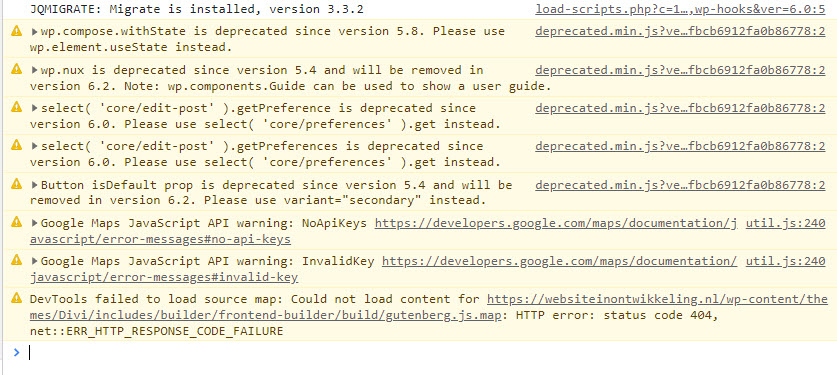
Am getting alot of "deprecated" error's in my browser console though, and I'm really not running alot of plugins (using Divi theme) so I don't think these are conflict issues.
Is it also possible to add breaks here? If this would work properly?
It should be possible to add the line breaks.
Would you mind allowing me to have admin access to the website so that I can have a more detailed look at this for you ?
Please where applicable please provide me with a link to an example page where I can see the issue.
I've enabled the private fields for your next response.
Thanks,
Shane
Thank you Shane for clearing up that Divi was the issue, I did a full plugin conflict check.. but did not check my theme! Sorry for the inconvenience, and have a great day.