Skip Navigation

[Assigned] select placeholder and no items found in view

This is the technical support forum for Toolset - a suite of plugins for developing WordPress sites without writing PHP.

Everyone can read this forum, but only Toolset clients can post in it. Toolset support works 6 days per week, 19 hours per day.

Sun Mon Tue Wed Thu Fri Sat
- 10:00 – 13:00 10:00 – 13:00 10:00 – 13:00 10:00 – 13:00 10:00 – 13:00 -
- 14:00 – 18:00 14:00 – 18:00 14:00 – 18:00 14:00 – 18:00 14:00 – 18:00 -

Supporter timezone: Asia/Kolkata (GMT+05:30)

This topic contains 3 replies, has 1 voice.

Last updated by raffyC 1 day, 5 hours ago.

Assisted by: Minesh.

Author
Posts
#2844277
Screenshot 2026-01-21 002304.jpg
Screenshot 2026-01-21 002344.jpg

Hi,

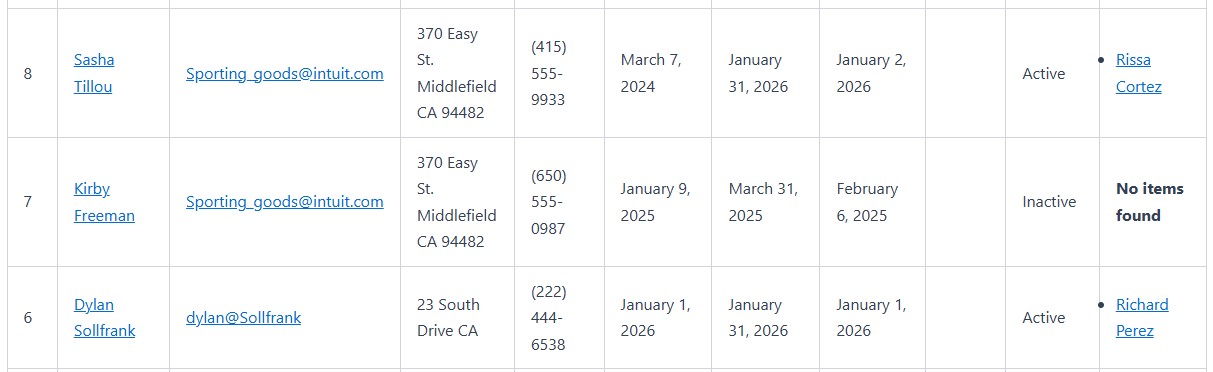
1. In legacy view, the message "No items found" is always shown in table view. I tried changing to other string in loop editor but doesn't take effect.

[wpv-no-items-found]
[wpml-string context="wpv-views"]Nothing to see here[/wpml-string]
[/wpv-no-items-found]

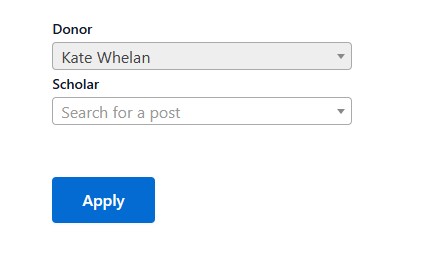
2. I can't seem to find the option to change the placeholder of a select box in Relationship form. How can I change "Search for a post" to something else?

Thank you.

#2844365

Minesh
Supporter

Languages: English (English )

Timezone: Asia/Kolkata (GMT+05:30)

Hello. Thank you for contacting the Toolset support.

At a time I will take one question.

Do you mean you do not want to display anything when there is no items found by views? if yes:

You can simply remove the text from no items found:

[wpv-no-items-found]
[/wpv-no-items-found]
#2844367

Hi Minesh,

No, I want to change the text in [wpv-no-items-found] but for some reason it always shows "No items found" even if I remove the text.

#2844369

Minesh
Supporter

Languages: English (English )

Timezone: Asia/Kolkata (GMT+05:30)

Can you please share problem URL and admin access details and let me check whats going wrong with your setup.

*** Please make a FULL BACKUP of your database and website.***
I would also eventually need to request temporary access (WP-Admin and FTP) to your site. Preferably to a test site where the problem has been replicated if possible in order to be of better help and check if some configurations might need to be changed.

I have set the next reply to private which means only you and I have access to it.