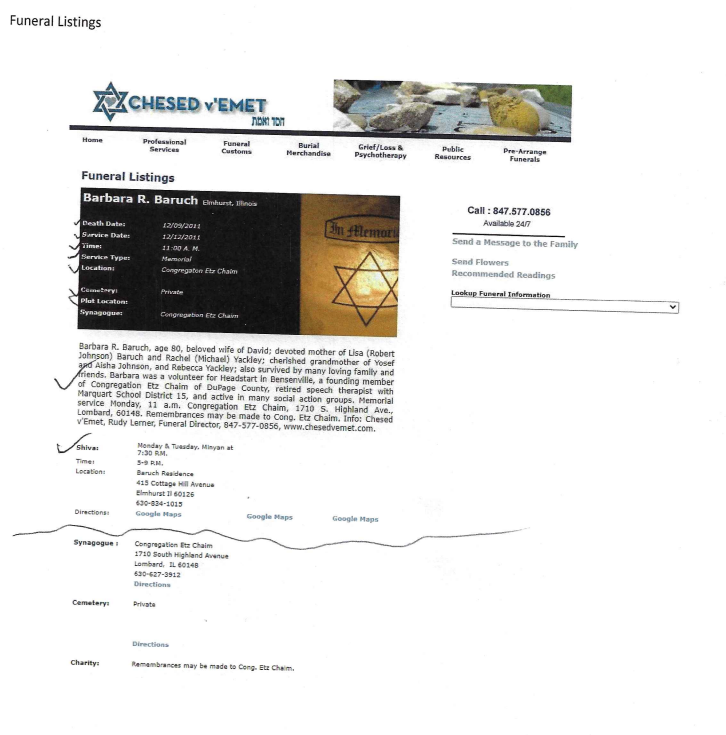
Tell us what you are trying to do? i want to have the funerals listed in a dropdown by CompleteName. (ordered alphabetically and by typing the first letter of the last name jump to that) once the deceased is choose, I want to display their funeral information along with the three relationships pulling information from their post types: Synagogue, Cemetery and Charity
in addition, I want empty files not to show. (Yes, i have some data issues. Null is showing when I imported)
Is there any documentation that you are following? I have gone through the videos.
Is there a similar example that we can see? No, the original site is so old it will not work on the new version of php. it was written in 2010. Chesedvemet.com
What is the link to your site? hidden link hidden link
Hello. Thank you for contacting the Toolset support.
There is no such feature available to add autocomplete to the custom search view's frontend filter as due to that there is no such feature available to combine the (first name and last name) and display it as a frontend filter.
And then you can format your view's loop output to display the information about Synagogue, Cemetery and Charity based which is depends on what kind of post relationship you created between post types and how and where you want to display it.
I think you misunderstood my questions. I am pulling from a field called "CompleteName". Which is also the post title. Once chosen I want to display a single record not multiple records.
Do you mean you have a custom field namely "CompleteName" that holds the same value as post title and you want to display all values stored with custom field "CompleteName" as dropdown select and when you select one option it should display that selected record information?
If you can share more details and the whole flow with what information what field structure you have and where exactly you want to implement it that would help me to guide you in the right direction.
Please share problem URL where you want to implement it.
*** Please make a FULL BACKUP of your database and website.***
I would also eventually need to request temporary access (WP-Admin and FTP) to your site. Preferably to a test site where the problem has been replicated if possible in order to be of better help and check if some configurations might need to be changed.
I have set the next reply to private which means only you and I have access to it.
It really doesn't matter. I just want it to work. Choose the funeral by CompleteName. Show only that funeral in the results. But I do want the relationship information to show. Synagogue info, Cemetery info, and charity info.
I was unable to put these in the loop.
I really need to finish this, please help.
The dropdown is working but I want it to display the view I created but only the obituary that they choose. I inserted the view but is loops all and I just want the one.
I grew increasingly frustrated with the toolset plugin. The fact that I could not pull the relationship table information into the results view plus getting the search results to show just the one record made the plugin unusable for this project. I removed the plugin, changed how I was handling the data to display, and moved the site to live.
I would like a refund for the plugin as it was unusable for this site. I had such high hopes for this plugin.