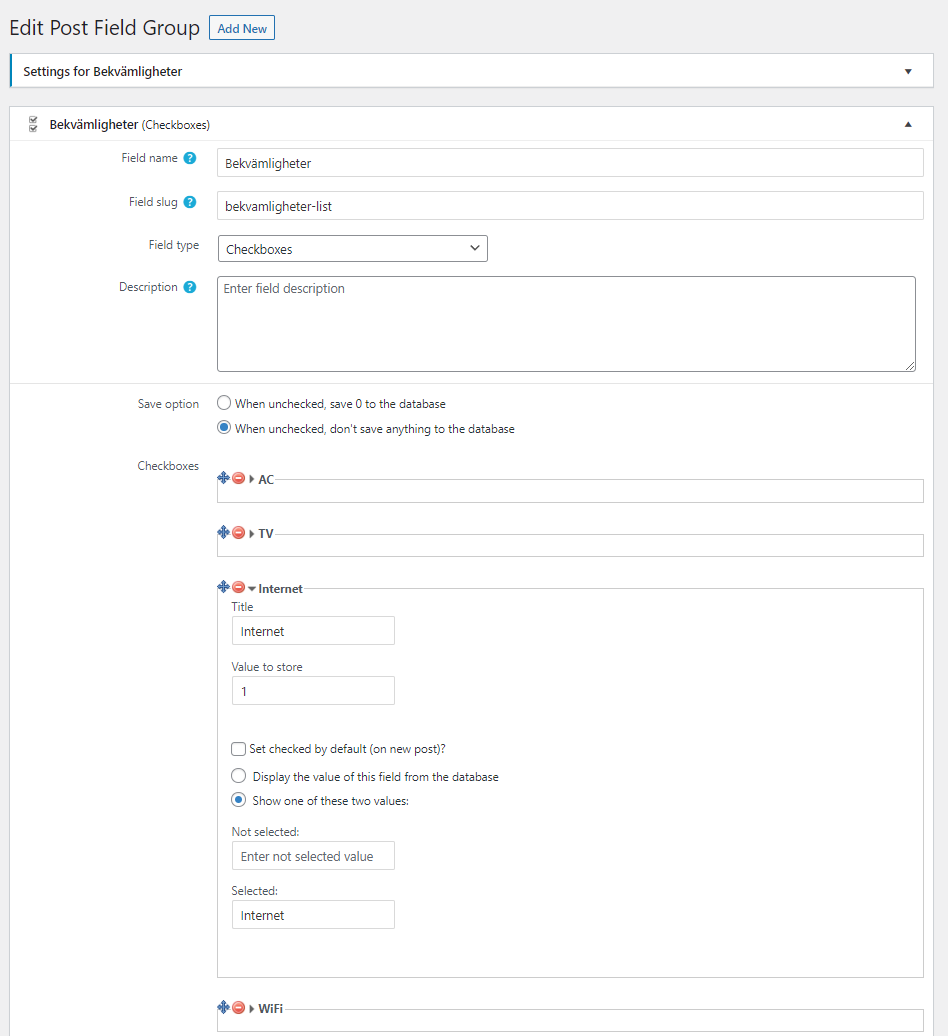
I have a custom fields group called "Bekvamligheter" (Facilities) and field type is "Checkboxes".
Here is an example and you can also see attachment.
Title: Internet
Value to store: 1
Selected: Internet
My website is multilingual (2 languages) and I'm using WPML.
Now when I added two more Facilities, I will get "1" when that checkbox is marked.
Facilities I added earlier still work and show text.
I understand that "1" is the "Value to store" value and if I change "1" to "Something" then it will show instead of "1".
Since I have multi lang website I need to translate and I have tried to translate "Value to store" value in "String translation" but default language only shows.
You will see some checkbox values here, hidden link
AC, Stove, Microwave, Fridge, Freezer, Kettle, Toaster, 1, Vattendispenser
Last 2 items (1, Vattendispenser) are my new options and I tried to translate "Vattendispenser" withou success.
Can you please share admin access details and let me check whats going wrong with your setup.
*** Please make a FULL BACKUP of your database and website.***
I would also eventually need to request temporary access (WP-Admin) to your site. Preferably to a test site where the problem has been replicated if possible in order to be of better help and check if some configurations might need to be changed.
I have set the next reply to private which means only you and I have access to it.
Please check the following screenshot: hidden link
For the checkboxes option that was displaying 1 - on the custom field page:
=> hidden link
- You have selected the option "Display the value of this field from the database", now I've changed the option to "Show one of these two values" and I can see its displaying the correct value on frontend.
Can you please confirm it works as expected now: hidden link
With option "Vattendispenser" - it is same issue.
- You have selected the option "Display the value of this field from the database", now I've changed the option to "Show one of these two values" and I can see its displaying the correct value on frontend.
Can you please confirm it works as expected now: hidden link