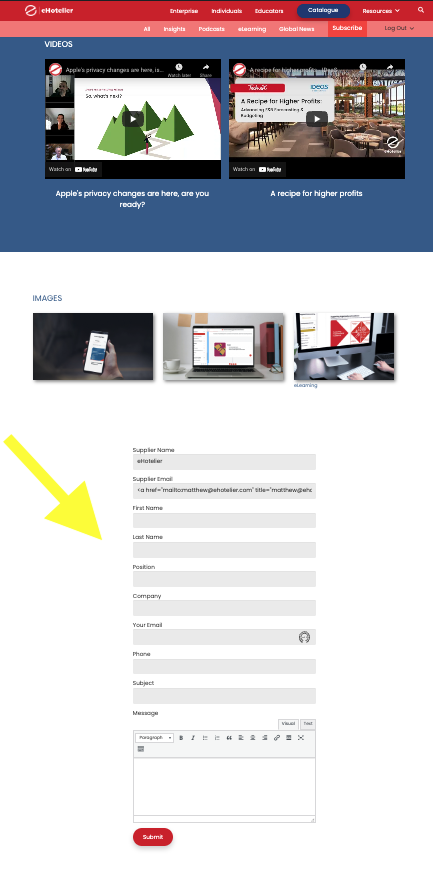
Tell us what you are trying to do? I have a directory site, that lists companies. I have set up an enquiry form as a custom post type, so site visitors can enquire about the supplier's products and services, also set up as a custom post type. The supplier CPT has an email address custom field, that I would like to send the notification to automatically when the field is submitted.
I have added the custom field 'email' to the post form, it is populating the field, but with additional HTML it seems, but ideally, I would like to remove this email field and the supplier name field from the form.
I can't see a way to send a notification to the email address of the supplier CPT custom field, from the enquiry CPT form. Is this possible?
Hello. Thank you for contacting the Toolset support.
Could you please share link of the page where you added the Toolset form and share information to what email you want to send email notification.
*** Please make a FULL BACKUP of your database and website.***
I would also eventually need to request temporary access (WP-Admin and FTP) to your site. Preferably to a test site where the problem has been replicated if possible in order to be of better help and check if some configurations might need to be changed.
I have set the next reply to private which means only you and I have access to it.
Could you please check now how form is setup:
=> hidden link
- I switch the form editing to "Expert Mode" and then added the "hidden" class to supplier email field and the post relationship field so those will will not be visible on the frontend but does exists on the form.
Then we can set the email notification setting to "Send notification to an email specified in an email field included in the form" and select the supplier email field and it will send the email notification to the value stored with the Supplier Email field. We also set the form should send email on form submit.