Tell us what you are trying to do?
I created a custom content type called "activity" and several custom fields. One of them is a "date/time" field.
In my content template i show the details of the activity and i include a gravity form so visitors can register for that activity.
In my gravity form i use 2 hidden fields. One holds the post title, the other should hold the date.
I use an extension for gravityforms to fill these hidden fields: hidden link
Everything is working perfect. Except, when i select my date field to populate my hidden field, i get a bunch of numbers instead of the date. I already contacted Gravitywiz support and they tell me it has to do with the way toolset stores the date in the database. They suggest using ACF since it works with ACF. Can you imagine 🙁
Therefore i'm putting my hopes on you guys.
Could you please give me any help?
Link to an example: hidden link
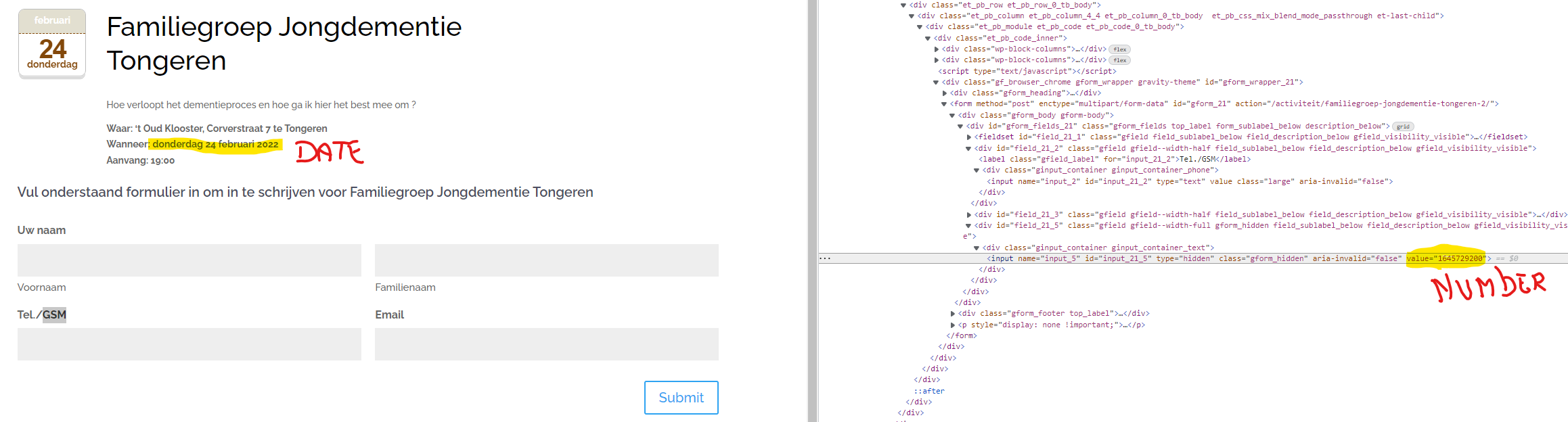
I include a screenshot. You can see the Toolset custom date field shown perfect on the website. In the source code you can see the hidden field with value of numbers. It works perfect for all other fields i create with toolset, just not the date field.
Our Date field values are stored as a timestamp in the database. If gravity forms is retrieving that field directly from the database then you will need to convert it from a timestamp to a human readable format.
If gravity forms has a hook that interfaces with the fields when they are being retrieved from the database then we can intercept the value and convert it.
Without this the only other option is to convert the timestamp using javascript.
I reached back out to the people from GravityWiz.
They replayed:
----
Yes, this will require some custom code to convert the TimeStamp value in the Database into a Date. We have a hook that can be used to modify values when they're populated: hidden link
Below is a link to a snippet that uses that hook to convert the populated value from a unix timestamp to yyyy-mm-dd. You'll need to modify a couple of things in the snippet in order to use it. The instructions are in the snippet itself. hidden link
Here's a walkthrough on how to install the snippet: How do I install a snippet?
----
So, i will give this a try. Thank you for your input!
greetings,
Johan.