Skip Navigation

[Resolved] Migration from Layouts and Views to Blocks

This is the technical support forum for Toolset - a suite of plugins for developing WordPress sites without writing PHP.

Everyone can read this forum, but only Toolset clients can post in it. Toolset support works 6 days per week, 19 hours per day.

Sun Mon Tue Wed Thu Fri Sat
- 10:00 – 13:00 10:00 – 13:00 10:00 – 13:00 10:00 – 13:00 10:00 – 13:00 -
- 14:00 – 18:00 14:00 – 18:00 14:00 – 18:00 14:00 – 18:00 14:00 – 18:00 -

Supporter timezone: Asia/Kolkata (GMT+05:30)

This topic contains 4 replies, has 1 voice.

Last updated by Minesh 1 month, 1 week ago.

Assisted by: Minesh.

Author
Posts
#2843972
Screenshot 2026-01-18 at 18.38.18.png

Hello,
I am trying to migrate from Layouts and Views to Blocks and when I go Layouts Migration it appears only one page to convert and even that is does not work.
the site is hidden link
I attached a print screen for you
I have a back-up of the site.
I created a user account Toolset as admin so you can see it live with the below pass
wfU1QZ1x9!fy%FwHEhQ8KSBC

Please let me know how I can migrate everything - please migrate for me Business Opportunities v2 which is used to display the opportunities (posts)
I am using conditionals and I have a lot of relationships, I hope the migration will also do that.
Thank you and kind regards,
Valentin

#2844038

Minesh
Supporter

Languages: English (English )

Timezone: Asia/Kolkata (GMT+05:30)

Hello. Thank you for contacting the Toolset support.

First of all, when you moving to Blocks, it will no affect any of your post-relationships and existing content you have.

You need to also understand that Toolset Views and Toolset Blocks are 1:1 copy of each other having said that when using Toolset Views, you can also build block bacsed content templates and views and I already seen that you already set the setting for that to use legacy views and blocks so you have luxury to create (contente templates, views, archives) either blocks or legacy mode.
- hidden link

Now, about Layouts migration:
=> https://toolset.com/documentation/legacy-features/toolset-layouts/how-to-use-the-toolset-layouts-migration-plugin/

This utility plugin will help you migrate layouts that you created for single pages, to the new Content Layouts. You only need this plugin if you built a site with Layouts 1.8.x or earlier and you are updating to the current version of Layouts plugin

- As we are not going to use Toolset Layouts, we are not going to use Toolset Layouts migration. Layouts migration plugin is used to create another kind of Layouts using existing layouts. I hope this is clear.

Now, to move to Blocks, its a work of redisigning the site.

In general - recommendation is to keep using Layouts for existing sites and to use Blocks for new content. There isn't a simple conversion tool - the conversion process often involves more than just redesigning templates. Access Control, Editing Forms, and Relationship Forms can be tightly coupled to Layouts implementations, and those coupled situations must be handled case by case when moving from Layouts to Blocks-based Content Templates.

However - if you decided to not using Layouts, then first of all, you need to create content template for your post type "business-opportunity", for that, navigate to: Toolset => Content Templates and click on Add New button to add new content template and name it "CT for business Opportunity - latest" and then edit your existing layout:
- hidden link

And then copy/paste the content you have with your layout to this content template and design your content template as required.

Once you created all required content templates for which you have layouts then you can disable the Toolset Layouts plugin.


#2844051

Thank you Minesh for the answer.
1. Just for me to better understand, in order to create the new content templates without using Layouts, which is the combination of the plugins I need to keep them active? My understanding is that I only need to deactivate Views when activating Block - but then the Opportunity page does not display properly, I mean the second column is not displayed.
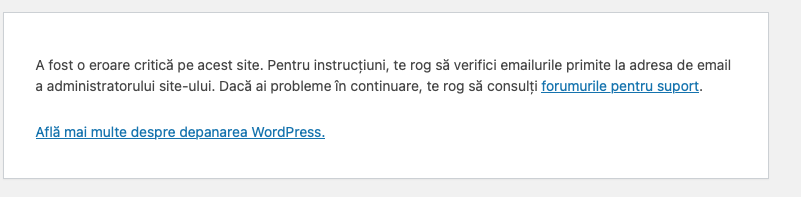
2. The other problem is that I cannot create a new Content template, I get an error that is a critical error on the site - I attached the print screen
Please advice,
Thank you!

#2844052
Screenshot 2026-01-19 at 09.25.11.png

print screen

#2844070

Minesh
Supporter

Languages: English (English )

Timezone: Asia/Kolkata (GMT+05:30)

1. Just for me to better understand, in order to create the new content templates without using Layouts, which is the combination of the plugins I need to keep them active? My understanding is that I only need to deactivate Views when activating Block - but then the Opportunity page does not display properly, I mean the second column is not displayed.
===>
When you disable layout and migrate all the content you added to your Layout to single post content template obviously it will not look the same as you may have to do design work as I shared with my previous reply. its redesign task and its on you either you use block based or legacy content template to redesign same template.

2. The other problem is that I cannot create a new Content template, I get an error that is a critical error on the site - I attached the print screen
==>
That is another issue and I'm not sure why there is critical error. You may create a new ticket and assign it to me and I'm happy to look at it.