This thread is resolved. Here is a description of the problem and solution.
Problem:
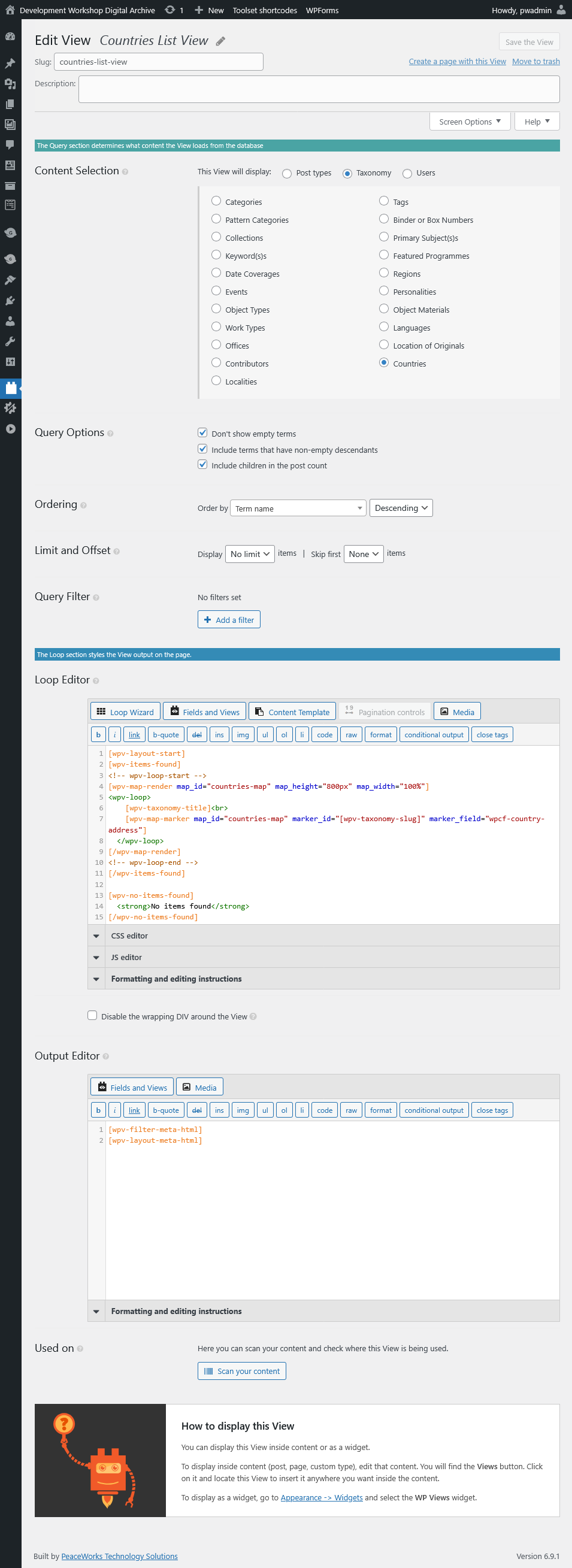
A Taxonomy View was created to display a Google Map with one marker per “Countries” taxonomy term using a Toolset Location/Address field. The map rendered, the address field output as text looked correct, Google Maps API loaded, but no markers appeared, even with a minimal hardcoded marker test. Conflict testing (default theme + only Toolset plugins) did not change the behavior.
Solution:
On the staging site, a new Taxonomy View was created and configured correctly for taxonomy term markers (Countries taxonomy + term address field) so Toolset Maps could read the term location field and output markers. After using the new View (ID 12255) on the test page, the markers displayed correctly. The working setup can be reused and customized:
Working View: /wp-admin/admin.php?page=views-editor&view_id=12255
Test page output: /toolset-support-test/
Relevant Documentation:
https://toolset.com/documentation/legacy-features/maps-plugin/
This is the technical support forum for Toolset - a suite of plugins for developing WordPress sites without writing PHP.
Everyone can read this forum, but only Toolset clients can post in it. Toolset support works 6 days per week, 19 hours per day.
This topic contains 4 replies, has 1 voice.
Last updated by 1 month, 3 weeks ago.
Assisted by: Christopher Amirian.