Skip Navigation

[Resolved] I am getting error on home page after setting up toolset commerce.

This support ticket is created 3 years, 6 months ago. There's a good chance that you are reading advice that it now obsolete.

This is the technical support forum for Toolset - a suite of plugins for developing WordPress sites without writing PHP.

Everyone can read this forum, but only Toolset clients can post in it. Toolset support works 6 days per week, 19 hours per day.

Sun Mon Tue Wed Thu Fri Sat
- 9:00 – 12:00 9:00 – 12:00 9:00 – 12:00 9:00 – 12:00 9:00 – 12:00 -
- 13:00 – 18:00 13:00 – 18:00 13:00 – 18:00 14:00 – 18:00 13:00 – 18:00 -

Supporter timezone: America/Jamaica (GMT-05:00)

This topic contains 16 replies, has 2 voices.

Last updated by dmitrya 3 years, 6 months ago.

Assisted by: Shane.

Author
Posts
#2437907

I tried to setup up toolset commerce to charge users for submitting a post I added a product to woo commerce setup payment. Then I checked charge users to submit form.

My form disappeared with this error message. The Toolset Form post-vote-request does not exist

When I uncheck charge for forms its still there I cannot restore my form please advise. If you go to my home page you will see it.

Thanks

Dmitry

#2437935

I have fixed the form issue but cannot get the form to charge users to submit the form. I have clicked charge for form already setup woo-commerce product.

Not sure what else is wrong.

#2438165

Shane
Supporter

Languages: English (English )

Timezone: America/Jamaica (GMT-05:00)

Hello,

Thanks for getting in touch.

Would you mind allowing me to have admin access to the website so that I can have a more detailed look at this for you ?

Please where applicable please provide me with a link to an example page where I can see the issue.

I've enabled the private fields for your next response.

Thanks,
Shane

#2438215

Dissmiss this reply. Admin details provided above.

#2438291

Shane
Supporter

Languages: English (English )

Timezone: America/Jamaica (GMT-05:00)

Hi Dmitrya,

Thank you for the login details.

I believe I've found the issue. There were 2 problems.
1. You had not setup the woocommerce pages information especially the checkout page information.
hidden link

There is no page set as the checkout page.

2. The second issue is that you had not setup the redirect to checkout on your Toolset Form redirect settings.hidden link

This is under the setting "After visitors submit this form". I went ahead and set this for you.

Once you've setup your woocommerce pages then this should work as intended.

Thanks,
Shane

#2438313

I have never dealt with woocomerce sorry. How would I set up these pages? does woo commerce already set them up for me? or do I need to create specific pages and then enter them in the settings?

Please guide me sorry.

#2438315

And in the future if I don't want to charge users anymore do I just uncheck the charge checkmark or is that a process?

#2438335

Shane
Supporter

Languages: English (English )

Timezone: America/Jamaica (GMT-05:00)

Hi Dmitrya,

You should be able to follow this woocommerce doc below to help you setup your pages.
https://woocommerce.com/document/woocommerce-pages/

And in the future if I don't want to charge users anymore do I just uncheck the charge checkmark or is that a process?

That's correct.

Thanks,
Shane

#2438381
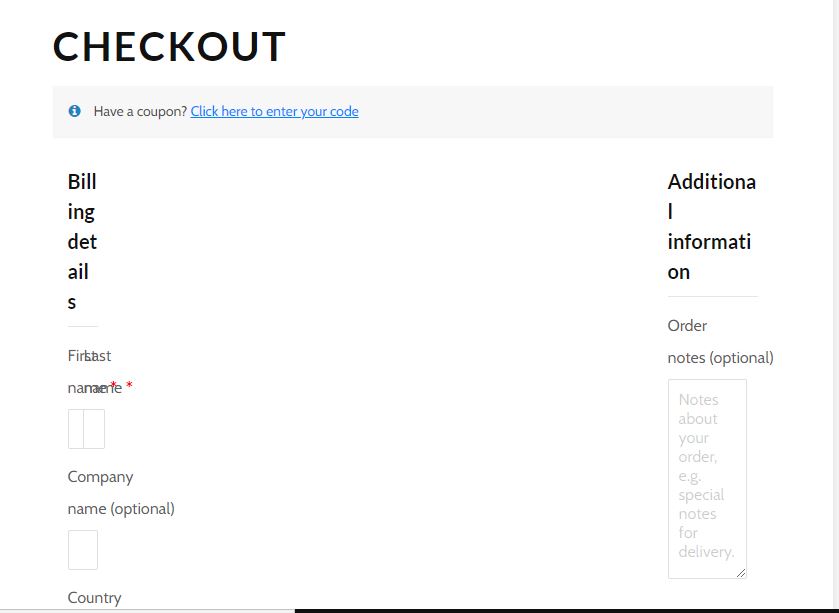
Checout error.JPG

Hi Shane,

I setup the woocommerce pages but the checkout page looks disturbed for some reason. The checkout form is not displaying properly.

Thanks

Dmitry

#2438433

I also tried to update the toolset woocommerce blocks plugin but it keeps giving me an error message.

Update failed: undefined

#2438877

Shane
Supporter

Languages: English (English )

Timezone: America/Jamaica (GMT-05:00)

Hi Dmitrya,

This is actually a conflict with Bootstrap and Woocommerce. What you can do to resolve this is to disable bootstrap loading on Toolset if its enabled.

Go to Toolset -> Settings and scroll to Bootstrap Loading and set the settings to the site is already loading bootstrap. This should resolve the issue with the checkout page.

Thanks,
Shane

#2438899

Hi Shane I am not seeing the option for this site is already loading bootstrap.

I see the theme or plugin is loading bootstrap 3

Theme or plugin is loading bootstrap 4.

Then other options are this site is not using bootstrap CSS.

Thanks

#2438901

Also is there a way to remove the billing address fields in the checkout page since all of that is not needed to just pay to post something seems silly.

I think EDD would of been a better implementation than Woo.

#2438905

Shane
Supporter

Languages: English (English )

Timezone: America/Jamaica (GMT-05:00)

Hi Dmitrya,

You can select the setting "Theme or plugin is loading bootstrap 4."

Also to disable the billing address information you can use the following.
hidden link

Please let me know if this helps.
Thanks,
Shane

#2439031

Hi Shane,

Thanks it worked.

Couple more questions.

1. How would I redirect users to a different page once they submit their post? For example, if I don't want to use woocommerce anymore I'm thinking about creating a checkout page using Paypal or some other plugin where would I enter the redirection URL?

2. Currently I have users confirm their email before the post is live on the site but since I want to charge them now I want to only approve the post after a purchase is made. Do I just check off users having to confirm an email?