Hi,
Welcome to Toolset support. It is hard to implement this without any custom coding. I will try my best but there is no guarantee.
Here is my thought process (most probably you will need the legacy views to have more control over the design):
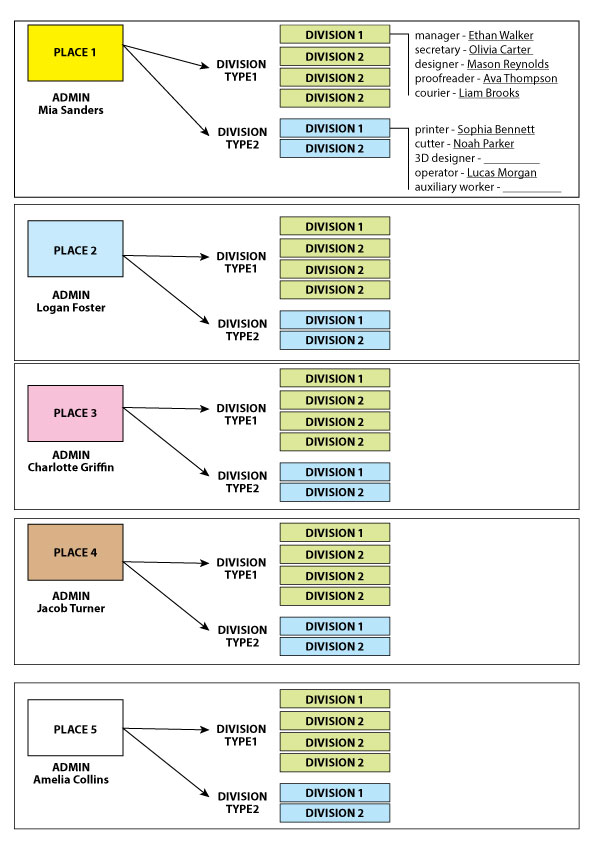
- Locations (CPT)
- Departments (CPT) + Department Type (taxonomy or a Types field)
- Employees (CPT)
Relationships: Location → Department (1-to-many), Department → Employee (optional; you can also use “Post Reference” fields for fixed roles)
1- Create the content types
Create CPTs: Locations, Departments, Employees
Create a taxonomy (or a Types field) for Department Type (Type1 / Type2)
2- Create relationships
Create relationship Location (parent) → Department (child)
3- Model the “fixed positions”
Because each department has fixed job slots, use Post Reference fields on the Department post:
For Type1 department add these fields on Departments:
- manager (post reference → Employee)
- secretary (post reference → Employee)
- designer (post reference → Employee)
- proofreader (post reference → Employee)
- courier (post reference → Employee)
For Type2 department add these fields on Departments:
- printer (post reference → Employee)
- cutter (post reference → Employee)
- 3d-designer (post reference → Employee)
- operator (post reference → Employee)
- support-worker (post reference → Employee)
- (optional) auxiliary-worker (post reference → Employee)
This approach makes your “Job title – Last name (or blank)” output straightforward (if the field is empty, you show nothing after the dash).
Conditionals documentation:
https://toolset.com/documentation/programmer-reference/views/views-shortcodes/#wpv-conditional
4- Build the Department page (single) showing the employee list
- Create a Content Template for single Department
- Inside the template, output each line using conditional output, for example (role shown always, name only if set). Something like this:
Manager - [wpv-conditional if="[types field='manager']" evaluate="not_empty"] [types field='manager'][/wpv-conditional]
- Repeat for each role field.
5) Build the “Manager dashboard” page: list only departments of their location
Assign the Location post author = the manager user
- Set each Location post author to the manager user.
- Create a View that lists Departments, filtered by:
Related to Location
AND that Location is authored by the current user (using Views filters / current user)
Documentation: https://toolset.com/documentation/programmer-reference/views/views-shortcodes/#wpv-current-user
6- Restrict access (so they don’t see other locations)
Use Toolset Access to create a role (e.g. “Location Manager”) and limit editing/reading to what they should manage.
Docs: https://toolset.com/course-chapter/controlling-access-to-content-in-directory-sites/
Honestly, I did not implement such a model, so I am not sure how practical this will be. But I thought I would give what I have in mind.
Thanks.