Skip Navigation

[Resolved] How to make sorting control & pagination work w/out clicking the submit button

This support ticket is created 4 years, 2 months ago. There's a good chance that you are reading advice that it now obsolete.

This is the technical support forum for Toolset - a suite of plugins for developing WordPress sites without writing PHP.

Everyone can read this forum, but only Toolset clients can post in it. Toolset support works 6 days per week, 19 hours per day.

Sun Mon Tue Wed Thu Fri Sat
- 9:00 – 12:00 9:00 – 12:00 9:00 – 12:00 9:00 – 12:00 9:00 – 12:00 -
- 13:00 – 18:00 13:00 – 18:00 13:00 – 18:00 14:00 – 18:00 13:00 – 18:00 -

Supporter timezone: America/Jamaica (GMT-05:00)

This topic contains 10 replies, has 2 voices.

Last updated by darcyR 4 years, 2 months ago.

Assisted by: Shane.

Author
Posts
#2214169

Tell us what you are trying to do?
We’ve set-up a view where the results update with when the submit button is clicked but we’d like the sorting control and pagination to work without needing to click the submit button.

Is there any documentation that you are following?
No

Is there a similar example that we can see?
Will find one if the question is not making sense.

What is the link to your site?
hidden link

#2214229

Shane
Supporter

Languages: English (English )

Timezone: America/Jamaica (GMT-05:00)

Hi Darcy,

Thank you for getting touch.

Can you let me know if you're using the Block view setup to create the search or if you're using the classic view setup.

This way I can provide specific instructions.

Thanks,
Shane

#2214233

It’s using the Classic view setup

#2214249

Shane
Supporter

Languages: English (English )

Timezone: America/Jamaica (GMT-05:00)

Hi Darcy,

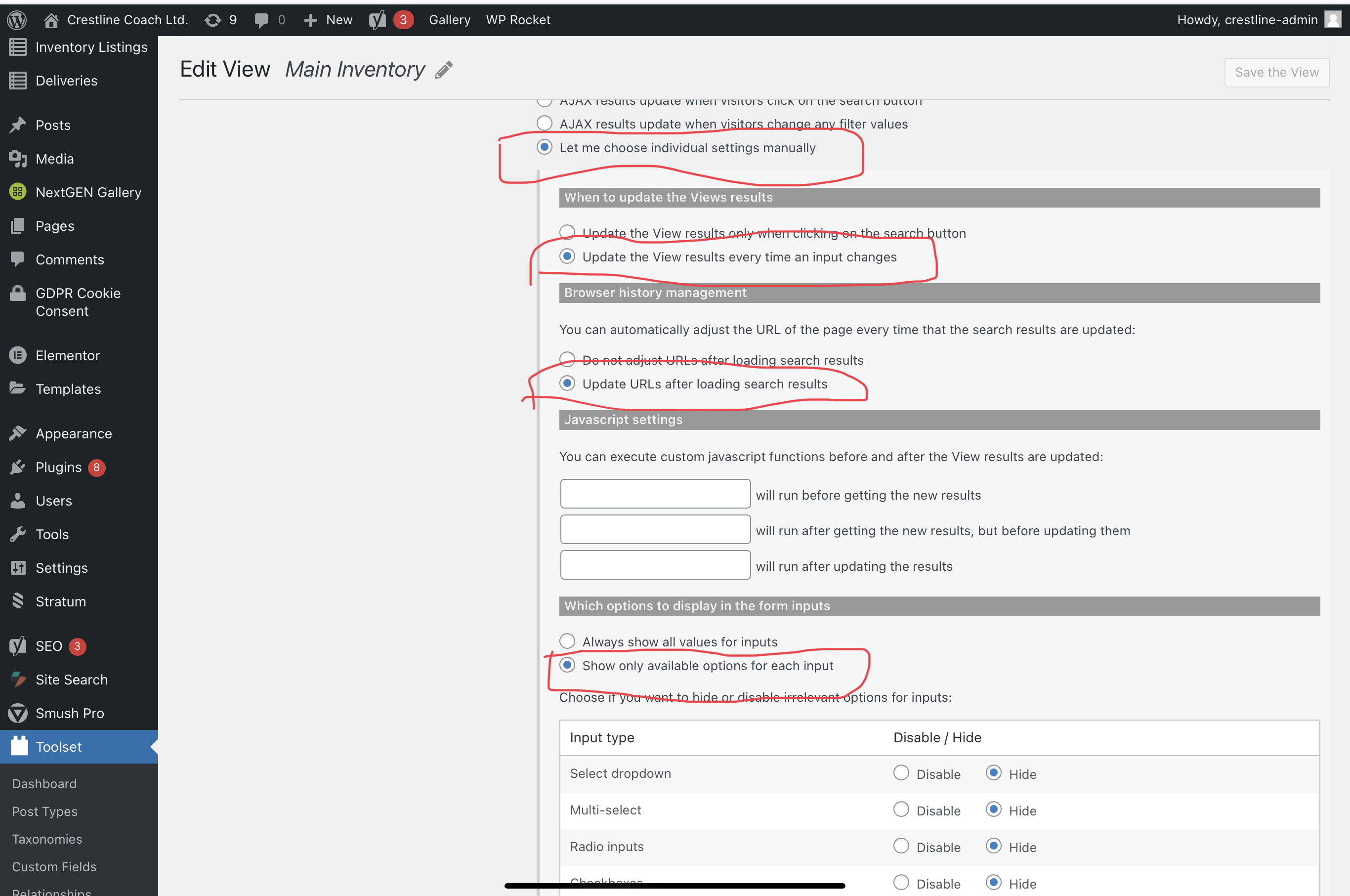
Given that this is the classic view setup then you should be able to achieve this by going to your Custom Search Settings and selecting the option " AJAX results update when visitors change any filter values"

Please let me know if this helps.
Thanks,
Shane

#2215371
Screenshot 2021-11-08 at 10.23.19 am.png

Is it possible to make it work that way by selecting the option specified in the screenshot attached?

#2215925

Shane
Supporter

Languages: English (English )

Timezone: America/Jamaica (GMT-05:00)

Hi Darcy,

Yes in your screenshot those settings will have the same effect as selecting "AJAX results update when visitors change any filter values".

Does it not work like this for you ? If there are any issues please let me know.

Thanks,
Shane

#2216013
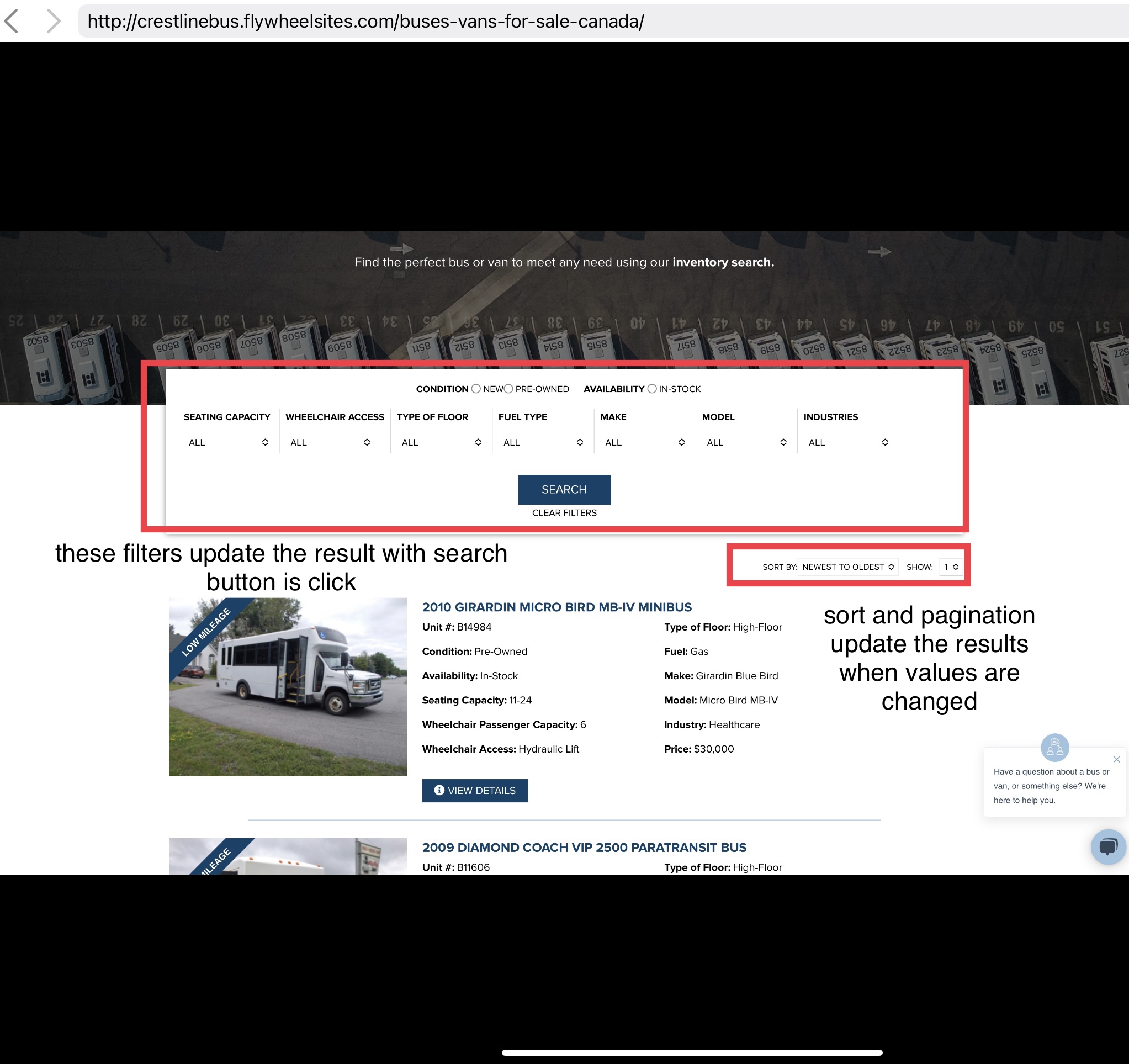
5B31A0D0-B65D-461D-A8C0-2325F407E963.jpeg

To make it clearer, this what we’re trying to do for this view - hidden link
Please see attachment.

#2216145

Shane
Supporter

Languages: English (English )

Timezone: America/Jamaica (GMT-05:00)

Hi Darcy,

Have you made the change based on your screenshot at your response #2215371

I Took a look at the page again and your search is now filtering whenever I interact with any of the search parameter as well as the ordering options.

Can you let me know if this doesn't happen on your end? If it doesn't can you perhaps using a different browser?

This is to eliminate any issues with your browser causing an unforeseen issue.

Thanks,
Shane

#2216353

I didn’t realise that I haven’t updated it back.
So right now, the filters should update only the result when the search button is clicked but then this would also be the same for the sort and the pagination.
We’d want the sort and pagination to just update the result without clicking the search.
I hope the screenshot makes sense now.

#2216835

Shane
Supporter

Languages: English (English )

Timezone: America/Jamaica (GMT-05:00)

Hi Darcy,

We’d want the sort and pagination to just update the result without clicking the search.

While it is possible to perform the pagination without affecting the search, you won't be able to perform the ordering independent of the search settings.

What I mean by this is that the "Update view every time an input changes" setting is tied to the entire filter output section. The frontend sorting is also included in the Filter Output. So it will be affected by the custom search setting as well.

It won't be possible to have the ordering controls have its own independent sorting settings vs the frontend filter settings.

I hope I was able to clear this up for you.

Thanks,
Shane

#2217197

My issue is resolved now. Thank you!