Skip Navigation

[Resolved] How can I implement conditional items in Search and Pagnification?

This support ticket is created 2 years, 9 months ago. There's a good chance that you are reading advice that it now obsolete.

This is the technical support forum for Toolset - a suite of plugins for developing WordPress sites without writing PHP.

Everyone can read this forum, but only Toolset clients can post in it. Toolset support works 6 days per week, 19 hours per day.

Sun Mon Tue Wed Thu Fri Sat
- 10:00 – 13:00 10:00 – 13:00 10:00 – 13:00 10:00 – 13:00 10:00 – 13:00 -
- 14:00 – 18:00 14:00 – 18:00 14:00 – 18:00 14:00 – 18:00 14:00 – 18:00 -

Supporter timezone: Asia/Kolkata (GMT+05:30)

This topic contains 3 replies, has 2 voices.

Last updated by Minesh 2 years, 9 months ago.

Assisted by: Minesh.

Author
Posts
#2608863
1.png
2.png

Tell us what you are trying to do?

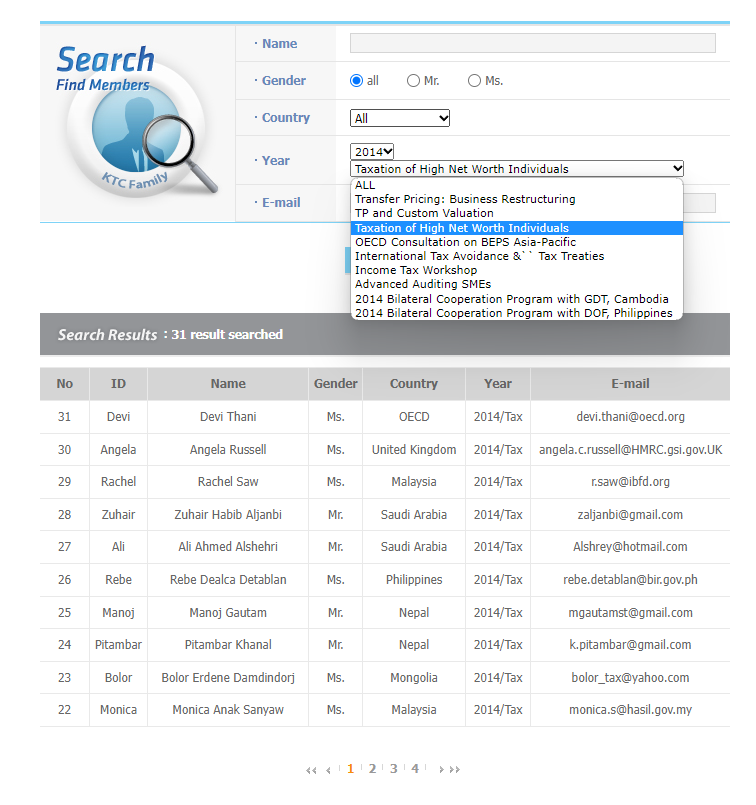
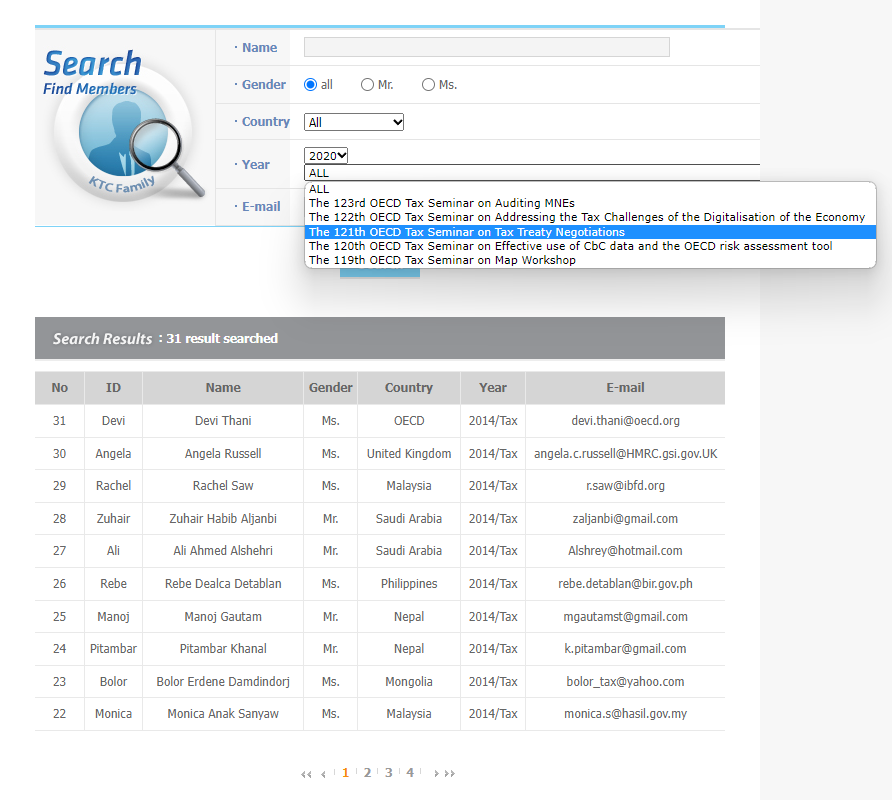
You want to implement conditional items in Search and Pagination in toolset > views. I would like to have the value of toolset custom fields year displayed in the search box of custom fields 2022 at the date of 2022. (so that you can select events held in 2022) / Click 2021, 2022 events are not visible.

I use conditional output like

<div class="form-group">
<label for="wpv-wpcf-1997-events">[wpml-string context="wpv-views"]1997[/wpml-string]</label>
[wpv-control-postmeta field="wpcf-1997-events" url_param="wpv-wpcf-1997-events"]</div>
<div class="form-group">

However, when a specific value of year is selected, the question value set conditionally is not displayed in the search. I have no idea what the problem is

Is there any documentation that you are following?

no.

Is there a similar example that we can see?

no.

What is the link to your site?

hidden link

#2608893

Minesh
Supporter

Languages: English (English )

Timezone: Asia/Kolkata (GMT+05:30)

Hello. Thank you for contacting the Toolset support.

As I understand - you wanted to implement the dependent dropdown like for instance, State -> City so when you select the specific State the another dropdown should populate the related cities belongs to selected state - is that correct?

If yes, for that you will have to setup the State and City as post types with one-to-many post relationship between them.

Please check the following doc that may help you:
- https://toolset.com/documentation/legacy-features/views-plugin/how-to-filter-by-related-posts/

#2608941

First of all, thank you for your reply. However, I feel that the answers you provided may not be optimized for what I am currently trying to implement.

I would like to ask if there is a better way to run it with toolset after looking at the following explanation.

What we're trying to implement is exactly.

1. Register member information on the backend. Membership information includes: (name, gender, country, year/seminar, e-mail)

2. Membership information of the matching backend can be inquired by searching for the above items (name, gender, country, year/seminar, e-mail) at the front end. (Refer to the image I attached at the first question)

3. There are events for each year. When selecting a year on the search form, I hope that you can only select events belonging to that year.

4. When searching finally, matching member information will be displayed along with information such as (name, gender, country, year/seminar, e-mail).

When implementing the above function using toolset, I would like to ask you which method is the most appropriate.

I'm sorry. There are many things I don't know, so I ask you one by one. I am asking because I think it will be difficult to register and manage member information with the relationship method. (There are currently approximately 3,700 member information required to register.)

#2609287

Minesh
Supporter

Languages: English (English )

Timezone: Asia/Kolkata (GMT+05:30)

1. Register member information on the backend. Membership information includes: (name, gender, country, year/seminar, e-mail)
===>
As I understand you want to register the user from the frontend and store the content in the backend using post type, if thats correct, yes you can do that. But I would like to know do you want to register user. But here case would be you should also create a post type "member information" and use this post type to create one entry per user when user register using user form. So, when user will create a new user using the user form and submit the form it should automatically create a new entry for post type "member information".

2. Membership information of the matching backend can be inquired by searching for the above items (name, gender, country, year/seminar, e-mail) at the front end. (Refer to the image I attached at the first question)
===>
You can build the custom search yes for the post type "Membership information" to search post but you can not create dependent search like state -> City.

3. There are events for each year. When selecting a year on the search form, I hope that you can only select events belonging to that year.
===>
Yes, thats correct. But you will have to use ajax search.

4. When searching finally, matching member information will be displayed along with information such as (name, gender, country, year/seminar, e-mail).
==>
Yes, its doable.

Please check the following related ticket that might help you:
- https://toolset.com/forums/topic/creating-a-custom-post-type-with-cred-and-user-registration-at-the-same-time/

The above post is just for reference, you can adjust the hook code as required.