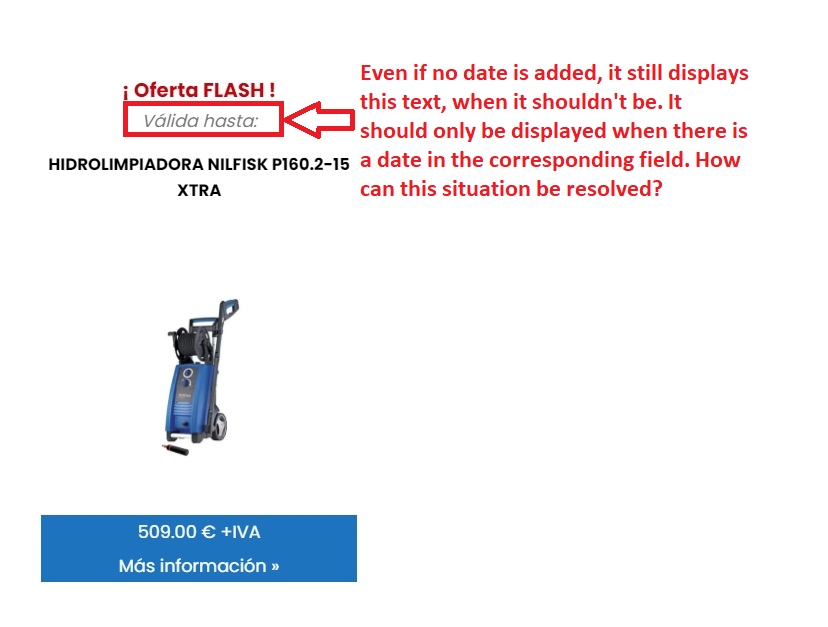
We use a conditional rule in our view to show this date field plus a few plain text words, when the field has been filled on the item, and we show a different plain text words when the field has not been filled.
This is the code we are using in our view to do this:
It works almost correctly: if the date field has been filled, the red code is shown on the view, and if it has not been filled, nothing is showing up.
However, the problem comes when you fill the date field and then delete it (setting it to blank). In those cases, the date value is not shown, but the span text is. To fix this, we have to remove the item and then add it again making sure the date field is never filled.
Is there any way we can show that span text only when there is a date filled at the moment?
We have also followed the steps for a previous ticket that got clossed because of time expiration, which told us to use the debug mode.
We have tried to add debug=’true’ to the conditional field in order to see any hint about why it isnt working, but nothing seems to show up.
We have also tried to enable compact and complete debug mode in Settings > Front-End content but got no feedback either. (No pop ups were blocked)