Skip Navigation

[Resolved] Having issues with setup

This support ticket is created 3 years, 8 months ago. There's a good chance that you are reading advice that it now obsolete.

This is the technical support forum for Toolset - a suite of plugins for developing WordPress sites without writing PHP.

Everyone can read this forum, but only Toolset clients can post in it. Toolset support works 6 days per week, 19 hours per day.

Sun Mon Tue Wed Thu Fri Sat
- 9:00 – 12:00 9:00 – 12:00 9:00 – 12:00 9:00 – 12:00 9:00 – 12:00 -
- 13:00 – 18:00 13:00 – 18:00 13:00 – 18:00 14:00 – 18:00 13:00 – 18:00 -

Supporter timezone: America/Jamaica (GMT-05:00)

This topic contains 7 replies, has 2 voices.

Last updated by Shane 3 years, 7 months ago.

Assisted by: Shane.

Author
Posts
#2382155
image_2022_06_10T05_04_20_608Z.png

Hi

having issues getting plugins setup and working

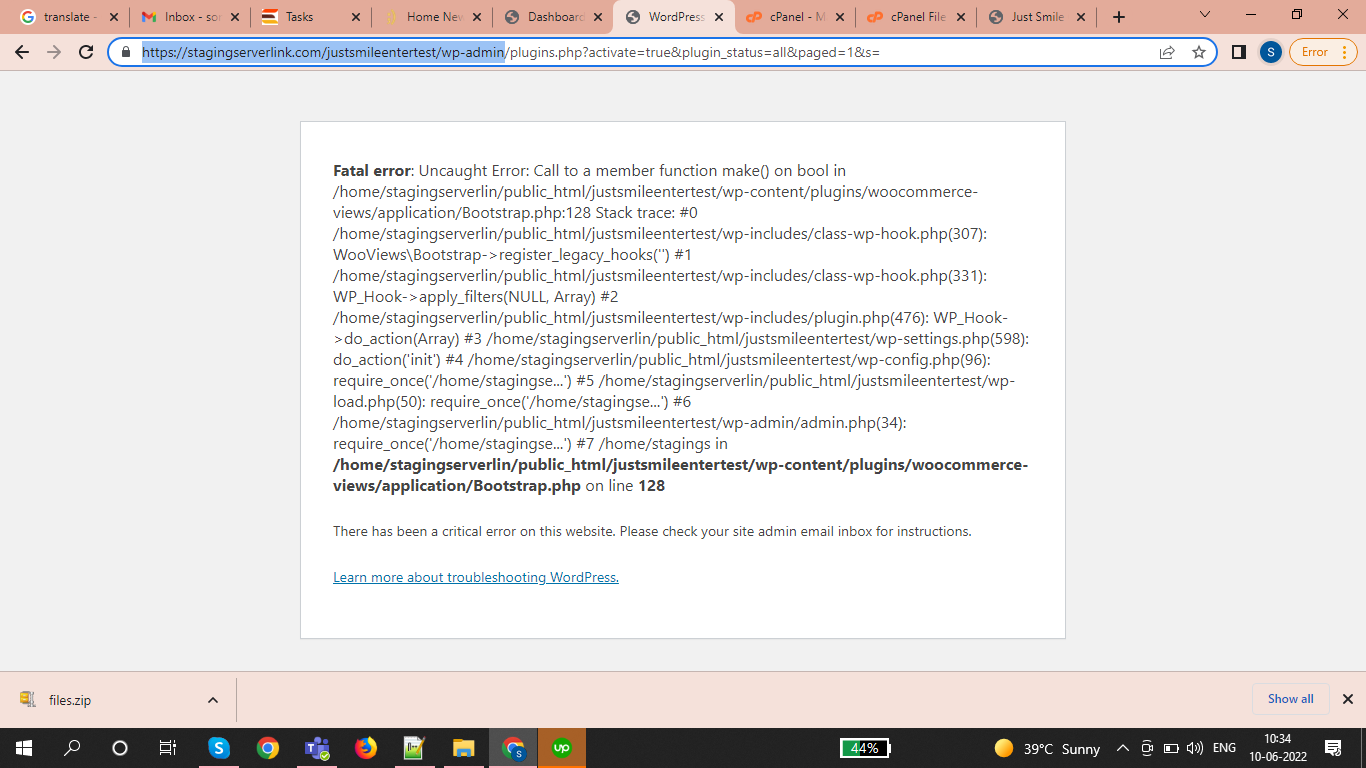
Hi, I have installed shared plugin with fresh wordpress . I am seeing this plugin error at the time of installation so can you discuss with support regarding this. Please check the default wordpress for just checking plugin installation

hidden link

#2382215

Shane
Supporter

Languages: English (English )

Timezone: America/Jamaica (GMT-05:00)

Hi Mark,

Thank you for getting in touch.

Are you able to provide FTP access to the site so that I can manually disable the plugin to see what could be causing this issue ?

Please let me know.

Thanks,
Shane

#2384833

Hi

here are the FTP logins

please adbise

#2384927

Shane
Supporter

Languages: English (English )

Timezone: America/Jamaica (GMT-05:00)

Hi Mark,

Thank you for the FTP details.

In order to use the Toolset Forms Commerce and Woocommerce Views you need to have our Toolset Forms and Toolset Blocks plugins installed as well as Woocommerce.

Without these plugins installed you won't be able to use the Toolset Forms Commerce and Woocommerce Views plugin.

Thanks,
Shane

#2388977
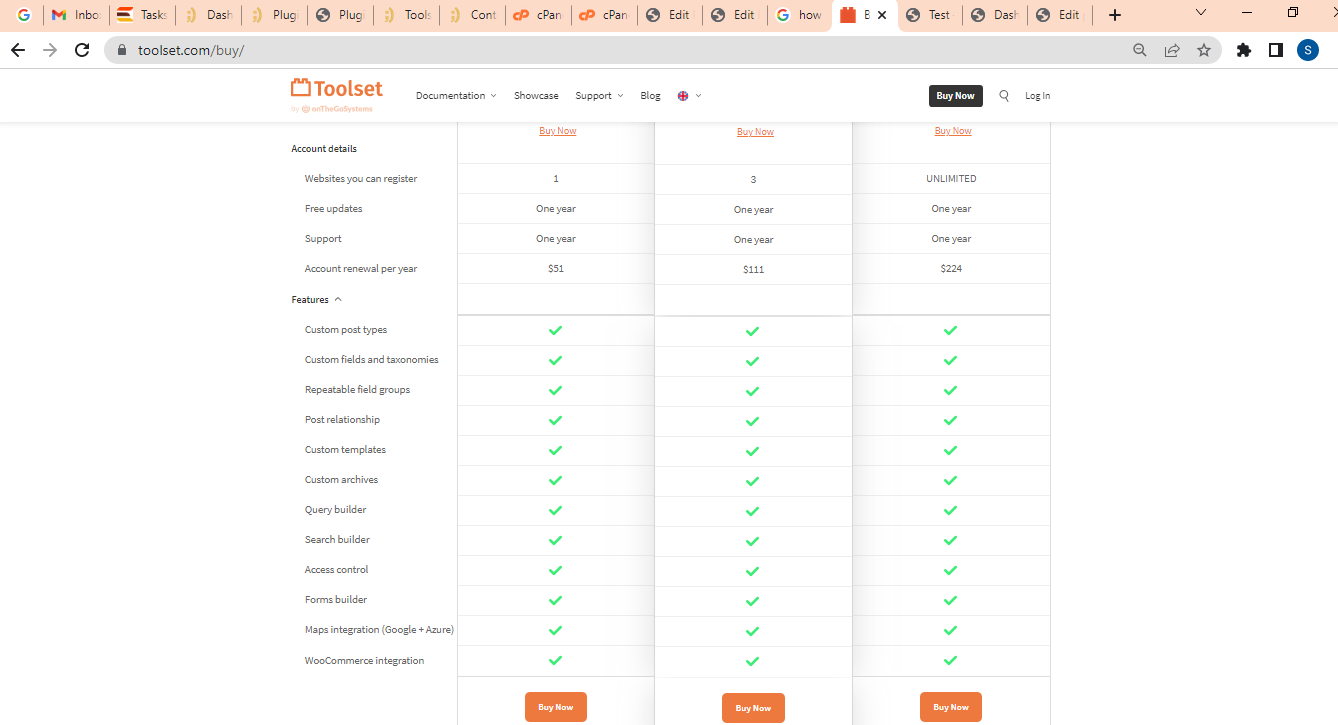
buy.png

We are not able to see all Tool-set modules(options, features) like dashboard , Post Type, Taxonomies, Custom fields, Add new post field group. Can you please share these modules / features. Please check the below features screenshot .I want to create custom forms like drop down, check boxes etc these fields will also show on product admin and fronted.

Url: hidden link
Username: admin
Password: ess@word1

many thanks
Mark

#2389175

Shane
Supporter

Languages: English (English )

Timezone: America/Jamaica (GMT-05:00)

Hi Mark,

I checked your site again and it appears that you've now installed the Toolset Forms and Toolset Blocks plugin.

It also appears that the Toolset Woocommerce Blocks plugin has now been activated without any issues.

Can you let me know if you've noticed any problems since activating the plugin. Also for the additional plugins you can download them from the link below.
https://toolset.com/account/downloads/

Thanks,
Shane

#2401909

We are not seeing all the features in our test setup as per message above

We are not able to see all Tool-set modules(options, features) like dashboard , Post Type, Taxonomies, Custom fields, Add new post field group. ??

Please login to out WP - and advise where these features are??

Can you please share these modules / features. Please check the below features screenshot .I want to create custom forms like drop down, check boxes etc these fields will also show on product admin and fronted.

Url: hidden link
Username: admin
Password: ess@word1
many thanks
Mark

#2402033

Shane
Supporter

Languages: English (English )

Timezone: America/Jamaica (GMT-05:00)

Hi Mark,

This is because the Types plugin is missing from your install.

I went ahead and installed this plugin for you. Please not that you will need to perform a registration of the plugins by getting your site key.

The best way to generate the site key is by following the instructions in the link below.
https://toolset.com/faq/how-to-install-and-register-toolset/#automatic-installation-once-you-have-types-plugin-installed

Paying close attention to step 3.

Thanks,
Shane