Link to a page where the issue can be seen: hidden link
I expected to see: The Permalink Settings page.
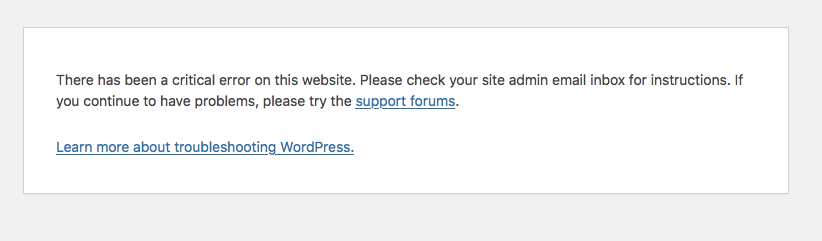
Instead, I got: See screenshot.
In troubleshooting this issue, disabling the Types plugin resolves the issue.
This seems to be a problem with custom post types and WordPress class-wp-rewrite.php
Here is the debug info:
Deprecated: WPV_Content_Template_Embedded::__construct(): Implicitly marking parameter $constants as nullable is deprecated, the explicit nullable type must be used instead in /home/duboisking/public_html/new/wp/wp-content/plugins/toolset-blocks/embedded/inc/classes/wpv-content-template-embedded.class.php on line 57

Deprecated: WPV_Content_Template_Embedded::__construct(): Implicitly marking parameter $wpv_wordpress_archive_frontend as nullable is deprecated, the explicit nullable type must be used instead in /home/duboisking/public_html/new/wp/wp-content/plugins/toolset-blocks/embedded/inc/classes/wpv-content-template-embedded.class.php on line 57

Deprecated: OTGS_UI_Loader::__construct(): Implicitly marking parameter $locator as nullable is deprecated, the explicit nullable type must be used instead in /home/duboisking/public_html/new/wp/wp-content/plugins/toolset-blocks/vendor/otgs/ui/src/php/OTGS_UI_Loader.php on line 22

Deprecated: OTGS_UI_Loader::__construct(): Implicitly marking parameter $assets as nullable is deprecated, the explicit nullable type must be used instead in /home/duboisking/public_html/new/wp/wp-content/plugins/toolset-blocks/vendor/otgs/ui/src/php/OTGS_UI_Loader.php on line 22

Deprecated: Toolset_Compatibility_Theme_Handler::__construct(): Implicitly marking parameter $populate_manager as nullable is deprecated, the explicit nullable type must be used instead in /home/duboisking/public_html/new/wp/wp-content/plugins/toolset-blocks/vendor/toolset/toolset-theme-settings/compatibility-modules/toolset.layouts-theme.class.php on line 48

Deprecated: Toolset_Compatibility_Theme_Handler::__construct(): Implicitly marking parameter $helper as nullable is deprecated, the explicit nullable type must be used instead in /home/duboisking/public_html/new/wp/wp-content/plugins/toolset-blocks/vendor/toolset/toolset-theme-settings/compatibility-modules/toolset.layouts-theme.class.php on line 48

Deprecated: OTGS\Toolset\Common\Relationships\MainController::__construct(): Implicitly marking parameter $database_layer_factory_di as nullable is deprecated, the explicit nullable type must be used instead in /home/duboisking/public_html/new/wp/wp-content/plugins/toolset-blocks/vendor/toolset/toolset-common/inc/m2m/MainController.php on line 85

Deprecated: OTGS\Toolset\Common\Relationships\MainController::__construct(): Implicitly marking parameter $cleanup_factory_di as nullable is deprecated, the explicit nullable type must be used instead in /home/duboisking/public_html/new/wp/wp-content/plugins/toolset-blocks/vendor/toolset/toolset-common/inc/m2m/MainController.php on line 85

Deprecated: ToolsetCommonEs\Library\MobileDetect\MobileDetect::__construct(): Implicitly marking parameter $headers as nullable is deprecated, the explicit nullable type must be used instead in /home/duboisking/public_html/new/wp/wp-content/plugins/toolset-blocks/vendor/toolset/common-es/server/Library/MobileDetect/MobileDetect.php on line 686

Deprecated: ToolsetCommonEs\Rest\Route\PostSearch::__construct(): Implicitly marking parameter $wp_query_factory as nullable is deprecated, the explicit nullable type must be used instead in /home/duboisking/public_html/new/wp/wp-content/plugins/toolset-blocks/vendor/toolset/common-es/server/Rest/Route/PostSearch.php on line 15

Deprecated: OTGS_Installer_Repository::set_subscription(): Implicitly marking parameter $subscription as nullable is deprecated, the explicit nullable type must be used instead in /home/duboisking/public_html/new/wp/wp-content/plugins/types/vendor/otgs/installer/includes/repository/class-otgs-installer-repository.php on line 85

Deprecated: OTGS_Installer_Package_Product_Finder::get_product_in_repository_by_subscription(): Implicitly marking parameter $subscription as nullable is deprecated, the explicit nullable type must be used instead in /home/duboisking/public_html/new/wp/wp-content/plugins/types/vendor/otgs/installer/includes/class-otgs-installer-package-product-finder.php on line 11

Warning: Cannot modify header information - headers already sent by (output started at /home/duboisking/public_html/new/wp/wp-content/plugins/types/vendor/otgs/installer/includes/class-otgs-installer-package-product-finder.php:11) in /home/duboisking/public_html/new/wp/wp-includes/functions.php on line 7182

Fatal error: Uncaught TypeError: Unsupported operand types: string & int in /home/duboisking/public_html/new/wp/wp-includes/class-wp-rewrite.php:1036 Stack trace: #0 /home/duboisking/public_html/new/wp/wp-includes/class-wp-rewrite.php(1413): WP_Rewrite->generate_rewrite_rules() #1 /home/duboisking/public_html/new/wp/wp-includes/class-wp-rewrite.php(1513): WP_Rewrite->rewrite_rules() #2 /home/duboisking/public_html/new/wp/wp-includes/class-wp-rewrite.php(1888): WP_Rewrite->refresh_rewrite_rules() #3 /home/duboisking/public_html/new/wp/wp-includes/rewrite.php(282): WP_Rewrite->flush_rules() #4 /home/duboisking/public_html/new/wp/wp-admin/options-permalink.php(212): flush_rewrite_rules() #5 {main} thrown in /home/duboisking/public_html/new/wp/wp-includes/class-wp-rewrite.php on line 1036
I tested 8.3, 8.2, 8.1, and 8.0 - ALL return the fatal error.
Deactivating Types the error goes away... but when I re-activate Types, I'm getting 404 errors for my CPTs - which is why I was trying to update my Permalinks.
Fatal error: Uncaught TypeError: Unsupported operand types: string & int in /home/duboisking/public_html/new/wp/wp-includes/class-wp-rewrite.php:1036 Stack trace: #0 /home/duboisking/public_html/new/wp/wp-includes/class-wp-rewrite.php(1413): WP_Rewrite->generate_rewrite_rules() #1 /home/duboisking/public_html/new/wp/wp-includes/class-wp-rewrite.php(1513): WP_Rewrite->rewrite_rules() #2 /home/duboisking/public_html/new/wp/wp-includes/class-wp-rewrite.php(1888): WP_Rewrite->refresh_rewrite_rules() #3 /home/duboisking/public_html/new/wp/wp-includes/rewrite.php(282): WP_Rewrite->flush_rules() #4 /home/duboisking/public_html/new/wp/wp-admin/options-permalink.php(212): flush_rewrite_rules() #5 {main} thrown in /home/duboisking/public_html/new/wp/wp-includes/class-wp-rewrite.php on line 1036
What if you try to deactivate all third-party plugins excluding Toolset plugins and then check if you able to see it working when ONLY Toolset plugins active.
- Do you see any difference?
NOTE: I downgraded to 7.4, and was able to access the Permalinks settings page with Types active.
However, a warning is still thrown:
Warning: A non-numeric value encountered in /home/duboisking/public_html/new/wp/wp-includes/class-wp-rewrite.php on line 1038
Disabling Types makes the warning go away. There is obviously a problem with strings/characters in my CPTs or taxonomies.
The warning does not display with debugging turned off in WP config.
NOTE: When I tried to switch to Twenty-Twenty Five theme with Types enabled.. Fatal Error.
It DID switch themes. Disabled Types, and no errors switching themes.