Skip Navigation

[Resolved] General Usage

This support ticket is created 2 years, 11 months ago. There's a good chance that you are reading advice that it now obsolete.

This is the technical support forum for Toolset - a suite of plugins for developing WordPress sites without writing PHP.

Everyone can read this forum, but only Toolset clients can post in it. Toolset support works 6 days per week, 19 hours per day.

Sun Mon Tue Wed Thu Fri Sat
- 10:00 – 13:00 10:00 – 13:00 10:00 – 13:00 10:00 – 13:00 10:00 – 13:00 -
- 14:00 – 18:00 14:00 – 18:00 14:00 – 18:00 14:00 – 18:00 14:00 – 18:00 -

Supporter timezone: Asia/Kolkata (GMT+05:30)

This topic contains 10 replies, has 2 voices.

Last updated by timB-13 2 years, 11 months ago.

Assisted by: Minesh.

Author
Posts
#2584191
Screenshot 2023-03-31 at 15.19.51.jpg

Tell us what you are trying to do?

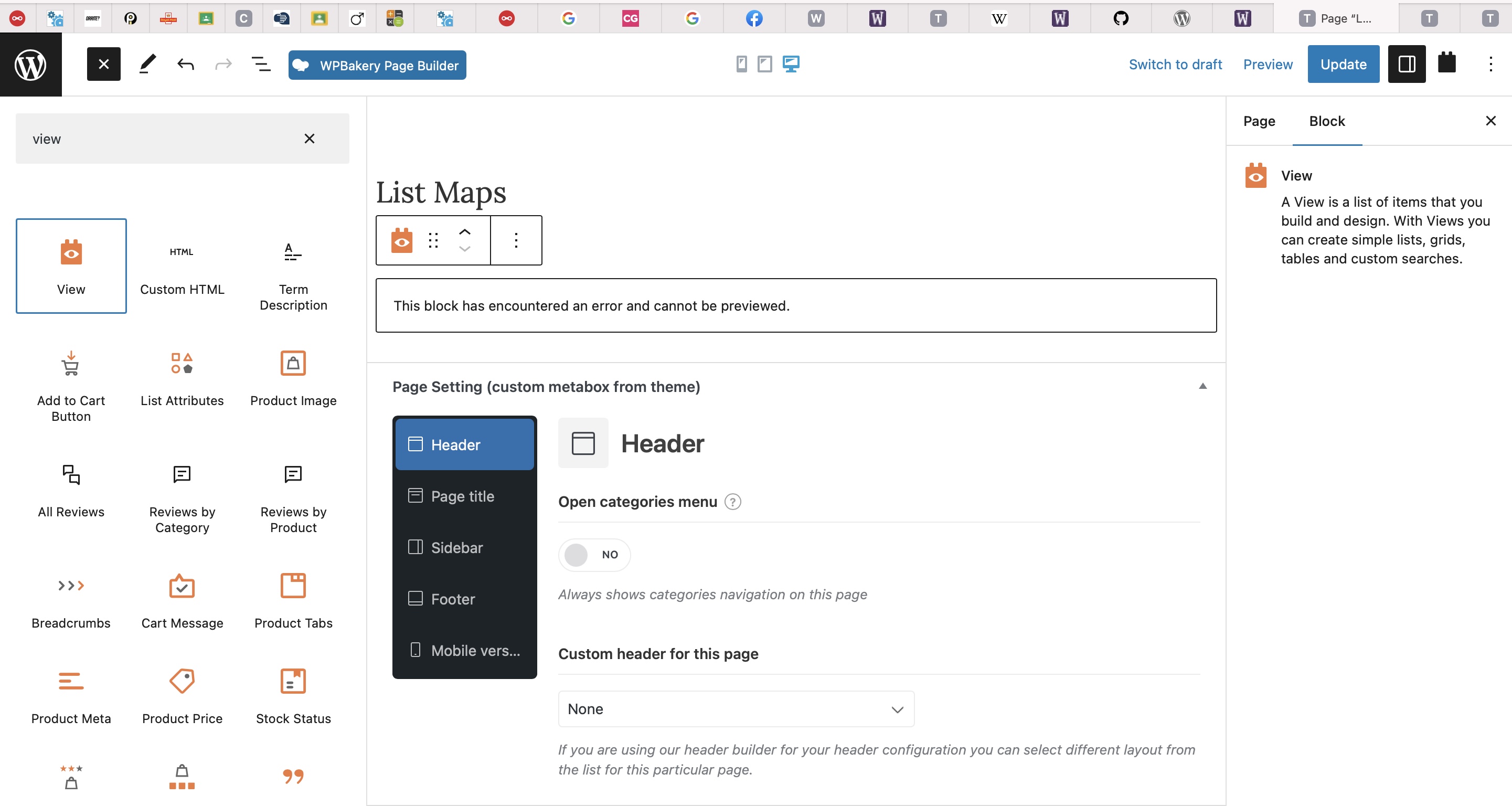
Hi I've been trying to follow the tutorials and just generally getting in a mess. I think initially its been down to my sites editor as I have a heavy dislike for Gutenberg and blocks so I usually use a plugin which disables it (I tend to use WP Bakery). I've turned the disable Gutenberg off for now as the block editor seems the only real effective option for Toolset. The main area that I've been struggling with is following the views and content templates tutorials and getting the content to view on the front end. I'm happy with all the custom fields and taxonomy but creating a new page and then adding a view doesn't bring up the window to choose a new or existing view or the layout design options. All I get is a message "This block has encountered an error and cannot be previewed." on the main page as shown in the screenshot.

The main areas I'm trying to do is to show a custom post type with locations on a map. One of the custom fields is a radio selection of areas which I'd like to use for a query to only show posts which have a particular area selected. So the plan would be to repeat this for each selection which would be 5 map lists overall, all for different regions.

Then in addition to that I would be using a custom shop page showing products which I think I've managed to sort ok. (that was more luck I think...)

Is there any documentation that you are following?

This is where it all starts to go wrong, trying to follow this, https://toolset.com/lesson-placement/lesson-placements-1824661-1620853/
Is there a similar example that we can see?

What is the link to your site?

hidden link

#2585855

Minesh
Supporter

Languages: English (English )

Timezone: Asia/Kolkata (GMT+05:30)

Hello. Thank you for contacting the Toolset support.

I see you are trying to add a view using the view block and you do not want to use the Gutenberg blocks. If so, you can enable the legacy views by following the steps given with the following Doc:
=> https://toolset.com/course-lesson/enabling-legacy-version-of-toolset-views/#enabling-legacy-views

And then you can add the view's shortcode instead of view's block.

#2585859

Hi Minesh
Thanks but I'm a long way from that as I've not been able to actually create a view to add. The issue I have is more with creating the views and the setup not reacting anything like the tutorials. I just seem to be going round in circles. I really want to use Toolset as I think it's exactly what I need but I just can't seem to create the views and templates to proceed.

Thanks
Tim

#2585865

Minesh
Supporter

Languages: English (English )

Timezone: Asia/Kolkata (GMT+05:30)

That is really strange. Have you activated the legacy views? if yes: then once you reload the admin dashboard you will see a menu:
Toolset => Views

Where you can click on button to add new view. If that's not the case please send me admin access details and I'll review whats going wrong with your setup and please share details where exactly you want to add view with what post/page/content template.

*** Please make a FULL BACKUP of your database and website.***
I would also eventually need to request temporary access (WP-Admin) to your site. Preferably to a test site where the problem has been replicated if possible in order to be of better help and check if some configurations might need to be changed.

I have set the next reply to private which means only you and I have access to it.

#2585945

Minesh
Supporter

Languages: English (English )

Timezone: Asia/Kolkata (GMT+05:30)

It seems there is issue with WordPress 6.2 and Toolset updates as I found that the Toolset map block does not get rendered and it throws the following message on screen when you try to add the map block:

This block has encountered an error and cannot be previewed.

If you want to use blocks then you will have to wait a bit until we fix this, otherwise I can show you how you can add map with markers and also display the items under the map using the classic view.

#2585949

ok well at least I'm not going mad! I'm happy to use the classic interface if it can still be achieved so if you were able I'd appreciate it.

Many thanks

#2585963

Minesh
Supporter

Languages: English (English )

Timezone: Asia/Kolkata (GMT+05:30)

Please check here: hidden link

I've created the following archive in classic view where I've added the map shortcode outside the archive's loop:
=> hidden link

And marker shortcode just after the loop starts:

[wpv-map-marker map_id='map-9' marker_id='marker-[wpv-post-id]' marker_field='wpcf-location-address'][wpv-post-link][/wpv-map-marker]

You can build the view's loop using the view's content template and add as many fields as you want to display to the following view's loop content template:
=> hidden link

More info:
=> https://toolset.com/documentation/legacy-features/views-plugin/#wordpress-archives
=> https://toolset.com/documentation/legacy-features/maps-plugin/

#2585975

Thanks Minesh, I'll take a look and will also keep an eye out for the next update which will hopefully mean I can use the blocks.

#2586411

Minesh
Supporter

Languages: English (English )

Timezone: Asia/Kolkata (GMT+05:30)

Ok - you are welcome to close this ticket and I'll update you when we release fix for the map block issue.

#2586551

Minesh
Supporter

Languages: English (English )

Timezone: Asia/Kolkata (GMT+05:30)

Here is the hotfix version for maps plugin: https://toolset.com/download/toolset-maps/#changelog

You can update the Toolset Maps plugin to latest version 2.1.1 and try to resolve your issue.

#2587393

My issue is resolved now. Thank you!








