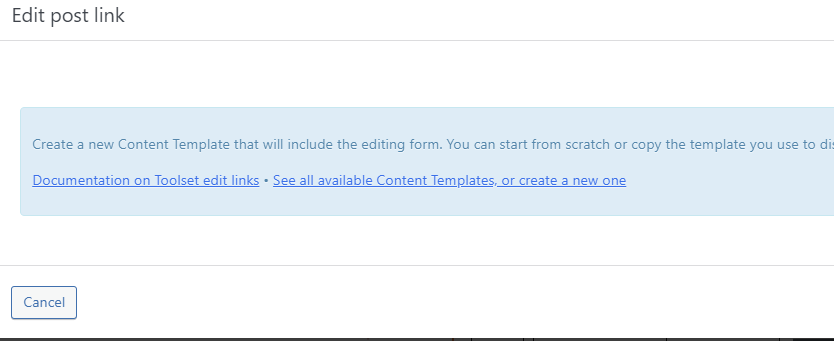
Tell us what you are trying to do?
I'm trying to add Edit link to product view as instructed below. There is a form etc but when clicking Add Edit Post Link, no Forms.
Is there any documentation that you are following?
https://toolset.com/course-lesson/front-end-forms-for-editing-content/?utm_source=plugin&utm_medium=gui&utm_campaign=forms
Is there a similar example that we can see? YEs
What is the link to your site? No direct link. It's under development.
Hi there,
You need to use the icon next to the toolset one for forms according to the screesnhot below:
https://toolset.com/wp-content/uploads/2019/11/forms-button-4.png
Ifthe problem persists, I'd appreciate it if you could give me the URL/User/Pass of your WordPress dashboard after you make sure that you have a backup of your website.
It is absolutely important that you give us a guarantee that you have a backup so if something happens you will have a point of restore.
Make sure you set the next reply as private.
Also tell me which content template you use (give me the link)
And which form you want to use (give me the link)
Thanks.
Hi there,
Please make the next reply as private, you can check the private checkbox.
Thanks.
Hi there,
Thank you for the login information. For the Edit Link to work you need to create a Content Template for the Products post type.
If you go to WordPress Dashboard > Toolset > Dashboard you will; see that the column for the content template for products is empty.
Please create a content template there which will represent the single product template.
Then add the Edit link inside that template:
https://toolset.com/course-lesson/front-end-forms-for-editing-content/?utm_source=plugin&utm_medium=gui&utm_campaign=forms#adding-an-edit-link-to-templates-that-display-single-items
Thanks.
Hi,
I added template for single product but the problem is still the same.
Kind Regards,
Tarmo
Hi there,
It seems that you use a correct way and there must be some sort of plugin conflict going on.
Would you please test the steps below?
- IMPORTANT STEP! Create a backup of your website. Or better approach will be to test this on a copy/staging version of the website to avoid any disruption of a live website.
- Switch to the default theme such as "TwentyTwenty" by going to "WordPress Dashboard > Appearance > themes".
- Go to "WordPress Dashboard > Plugins" and deactivate all plugins except Toolset and its add-ons.
- Check if you can still recreate the issue.
- If not, re-activate your plugins one by one and check the issue each time to find out the plugin that causes the problem.
If the issue persists, I'd appreciate it if you could allow us to copy the website to our server for further investigation.
Thanks.