Skip Navigation

[Closed] Fatal PHP error on WP admin pages

This support ticket is created 4 years, 3 months ago. There's a good chance that you are reading advice that it now obsolete.

This is the technical support forum for Toolset - a suite of plugins for developing WordPress sites without writing PHP.

Everyone can read this forum, but only Toolset clients can post in it. Toolset support works 6 days per week, 19 hours per day.

Sun Mon Tue Wed Thu Fri Sat
- 9:00 – 12:00 9:00 – 12:00 9:00 – 12:00 9:00 – 12:00 9:00 – 12:00 -
- 13:00 – 18:00 13:00 – 18:00 13:00 – 18:00 14:00 – 18:00 13:00 – 18:00 -

Supporter timezone: America/Jamaica (GMT-05:00)

This topic contains 8 replies, has 2 voices.

Last updated by Shane 4 years, 3 months ago.

Assisted by: Shane.

Author
Posts
#2183877
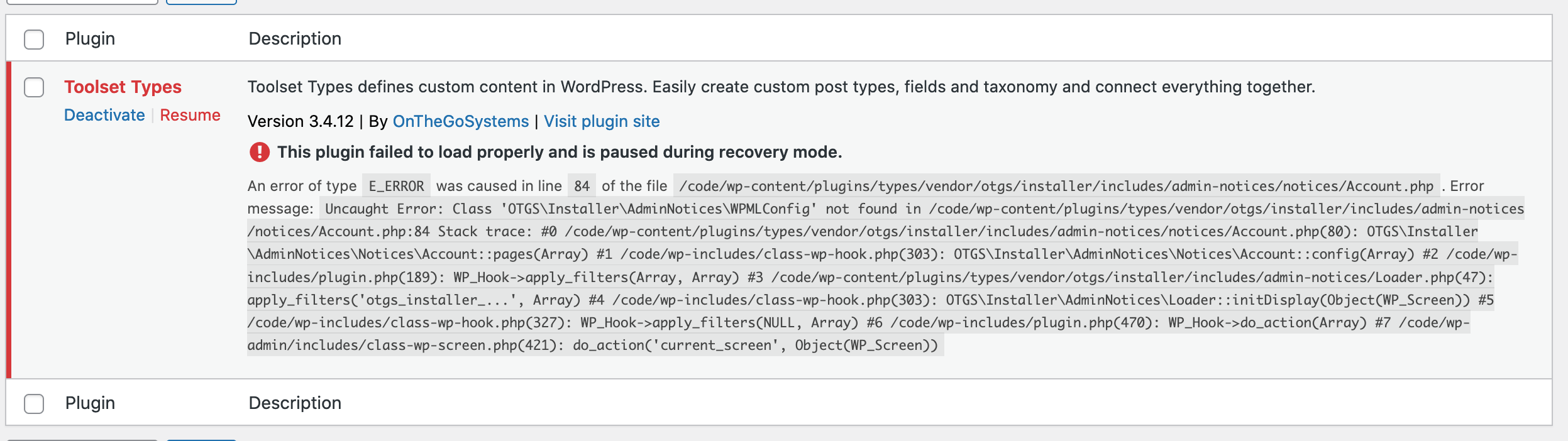
Screen Shot 2021-09-30 at 11.42.11 AM.png

Hi,

We received a notice from our site this morning that Toolset Types is causing a fatal error on our admin pages. I'm including the error from the email below & a screenshot from the plugin dashboard using recovery mode. I'm unable to access the debug info because the plugin is paused by recovery mode.

WordPress version 5.8.1
Current theme: wwad (version 1.0.4)
Current plugin: Toolset Types (version 3.4.12)
PHP version 7.4.24

Error Details
=============
An error of type E_ERROR was caused in line 84 of the file
/code/wp-content/plugins/types/vendor/otgs/installer/includes/admin-notices/notices/Account.php.
Error message: Uncaught Error: Class
'OTGS\Installer\AdminNotices\WPMLConfig' not found in
/code/wp-content/plugins/types/vendor/otgs/installer/includes/admin-notices/notices/Account.php:84
Stack trace:
#0 /code/wp-content/plugins/types/vendor/otgs/installer/includes/admin-notices/notices/Account.php(80):
OTGS\Installer\AdminNotices\Notices\Account::pages(Array)
#1 /code/wp-includes/class-wp-hook.php(303):
OTGS\Installer\AdminNotices\Notices\Account::config(Array)
#2 /code/wp-includes/plugin.php(189): WP_Hook->apply_filters(Array, Array)
#3 /code/wp-content/plugins/types/vendor/otgs/installer/includes/admin-notices/Loader.php(47):
apply_filters('otgs_installer_...', Array)
#4 /code/wp-includes/class-wp-hook.php(303):
OTGS\Installer\AdminNotices\Loader::initDisplay(Object(WP_Screen))
#5 /code/wp-includes/class-wp-hook.php(327): WP_Hook->apply_filters(NULL, Array)
#6 /code/wp-includes/plugin.php(470): WP_Hook->do_action(Array)
#7 /code/wp-admin/includes/class-wp-screen.php(421):
do_action('current_screen', Object(WP_Screen))

#2184121

Shane
Supporter

Languages: English (English )

Timezone: America/Jamaica (GMT-05:00)

Hi Rachael,

Thank you for getting in touch.

I see that your types plugin is actually outdated. Can you go to Plugins -> Add New and then click the commercial tab and update your Types plugin from this screen.

Once you've done this please let me know if the issue still remains.

Thanks,
Shane

#2184875

Hi, thanks, but we're still getting the error with 3.4.14.

#2184937

Shane
Supporter

Languages: English (English )

Timezone: America/Jamaica (GMT-05:00)

Hi Rachael,

Would you mind allowing me to have admin access to the website to check on this issue further for you ?

I've enabled the private fields for your next response.

Thanks,
Shane

#2187175

Shane
Supporter

Languages: English (English )

Timezone: America/Jamaica (GMT-05:00)

Hi Rachael,

Whenever I try to log into the site and access the dashboard i'm getting a fatal error.

Can you check on this for me so that I can have a look at the issue with the plugin.

Thanks,
Shane

#2187905

Hi Shane,

Yes, that's the whole problem! The Toolset plugin is causing the fatal error on the admin dashboard.

#2187923

If you can give me another private field, I'll give you another admin account to try with.

#2188109

Shane
Supporter

Languages: English (English )

Timezone: America/Jamaica (GMT-05:00)

Hi Rachael,

I will need FTP access as well.

If you can provide this please do as well.

Thanks,
Shane

#2188167

Shane
Supporter

Languages: English (English )

Timezone: America/Jamaica (GMT-05:00)

Hi Rachael,

This limits the amount of debugging that I can do.

Are you able to provide me with a copy of the site ?

https://toolset.com/faq/provide-supporters-copy-site/

This way I can test to see if the issue occurs when the site is moved to a different server environment.

Thanks,
Shane

The topic ‘[Closed] Fatal PHP error on WP admin pages’ is closed to new replies.