Skip Navigation

[Resolved] Date picker issue

This thread is resolved. Here is a description of the problem and solution.

Problem:

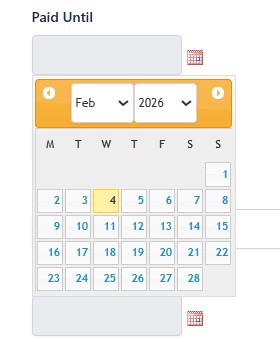
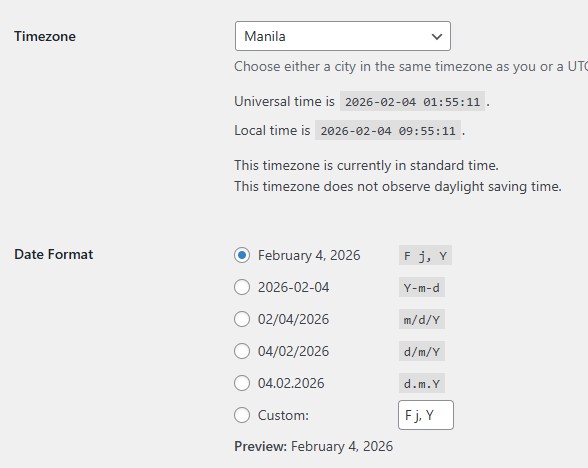
The date picker was displaying a date one day earlier than the date selected in the calendar (e.g., selecting Feb 4 showed Feb 3 in the input field), even though the WordPress timezone was set correctly. The issue occurred both on localhost and on the production site.

Solution:

The issue was caused by a global date_default_timezone_set('Asia/Manila') call introduced by the QuickBooks PHP SDK. Setting the PHP default timezone to a non-UTC value affected the JavaScript/PHP date handling used by the date picker, resulting in an off-by-one-day shift. Removing this call or keeping the default timezone as UTC resolved the issue and restored correct date selection behavior.

This is the technical support forum for Toolset - a suite of plugins for developing WordPress sites without writing PHP.

Everyone can read this forum, but only Toolset clients can post in it. Toolset support works 6 days per week, 19 hours per day.

This topic contains 1 reply, has 1 voice.

Last updated by raffyC 5 days, 8 hours ago.

Assisted by: Christopher Amirian.

Author
Posts
#2846308
Screenshot 2026-02-04 095309.jpg
Screenshot 2026-02-04 095329.jpg
Screenshot 2026-02-04 100108.jpg

Hi,

The date picker is showing 1 day before of the selected date in calendar. For example, in the screenshot I selected Feb 4 (today) but shows Feb 3 in the field.
The timezone in WordPress is correct. I tried setting date_default_timezone_set('Asia/Manila'); in functions.php but it didn't work.

It happens in localhost and on the production site.

Thank you.

#2846355

Christopher Amirian
Supporter

Languages: English (English )

Hi,

Thank you for the report. May I ask you to test the same thing on a clean installation below and see if the problem happens there too?

hidden link

If yes, please give me the link to the page where you managed to replicate the problem.

If the same thing is not possible to replicate on a clean installation, please start by testing a minimal installation on a staging version of your website:

- IMPORTANT STEP! Create a backup of your website. Or better approach will be to test this on a copy/staging version of the website to avoid any disruption of a live website.
- Switch to the default theme such as "TwentyTwenty" by going to "WordPress Dashboard > Appearance > themes".
- Go to "WordPress Dashboard > Plugins" and deactivate all plugins except:
. Toolset plugins.
- Check if you can still recreate the issue.
- If not, re-activate your plugins one by one and check the issue each time to find out the plugin that causes the problem.

Thanks.

#2846360

Thanks. I found the issue is when I set date_default_timezone_set('Asia/Manila') in Quickbooks PHP SDK the datepicker gets 1 day before, it's works fine if UTC or not set.