My WordPress installation has stopped pulling updates for plugins.
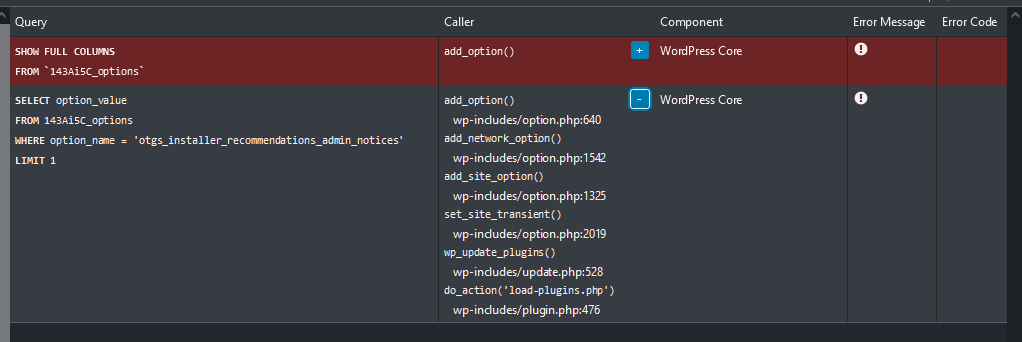
I was trying to troubleshoot this, and using Query Monitor discovered the database hitting the error attached.
I looked up what "otgs_installer_recommendations_admin_notices" was referring to, and it led me to you guys. I use Types (standalone, v3.4.16) so this made some sense. Although, as I specifically opted for the standalone version, it was odd I'd get an error related to the OTGS installer.
The "otgs_installer_recommendations_admin_notices" row does not exist in the database, so I tried inserting it manually but it causes a critical/fatal error.
If you click on the exclamation icon for the error message does it give details of the actual error?
That query to select the option otgs_installer_recommendations_admin_notices looks innocuous, it may not return a result if there is no option with that name, but need not have any implications.
If it did I'd expect an error or warning in the PHP debug.log.
When you say your site "has stopped pulling updates for plugins", do you mean generally, or specifically updates for Types?
Types includes custom installer code to handle registering the site and pulling updates.
You can go to the commercial tab of the Add New plugins page which will bring up the custom Toolset installer page where you can register the site, provide a site key etc. Clicking the "Check for updates" button can help if the page appears stuck.
And you can go to the installer support page (at wp-admin/admin.php?page=otgs-installer-support) where you can see if any connection issues are reported.
The topic ‘[Closed] Database error caused by Types seems to be preventing WP plugin updates’ is closed to new replies.