Hello Toolset Team!
My goal is to create a quotation system that works in the following way.
1-My site has 2 User Roles, Project Owners and Developers. I have created 2 custom post types Projects & Quotes.
2-Project owners will be able to post Projects and Developers to Quotes.
3-Projects should be visible to Everyone
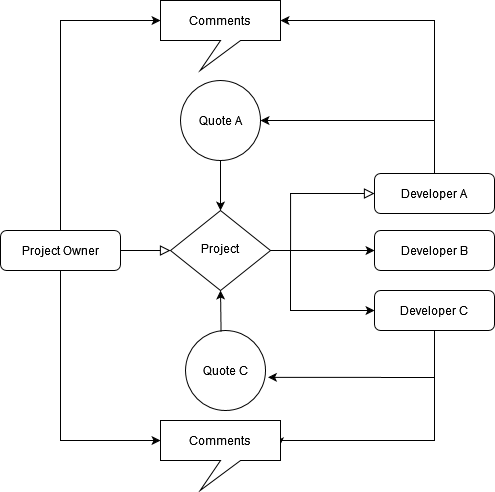
4-Quotes should be visible only to their author and to The Project Owner that posted the Project. Under each Quote default, WP commenting system can be in place so both sides can seal the deal between them
According to the above, what should be the relationship between Projects and Quotes?
Can you guide me with relevant tutorials -threads if exist?
I include a diagram in order to visualize what I want to achieve
Hello. Thank you for contacting the Toolset support.
1-My site has 2 User Roles, Project Owners and Developers. I have created 2 custom post types Projects & Quotes.
==>
OK
2-Project owners will be able to post Projects and Developers to Quotes.
==>
Ok, we can manage this. We can create form and post group and using post group we can assign the permission to Projects and Developers.
3-Projects should be visible to Everyone
==>
Ok
4-Quotes should be visible only to their author and to The Project Owner that posted the Project. Under each Quote default, WP commenting system can be in place so both sides can seal the deal between them
==>
We can create a view to display Quotes belongs to logged in user and filter it based on the loggedin user author and we can differentiate based on role. You can activate the comment system for your post type to display the comment.
Actually, its up to you as how you want to manage the relationship between the post types Projects & Quotes. It can be either One-2-Many or Many-2-Many. But based on the description you shared it seems to me One-2-Many post relationship will suit in your case.
Based on the requirement you shared it seems most of the things you can control using Toolset access as Toolset Access works on the Roles and you can assign the your desired permissions to Project Owners and Developers as required.
- https://toolset.com/course-chapter/setting-up-custom-roles-for-site-members/
Before doing anything further I would rather suggest you to create a test site on our free test platform http://www.discover-wp.com site and create a test site using any of our available reference site and with with it to know that you can do using Access, whats possible and what things would workaround.