Skip Navigation

[Resolved] Conflict with toolset Gmap and Tartaucitron js (2 Gmap API call)

This is the technical support forum for Toolset - a suite of plugins for developing WordPress sites without writing PHP.

Everyone can read this forum, but only Toolset clients can post in it. Toolset support works 6 days per week, 19 hours per day.

Sun Mon Tue Wed Thu Fri Sat
- 10:00 – 13:00 10:00 – 13:00 10:00 – 13:00 10:00 – 13:00 10:00 – 13:00 -
- 14:00 – 18:00 14:00 – 18:00 14:00 – 18:00 14:00 – 18:00 14:00 – 18:00 -

Supporter timezone: Asia/Kolkata (GMT+05:30)

This topic contains 4 replies, has 2 voices.

Last updated by Minesh 1 year, 10 months ago.

Assisted by: Minesh.

Author
Posts
#2690689
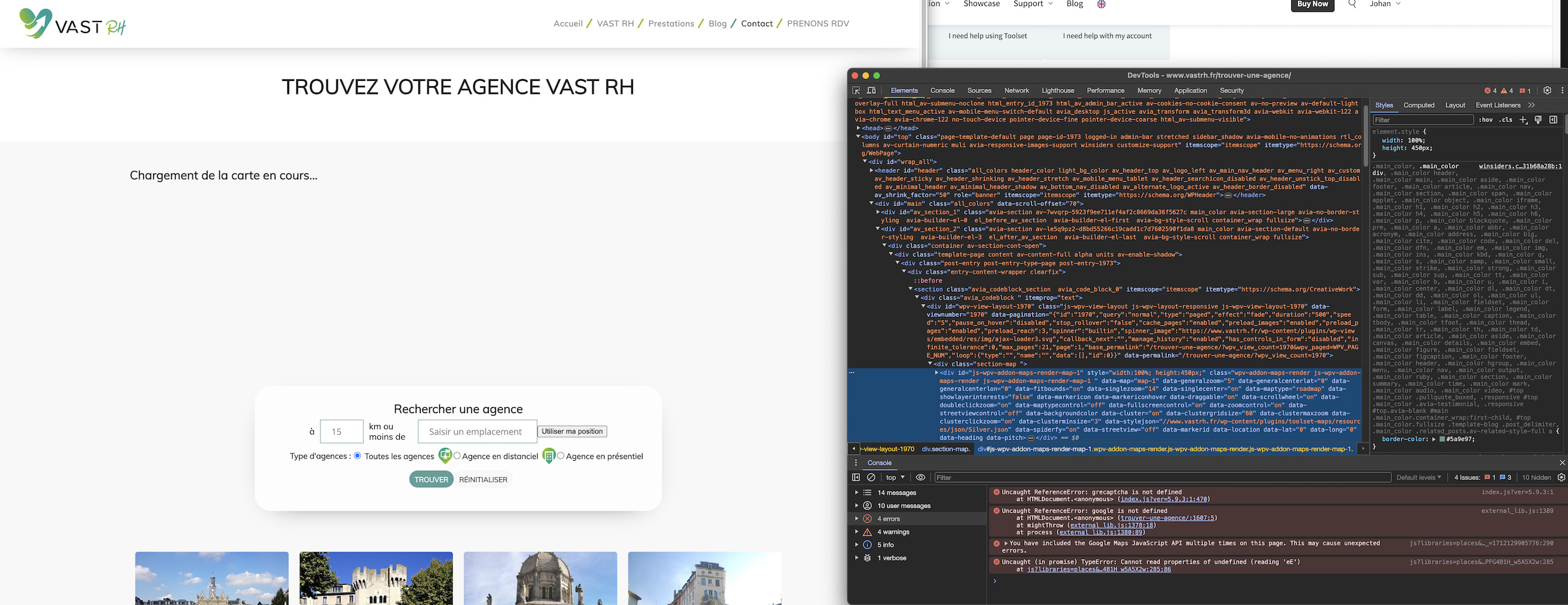
Capture-decran-2024-04-03-09.44.00.jpg

Tell us what you are trying to do?
I want to display my toolset map with tarteaucitronplugin (GPDR Cookies plugin) on hidden link. My map work perfectly on another twin site here without this plugin :
hidden link

Is there any documentation that you are following?
I think my problem is similar of this topic https://toolset.com/forums/topic/toolset-maps-and-gdpr-cookie-consent-plugin-seems-to-conflict/#post-1326825, but i'm not sure, and i'm not a developper for custom this solution with tarteaucitron plugin

Is there a similar example that we can see?

What is the link to your site?
hidden link

#2690749

Minesh
Supporter

Languages: English (English )

Timezone: Asia/Kolkata (GMT+05:30)

Hello. Thank you for contacting the Toolset support.

We do not have any official integration with the plugin you shared but we can workaround it.

Here is a ticket you should try to follow that should help you to resolve your issue:
- https://toolset.com/forums/topic/how-to-block-google-api-requests-until-consent-is-given-for-gdpr/

#2690794

Hi Minesh,
Thanks for the links, but its not a solution with my issue : When I've Toolset Map and Tarteaucitron, I've 2 gmap API script call. That create a conflict and dont display the map...
Any solution?
Thanks for your help

#2690887

Minesh
Supporter

Languages: English (English )

Timezone: Asia/Kolkata (GMT+05:30)

To exclude a script - there is a solution offered by its with Pro version of "gdpr-cookie-consent" plugin with the reference ticket you shared
- https://toolset.com/forums/topic/toolset-maps-and-gdpr-cookie-consent-plugin-seems-to-conflict/#post-1326825

The other solution does not include excluding the javascript file.

Is such filter hook available with Tarteaucitron so that you can exclude the specific script like mentioned with above reference ticket you shared.

If you can share admin access details I will check the Tarteaucitron plugin section if there is any such option otherwise you will have to get in touch with Tarteaucitron and check with them if they have any workaround for this issue.

*** Please make a FULL BACKUP of your database and website.***
I would also eventually need to request temporary access (WP-Admin and FTP) to your site. Preferably to a test site where the problem has been replicated if possible in order to be of better help and check if some configurations might need to be changed.

I have set the next reply to private which means only you and I have access to it.

#2691084

Minesh
Supporter

Languages: English (English )

Timezone: Asia/Kolkata (GMT+05:30)

After spending time I do not able to find from where exactly the Tarteaucitron GDPR plugin is loading the google map api.

However - the only workaround is I found a plugin that can help you to disable the specific plugin on specific page:
- https://wordpress.org/plugins/wp-plugin-manager/

I've installed the plugin and set the condition to disable the plugin on the page: "Trouver une agence"
- hidden link

I can see now its loading the map:
- hidden link

If you still want to use the Tarteaucitron GDPR plugin on above page then you should contact the "Tarteaucitron GDPR" plugin support and check with them what would be the way to disable their google API(s) on your page.