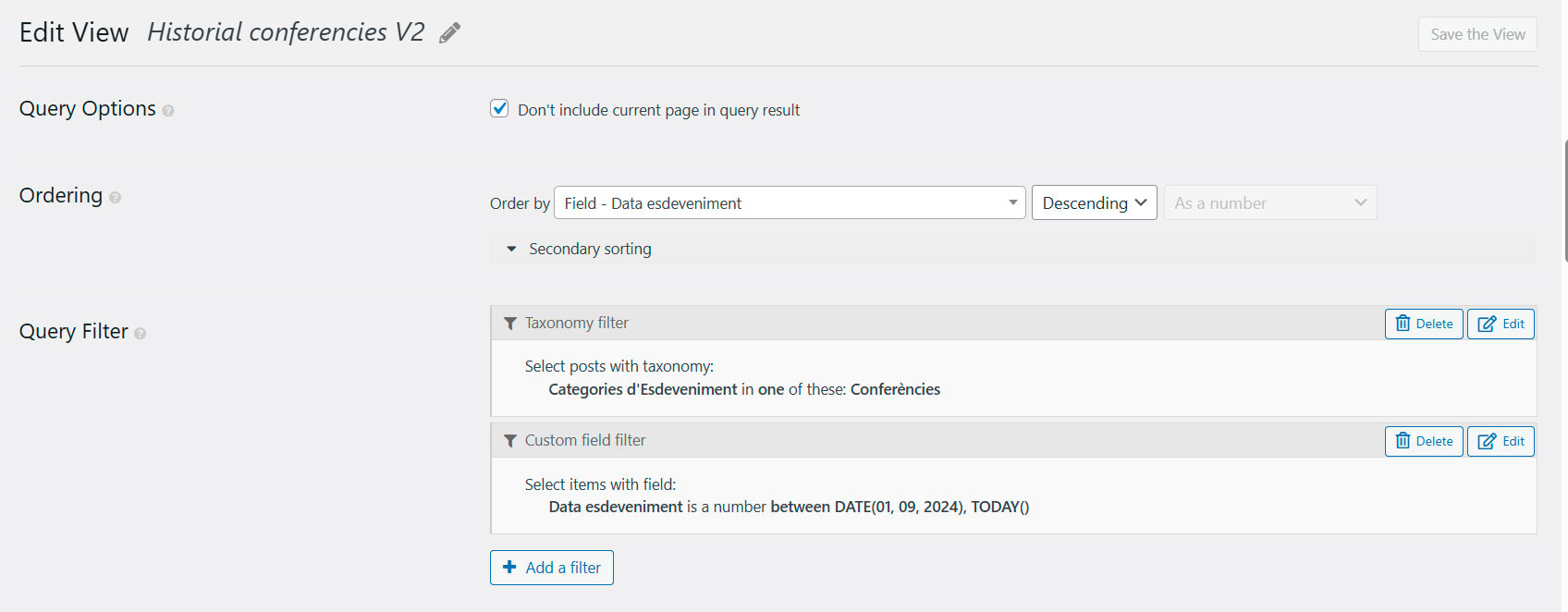
I have an issue with Toolset and the plugin "The Events Calendar". This plugin generates custom post types for the events. The problem occurs when an event has already taken place on a specific date. I have a View that displays the event history, and it is currently working correctly, but when I update the Toolset plugins, the results stop showing. I don’t know how to fix it. I reported this problem some time ago, but now I have no choice but to update both "The Events Calendar" and the Toolset plugins, and then it stops working.
Let’s see how I could solve the problem: currently, you can see the page where I display the View at: hidden link
Best regards, and I hope you can offer me a solution so that I can update the plugins without any issues.
Rafa Corts
Hello. Thank you for contacting the Toolset support.
CAn you please send me admin access details and tell me what is your expected result on the problem URL you shared. I mean what date posts you want to display with the view.
*** Please make a FULL BACKUP of your database and website.***
I would also eventually need to request temporary access (WP-Admin and FTP) to your site. Preferably to a test site where the problem has been replicated if possible in order to be of better help and check if some configurations might need to be changed.
I have set the next reply to private which means only you and I have access to it.
Correct, if we don’t update the Toolset plugins, everything works properly, but as soon as they are updated, it stops working.
I need to update the plugins to keep the website protected from possible security vulnerabilities or viruses.
I need to know What plugin I need to update.
- Do I need to update ALL Toolset plugins?
- Do I need to update only Toolset Views/Blocks plugins?
- Do I need to update Toolset Views/Blocks and Events Calendar plugins?
- Do I need to update only Events Calendar plugin/
Hi, in principle all the plugins should be updated in order to keep the website secure. The one that causes the most issues when updating, I believe, is the Toolset Types plugin, but in any case the other plugins will also need to be updated.
Hello, we’ve made good progress. With this code, the list of conferences is displayed correctly, but the order should be reversed.
The most recent dates should appear at the top. I’ve tried changing the order so that the latest entries are the most recent ones — for example, October 7 should appear at the end, and the first result should be November 25.
In the case that we have another view called “monografics-realitzades,” how should I duplicate the code?
Best regards, and thanks for the support.
Rafa Corts
I've adjusted the code added to "Custom Code" section with code snippet namely "toolset-custom-code" as given under:
=> hidden link
add_action('pre_get_posts', 'func_tribe_events_date_filter_adjust',99,1);
function func_tribe_events_date_filter_adjust( $query ) {
	  global $WP_Views;

      		  if($WP_Views->current_view == 5575){

                	 $meta_query = $query->get('meta_query') ?: [];


                	$remove_keys = ['tec_event_start_date', 'tec_event_end_date'];

                    // Remove unwanted keys
                    foreach ($remove_keys as $key) {
                        if ( isset($meta_query[$key]) ) {
                            unset($meta_query[$key]);
                        }
                    }
                	 $query->set('meta_query', $meta_query);


              }
  		return $query;
}


add_filter( 'wpv_filter_query_post_process', 'func_sort_event_date_within_view_result', 10, 3 );
function func_sort_event_date_within_view_result( $query, $view_settings, $view_id ) {

  if ($view_id==5575 and !empty( $query->posts ) ) {

      $result = array();

     foreach($query->posts as $k=>$v):
        $timestamp = get_post_meta($v->ID,'wpcf-data-esdeveniment',true);


        $result[$timestamp] = $v;

      endforeach;

       krsort($result);

    $result = array_values($result);

        $query->posts = $result;
        $query->found_posts = count($result); // modify the count of found posts
              $query->post_count = count($result); // modify the count of displayed posts
    }
    return $query;
}
Can you please confirm it works as expected: hidden link
If you want to apply the same thing to other view, you can add the view id with or clause or let me know to what views you want to apply so I can offer you the exact code that should apply to multiple views.
Hi, the “Historial conferencies e V2” view is correct; we just need to integrate the “monografics-realitzats” view (id=3003).
If I have another view, how should I add it?
We’re almost done. Once this is solved, if I update The Events Calendar and Toolset plugins, will the website remain stable? Will everything update correctly?
Hi, the “Historial conferencies e V2” view is correct; we just need to integrate the “monografics-realitzats” view (id=3003).
If I have another view, how should I add it?
====>
You can try to use the following code where I've added the $target_view_ids wheter you can mention the multiple view IDs as you can see with the following code which is adjusted under "Custom Code" section with code snippet "toolset-custom-code":
add_action('pre_get_posts', 'func_tribe_events_date_filter_adjust',99,1);
function func_tribe_events_date_filter_adjust( $query ) {
	  global $WP_Views;


               $target_view_ids = array(5575,3003);

              if(in_array($WP_Views->current_view,$target_view_ids)){

      		 /// if($WP_Views->current_view == 5575){

                	 $meta_query = $query->get('meta_query') ?: [];


                	$remove_keys = ['tec_event_start_date', 'tec_event_end_date'];

                    // Remove unwanted keys
                    foreach ($remove_keys as $key) {
                        if ( isset($meta_query[$key]) ) {
                            unset($meta_query[$key]);
                        }
                    }
                	 $query->set('meta_query', $meta_query);


              }
  		return $query;
}


add_filter( 'wpv_filter_query_post_process', 'func_sort_event_date_within_view_result', 10, 3 );
function func_sort_event_date_within_view_result( $query, $view_settings, $view_id ) {

   $target_view_ids = array(5575,3003);

       if (in_array($view_id,$target_view_ids) and !empty( $query->posts ) ) {

      $result = array();

     foreach($query->posts as $k=>$v):
        $timestamp = get_post_meta($v->ID,'wpcf-data-esdeveniment',true);


        $result[$timestamp] = $v;

      endforeach;

       krsort($result);

    $result = array_values($result);

        $query->posts = $result;
        $query->found_posts = count($result); // modify the count of found posts
              $query->post_count = count($result); // modify the count of displayed posts
    }
    return $query;
}
We’re almost done. Once this is solved, if I update The Events Calendar and Toolset plugins, will the website remain stable? Will everything update correctly?
===>
Yes, it seems to be. If you check the staging site, every plugin is updated 🙂