This is the technical support forum for Toolset - a suite of plugins for developing WordPress sites without writing PHP.
Everyone can read this forum, but only Toolset clients can post in it. Toolset support works 6 days per week, 19 hours per day.
This topic contains 6 replies, has 2 voices.
Last updated by Christopher Amirian 3 years, 11 months ago.
Assisted by: Christopher Amirian.

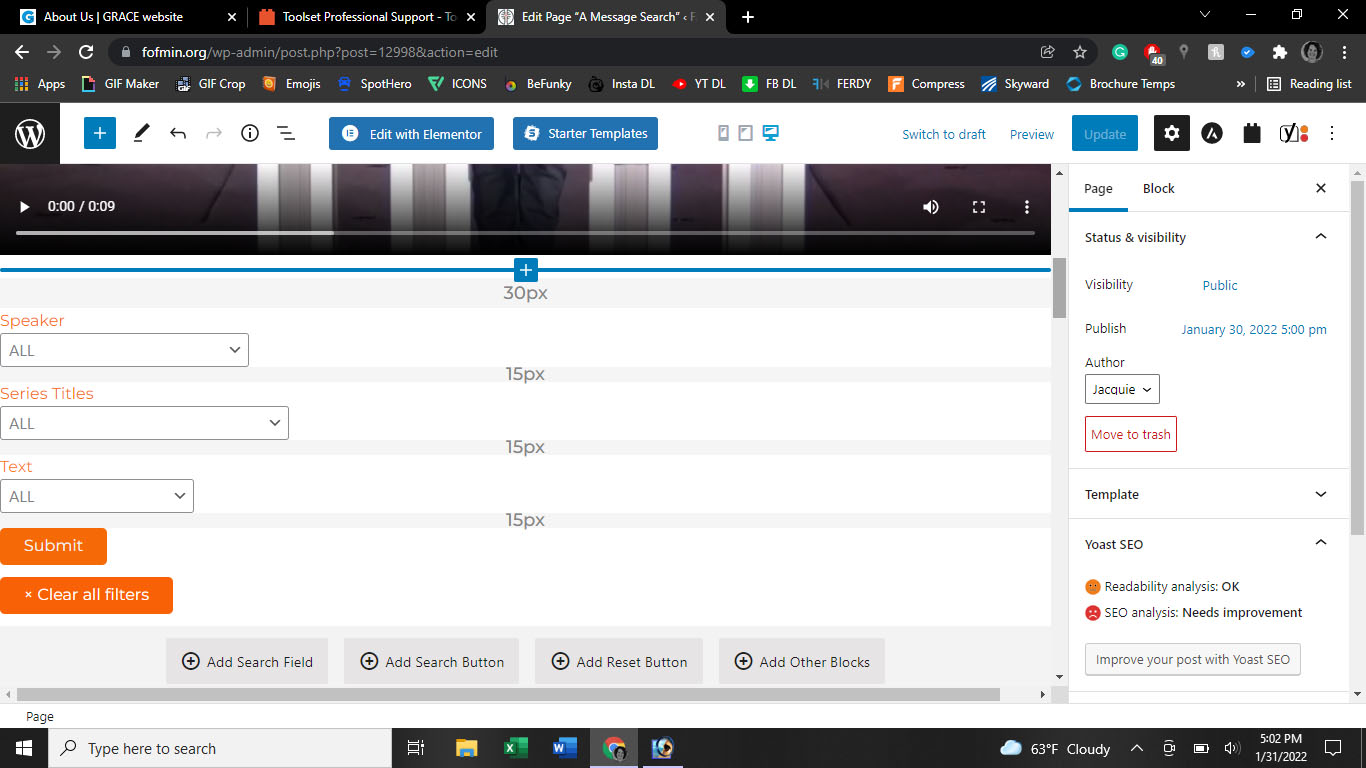
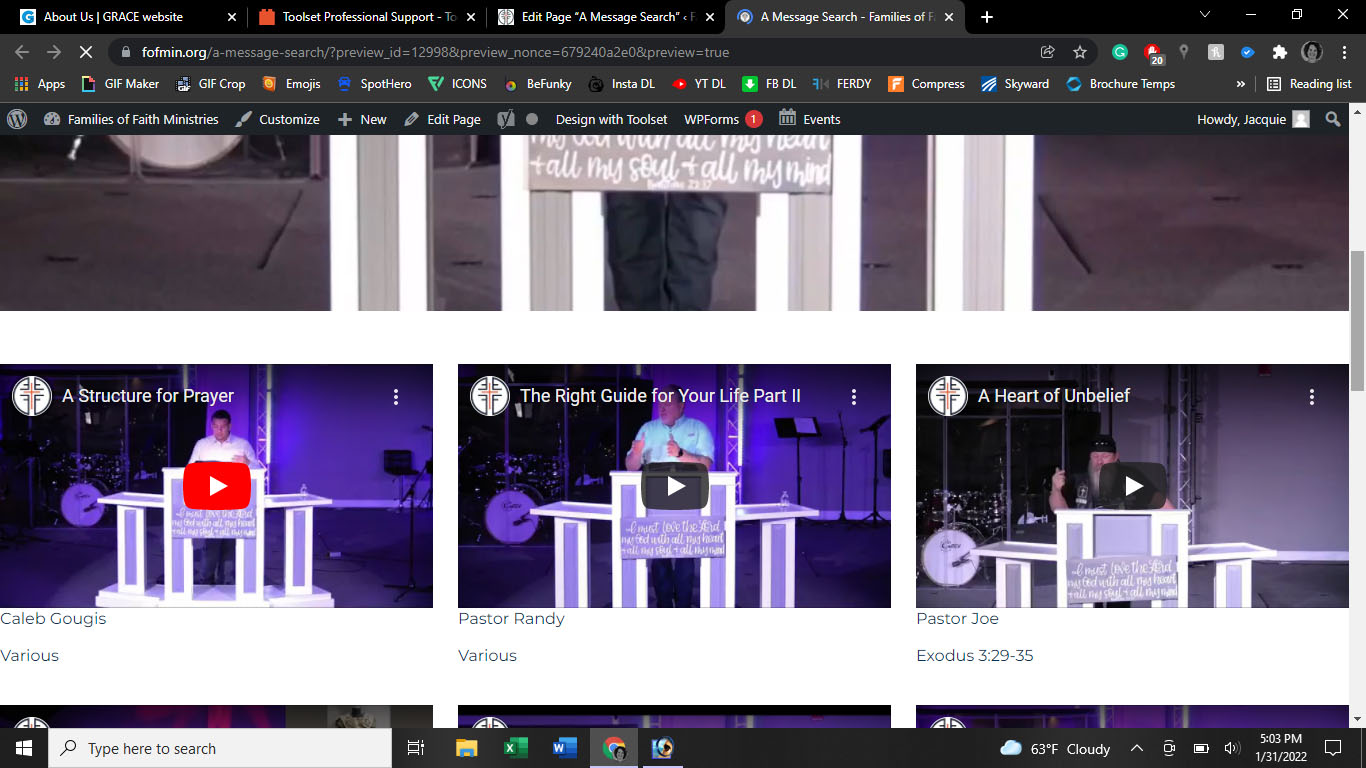
Tell us what you are trying to do? I have a search for church messages and it looks fine on the backside, see pic, when I look at the preview, it only shows the video header and all the messages dynamically linked. No one would be able to search for a speaker or anything else because the dropdowns won't show up.
Is there any documentation that you are following? Toolset tutorials
Is there a similar example that we can see? No
What is the link to your site? hidden link, this page is not live on the site yet




Hi there,
Would you please kindly go to "WordPress Dashboard > Toolset > Settings" and from the bottom of the page click the "Toolset Debug Information and Troubleshooting ." link.
Please paste the data to the Debug information below so that we can have an idea about your setup.
The next step is to check for a possible plugin conflict. Please follow the steps below:
- IMPORTANT STEP! Create a backup of your website.
- Go to "WordPress Dashboard > Plugins" and deactivate all plugins except Toolset and its add-ons.
- Check if you can still recreate the issue.
- If not, re-activate your plugins one by one and check the issue each time to find out the plugin that causes the problem.
And finally, as you mentioned that the front end does not show the dropdowns I'd appreciate it if you test the steps below:
- IMPORTANT STEP! Create a backup of your website.
- Switch to the default theme such as "TwentyTwenty" by going to "WordPress Dashboard > Appearance > themes".
- See if the issue is fixed.
Thanks.
Here is the debug information. I disabled all of the site plugins and the search dropdowns still didn't show, so it's not likely a plugin conflict.
I also activated the 2021 theme and still no dropdowns. I didn't think that was the issue either because I use Toolset on another website using the Astra theme.
Hopefully, you can see something in the debug code that will fix this issue. I've removed the Toolset plugin and re-installed, created a new page, and re-built my search page and neither of those things made a difference either.
Thanks.
Hi there,
Thank you for the information. I checked and the setup seems to be ok.
I'd appreciate it if you could backup your website and give us the login information. The next reply will have the Private checkbox so that you can securely provide the login info.
Please create a new sample page and add one dropdown in the search so that we can check. Get back to us with the name of the page in question.
Thanks.
I sent the person who hosts my website the email from WordPress with the error information. He said that the error is on your end and he wonders if you are up to date on your PHP related changes? Here is the actual error code.
Fatal error: Uncaught ArgumentCountError: array_merge() does not accept unknown named parameters in /sites/fofmin.org/files/wp-content/plugins/toolset-blocks/embedded/inc/classes/wpv-cache.class.php:358 Stack trace: #0 /sites/fofmin.org/files/wp-content/plugins/toolset-blocks/embedded/inc/classes/wpv-cache.class.php(358): array_merge() #1 /sites/fofmin.org/files/wp-content/plugins/toolset-blocks/embedded/inc/classes/wpv-cache.class.php(580): WPV_Cache::generate_post_data_cache() #2 /sites/fofmin.org/files/wp-content/plugins/toolset-blocks/embedded/inc/wpv-filter-query.php(220): WPV_Cache::generate_native_cache() #3 /sites/fofmin.org/files/wp-includes/class-wp-hook.php(307): WPV_View_Post_Query->wpv_filter_extend_query_for_parametric_and_counters() #4 /sites/fofmin.org/files/wp-includes/plugin.php(189): WP_Hook->apply_filters() #5 /sites/fofmin.org/files/wp-content/plugins/toolset-blocks/embedded/inc/wpv-filter-query.php(848): apply_filters() #6 /sites/fofmin.org/files/wp-content/plugins/toolset-blocks/embedded/inc/wpv.class.php(2497): wpv_filter_get_posts() #7 /sites/fofmin.org/files/wp-content/plugins/toolset-blocks/embedded/inc/wpv.class.php(2124): WP_Views->render_view() #8 /sites/fofmin.org/files/wp-content/plugins/toolset-blocks/embedded/inc/wpv.class.php(639): WP_Views->render_view_ex() #9 /sites/fofmin.org/files/wp-includes/shortcodes.php(356): WP_Views->short_tag_wpv_view() #10 [internal function]: do_shortcode_tag() #11 /sites/fofmin.org/files/wp-includes/shortcodes.php(228): preg_replace_callback() #12 /sites/fofmin.org/files/wp-includes/class-wp-hook.php(307): do_shortcode() #13 /sites/fofmin.org/files/wp-includes/plugin.php(189): WP_Hook->apply_filters() #14 /sites/fofmin.org/files/wp-includes/post-template.php(253): apply_filters() #15 /sites/fofmin.org/files/wp-content/themes/astra/template-parts/content-page.php(54): the_content() #16 /sites/fofmin.org/files/wp-includes/template.php(772): require('...') #17 /sites/fofmin.org/files/wp-includes/template.php(716): load_template() #18 /sites/fofmin.org/files/wp-includes/general-template.php(204): locate_template() #19 /sites/fofmin.org/files/wp-content/themes/astra/inc/class-astra-loop.php(109): get_template_part() #20 /sites/fofmin.org/files/wp-includes/class-wp-hook.php(307): Astra_Loop->template_parts_page() #21 /sites/fofmin.org/files/wp-includes/class-wp-hook.php(331): WP_Hook->apply_filters() #22 /sites/fofmin.org/files/wp-includes/plugin.php(474): WP_Hook->do_action() #23 /sites/fofmin.org/files/wp-content/themes/astra/inc/class-astra-loop.php(197): do_action() #24 /sites/fofmin.org/files/wp-content/themes/astra/inc/class-astra-loop.php(174): Astra_Loop->loop_markup() #25 /sites/fofmin.org/files/wp-includes/class-wp-hook.php(307): Astra_Loop->loop_markup_page() #26 /sites/fofmin.org/files/wp-includes/class-wp-hook.php(331): WP_Hook->apply_filters() #27 /sites/fofmin.org/files/wp-includes/plugin.php(474): WP_Hook->do_action() #28 /sites/fofmin.org/files/wp-content/themes/astra/inc/core/theme-hooks.php(267): do_action() #29 /sites/fofmin.org/files/wp-content/themes/astra/page.php(32): astra_content_page_loop() #30 /sites/fofmin.org/files/wp-includes/template-loader.php(106): include('...') #31 /sites/fofmin.org/files/wp-blog-header.php(19): require_once('...') #32 /sites/fofmin.org/files/index.php(17): require('...') #33 {main} thrown in /sites/fofmin.org/files/wp-content/plugins/toolset-blocks/embedded/inc/classes/wpv-cache.class.php on line 358
One thing I just noticed is that my webpage works fine when I add the view in and I can add whatever dynamic info I want to the block. I can also add a Search button. However, when I add a Search Field, I can no longer update the page and the Search Field will not show up in a preview either.
The only thing that shows up in the preview is the View and the Search Button. I also was not allowed to update if I Added Reset Button. Once I deleted the Reset Button and/or the Search Field out, I was able to update the page again.
Hi there,
Thank you for the details. Unfortunately, the login information is not working for me.
I checked the error that you shared and it seems to be related to PHP 8 problem, but the debug information gave me the fact that you use PHP 7.4, so I am not sure, but to be on the safe side, I'd appreciate it if you contact your hosting service provider and ask them to downgrade PHP from version 8 as Toolset does not support PHP 8 at the moment:
https://toolset.com/toolset-requirements/
I'd appreciate it if you answer back and set the next reply as private with the correct login information.
Thanks.
The topic ‘[Closed] Can't get my search drop down menus to show up on live site’ is closed to new replies.


