I am trying to: Click on Program Certificates or View Profile
Link to a page where the issue can be seen:
hidden link
I expected to see:
Program Certificates open - View Profile opens modal window
Instead, I got:
Nothing happen
If you try clicking on either of them before you do a search it works.
Hi there,
The issue that I see is that whatever method that you used to create that collapse feature and the pop up is not coded to handle the Ajax calls.
The way Toolset works are to remove the previous content and add new content of the search result instead of the previous one with Ajax.
The method you used does not handle that method, that is why the Javascript code is not assigned to the newly added items anymore.
You can test my theory by opening up this link:
hidden link
It is a direct link to the search result. Because there is no Ajax loading there, it works with no issues.
You can even test by searching something to cause the issue, then reload the same result page and you will see that it works.
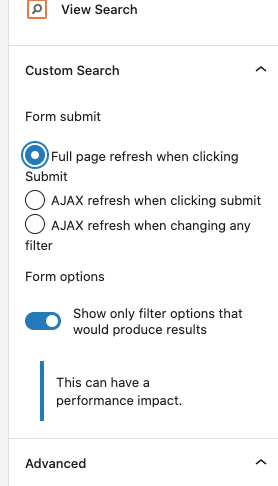
I suggest that you turn off the Ajax search load and let the search results appear by reloading the page.
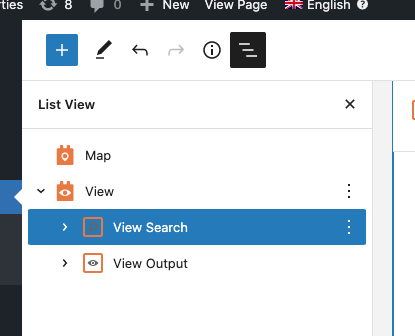
To do that go to the View and select the View Search block and in the sidebar options, select the "Full page refresh when clicking Submit" option. (Kindly check the attached screenshots)
Thanks.