Skip Navigation

[Resolved] Browser History Management isn’t working ?

This thread is resolved. Here is a description of the problem and solution.

Problem:

I am trying to: Disable the browser history management in my CPT Archive in order to make a SEO friendly url.

Link to a page where the issue can be seen: https://photographers-tips.cyme.io/courses/?wpv_view_count=5259

I expected to see: https://photographers-tips.cyme.io/courses/, .../page/1, .../page/2, etc.

Instead, I got: .../page/2/?wpv_post_search&wpv_view_count=5259, etc.

Solution:
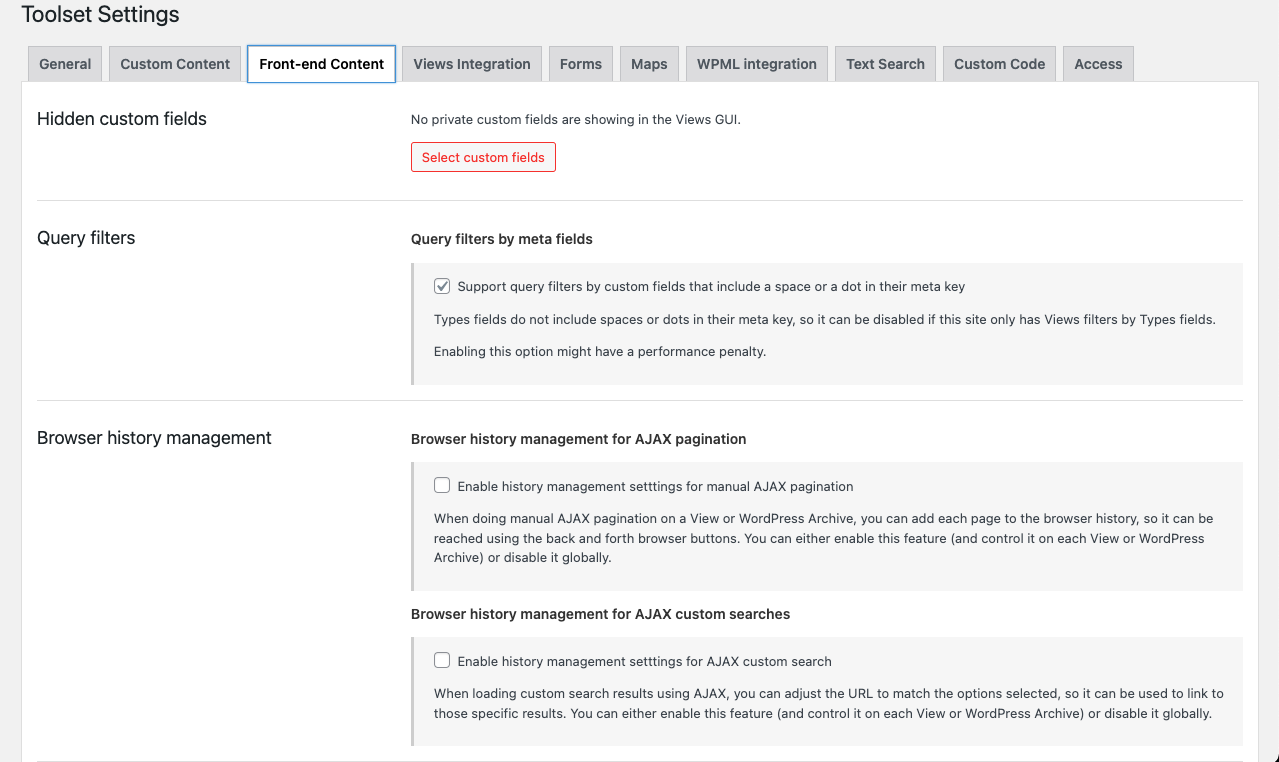
I find a section about Browser History Management in the Toolset settings, in the Font-end Content section.
I disabled all inside, and it's works like a charm !

This support ticket is created 2 years, 9 months ago. There's a good chance that you are reading advice that it now obsolete.

This is the technical support forum for Toolset - a suite of plugins for developing WordPress sites without writing PHP.

Everyone can read this forum, but only Toolset clients can post in it. Toolset support works 6 days per week, 19 hours per day.

Sun Mon Tue Wed Thu Fri Sat
- 9:00 – 12:00 9:00 – 12:00 9:00 – 12:00 9:00 – 12:00 9:00 – 12:00 -
- 13:00 – 18:00 13:00 – 18:00 13:00 – 18:00 13:00 – 18:00 13:00 – 18:00 -

Supporter timezone: America/Sao_Paulo (GMT-03:00)

This topic contains 3 replies, has 2 voices.

Last updated by claudiaZ-2 2 years, 9 months ago.

Assisted by: Mateus Getulio.

Author
Posts
#2616999

I am trying to: Disable the browser history management in my CPT Archive in order to make a SEO friendly url.

Link to a page where the issue can be seen: hidden link

I expected to see: hidden link, .../page/1, .../page/2, etc.

Instead, I got: .../page/2/?wpv_post_search&wpv_view_count=5259, etc.

#2617101

Mateus Getulio
Supporter

Languages: English (English )

Timezone: America/Sao_Paulo (GMT-03:00)

Hello there,

Thanks for your contact!

We're not able to reproduce this issue anymore, have you managed to solve it in the meantime? If you haven't, could you please tell us the exact step-by-step that you're following in order to experience the issue?

Right now if we access hidden link, the Browser history management seems disabled and not producing the URLs you mentioned (if we use the 'next' button). Please let me know if I am missing anything.

Looking forward to your reply. Thank you.

Kind regards,
Mateus.

#2617183
Screenshot 2023-06-20 at 09.12.09.png

You're right, my problem was solved.
I find a section about Browser History Management in the Toolset settings, in the Font-end Content section.
I disabled all inside, and it's works like a charm !

#2617201

My issue is resolved now. Thank you!