This is the technical support forum for Toolset - a suite of plugins for developing WordPress sites without writing PHP.
Everyone can read this forum, but only Toolset clients can post in it. Toolset support works 6 days per week, 19 hours per day.
This topic contains 13 replies, has 3 voices.
Last updated by Christopher Amirian 4 years, 6 months ago.
Assisted by: Christopher Amirian.

Hi,
we created two custom taxonomies for blog posts. This way we can sort our blog posts into different categories.
Now we would like to add these two custom taxonomies and their attributes to the sidebar of the blog. The user can then click on one attribute and gets all blog posts which are tagged with this attribute.
We already tried to add this with a widget to the sidebar, but it doesn't work. How can we add the custom taxonomies to the sidebar of the blog?
Best regards



Hi there,
You will need to use the Views Block to be able to have such a taxonomy functionality. Please follow the steps below:
- Go to "WordPress Dashboard > Appearance > Widgets".
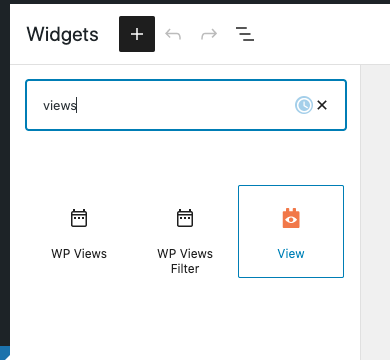
- From the top section click the + button and select the VIEW block.
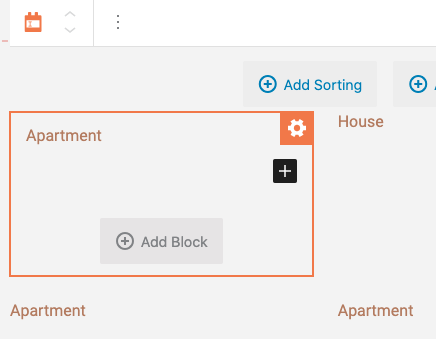
- Select the POST for the source of the content.
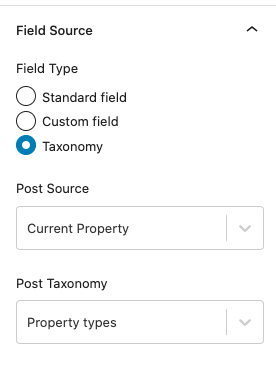
- In the block view use the Single Field block and in theF ield source (sidebar) select the Taxonomy option.
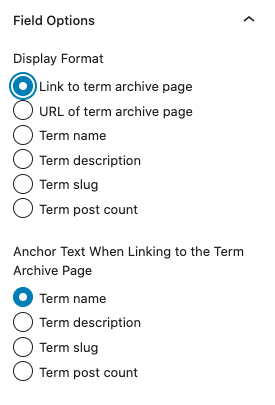
- In the sidebar scroll down and select "Link to term archive page" and "Term Name" options. (check screenshots)
- Now you will have a list that contains the list of the taxonomy terms and they link to a proper archive page.
Thanks.
Hi Christopher,
thank you for your message.
How can I find the "Views Block"? Do I have to install an plugin for that or comes it with Toolset Types?
Also I don't have the exact same design like in your screenshot. We still have the older WordPress widget design, but I think this shouldn't matter here.
Best regards

Christopher Amirian
Ah I see. That matters actually. If you have the old method of adding widgets you will not be able to use the View Block because the old widget system is not block based.
For that you should do the same steps, but by adding a page and use the Gutenberg editor to add the view and do all the steps I mentioned.
After that, you need to do as follows:
Go to Toolset > Settings > General.
Select the " Show both the legacy and Blocks interface and let me choose which to use for each item I build" option under "Editing experience" section.
Reload the browser window
Go to Toolset Views and you will see the name of the View that you have created.
Use the shortcode below in the TEXT WIDGET to add the view:
[wpv-view name="test-1"]
The name should be lowercase and have - when there is a space. So for my case Test 1 is test-1
For more information about the view shortcode:
https://toolset.com/documentation/programmer-reference/views/views-shortcodes/#vf-154377
Thank you.
I created this view which only is for the "Themen" taxonomies. After that I added the shortcode to the widget, but in the blog sidebar it's is still empty.
What am I doing wrong here?
View: hidden link
Widgets: hidden link

Nigel




Languages: English (English ) Spanish (Español )
Timezone: Europe/London (GMT+01:00)
Hi there
Christopher is sick, let me step in here.
Looking at the screenshot of your View, the output section is empty, hence nothing is output by the View in the widget area.
Edit your View and in the Loop Editor use the Loop Wizard to insert the shortcode to output the term name as a link to the taxonomy archive.
When you've done that and saved the View check the output of the widget again.
Hi Nigel,
thank you for the help. I think we moved a step forward and finally some content is displayed in the blog sidebar.
Unfortunately it is the wrong content. Currently the product taxonomies are displayed, but we would like to show the post taxonomies. I think the reason for that is because we use the same terms ("Themen" and "Anlässe") in the products and posts: hidden link
When I edit the view there is only one taxonomy to select. So no difference between product and post taxonomies: hidden link
How can I show the post taxonomies in the sidebar?
Best regards
Nigel
From your screenshots it looks like there really is only one Anlässe taxonomy and one Themen taxonomy, it's just that the taxonomies are available to both the product post type as well as posts.
So your View looks like it would just output links to the archives for these taxonomy terms. There isn't a different URL for terms that have been assigned to some posts vs a term that has been assigned to some products.
Maybe I have misunderstood, but that's how it looks from your screenshots.
I think it would help to have access to your site to check exactly what you've done if that's okay.
Let me mark your next reply as private so that we can get log-in credentials from you—you may want to create a temporary admin user for us to use that you can later delete. And be sure to have a current backup of your site.
Any particular page we can see that widget on?
Hi,
thank you for your feedback and the detailed explanation. I made the adjustments, but unfortunately I didn't find a solution. If I change the basis of one taxonomy (Posts), then it also changes in the other taxonomy (Products). Only then did I see that they are the same taxonomies: hidden link
So would the solution now be to remove the tick and create a completely new taxonomy with a different name? Do you know if there might be problems with the assignment if I uncheck the posts?
Best regards
Christopher Amirian
Hi there,
Again, your assumption is correct and as you used the same taxonomy for both custom post types, the result that you get in the widget is expected.
And yet again, your assumption is correct about the solution which is to make sure that the taxonomy in question is working only for one custom post type, and add another one for the other custom post type and populate it with the terms and assign them to proper posts.
Thank you.
Hi,
thank you for your feedback. So far I understand what the next steps are, but I hesitate a bit because I'm worried that I'll delete important links (e.g. posts -> custom taxnomy).
If I assign the taxonomy to only one custom post type, what will happen to the other content? For example if I uncheck the "Themen" taxonomy from the custom post type, it will only be assigned to the products.
Does the current assignment between the posts and the "Themen" taxonomy get lost? So that I need to assign them back manually to the new taxonomy?
Best regards
Christopher Amirian
Hi there,
Again your assumption is correct as you would deactivate the taxonomy for the custom post type and add a new taxonomy. The new taxonomy with the new terms are not assigned to the individual posts yet and you need to do it manually yes.
That is an expected result because you will use a new taxonomy that was not there before.
So basically all the steps that you see are expected:
- You currently have assigned one taxonomy to more than one post, that is why the links in the widget show from both posts.
- If you do not want that you need to remove the taxonomy from one of the posts.
- That will fix the links from different post types issue.
- But naturally now you will not have the taxonomy for the post that you removed it from.
- For that, you need to do it from scratch, create a taxonomy, populate the taxonomy terms, and assign those terms to the post manually.
Thanks.
Hi,
again thank you for the feedback and confirming my assumptions.
Since we have over 1,000 blog posts it would be a lot of work to manual assign them to the newly created taxonomies.
Is there a solution to make this via an import? For example with WP All Import or any other tool. Do you have any experience with this kind of solution or what would you recommend in this case?
Best regards
Christopher Amirian
Hi there,
This is outside of our expertise as we can comment about Toolset and not beyond.
I suggest that you contact WP All Import suopport and ask about that.
Just to make sure I give you context, the new taxonomy that you create or the old one created, which was done by Toolset, is stored in database like any other taxonomy in WordPress.
So no matter you added the taxonomy with Toolset or not you can consider it a native taxonomy, and whatever you can do with this taxonomy can be done with any other WordPress Taxonomy.
That will help you when communicating with the WP All Import support so you will consider a native taxonomy.
Thank you.


