Passer la navigation

[Résolu] The “Fields and Text” block displays a blank area

This support ticket is created Il y a 3 weeks, 2 days. There's a good chance that you are reading advice that it now obsolete.

This is the technical support forum for Toolset - a suite of plugins for developing WordPress sites without writing PHP.

Everyone can read this forum, but only Toolset clients can post in it. Toolset support works 6 days per week, 19 hours per day.

Sun Mon Tue Wed Thu Fri Sat
- 10:00 – 13:00 10:00 – 13:00 10:00 – 13:00 10:00 – 13:00 10:00 – 13:00 -
- 14:00 – 18:00 14:00 – 18:00 14:00 – 18:00 14:00 – 18:00 14:00 – 18:00 -

Fuseau horaire du supporter : Asia/Kolkata (GMT+05:30)

Ce sujet contient 4 réponses, a 1 voix.

Dernière mise à jour par dominiqueM-3 Il y a 4 days, 5 hours.

Assisté par: Minesh.

Auteur
Publications
#2866942
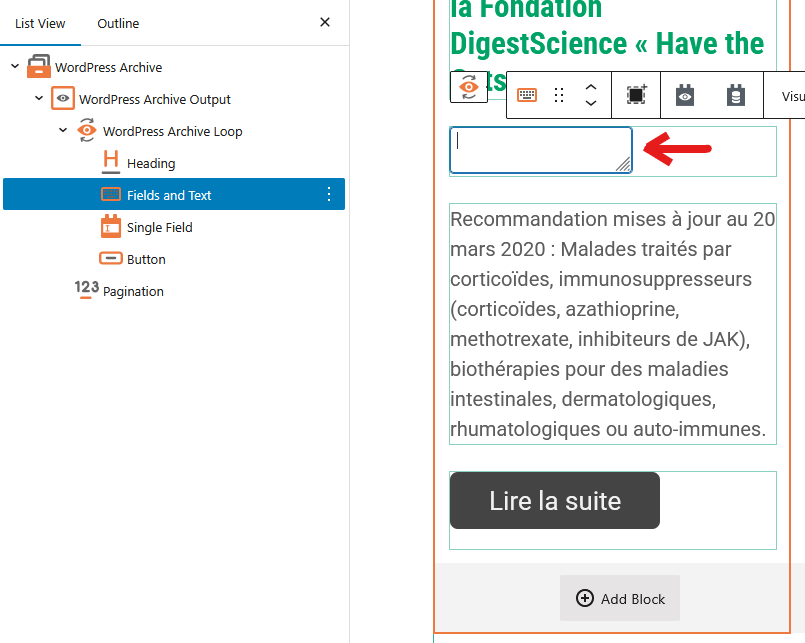
Capture d'écran 2026-06-30 112047.png
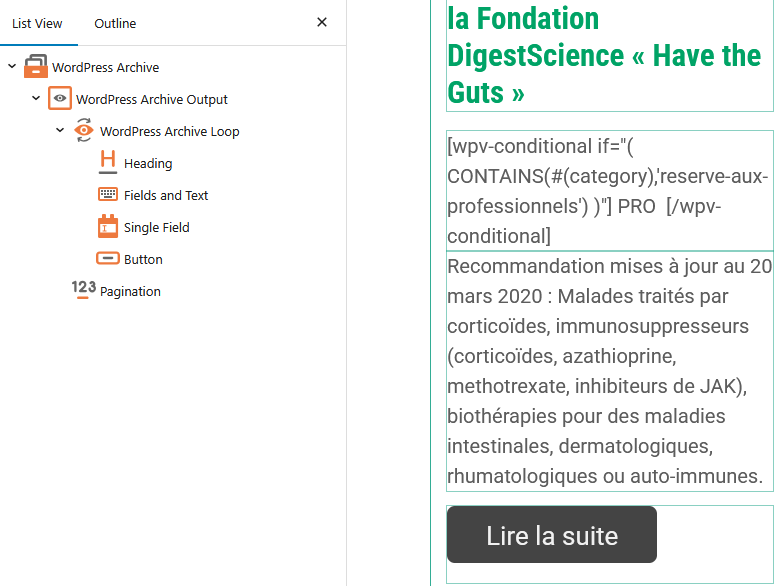
Capture d'écran 2026-06-30 112121.png

Hello,

Ever since I updated Toolset Block to version 1.6.24, the “Fields and Text” block displays a blank area when I select it to edit its content.
The content appears when the block is not selected.

Also, WordPress isn’t offering me the update to version 1.7, which I believe was released several days ago.

Thank you

#2866958

Minesh
Supporter

Les langues: Anglais (English )

Fuseau horaire: Asia/Kolkata (GMT+05:30)

Hello. Thank you for contacting the Toolset support.

Yes - I can see the issue which you reported for the "Fields and Text" block and I've raise that in front of our Devs. It will be a quick fix, please hold on for futher update.

I'll get in touch with you as soon as I have update on it.

On June 18th, we have a major release with many Toolset plugins:
- https://toolset.com/2026/06/toolset-1-7-complete-support-for-full-site-editing-with-blocks-and-views/

And if you go to your account's Downloads page and click on "Download Toolset manually", it will show you latest plugins version to download.

However - if you click on the "Changelog & Previous versions" link available with every plugin, for instance, Toolset Blocks, you will notice version is publish on what date and it's associated change log information:
- https://toolset.com/download/toolset-blocks/#changelog

On download's page you can see the latest plugin version, you need to make sure you are using that. Toolset 1.7 is the version of the release - that includes all Toolset plugins(they have their own versions).

#2867036

Hello Minesh,

Thank you for following up.
I'll be waiting for the next update.

Best regards

#2868348

Minesh
Supporter

Les langues: Anglais (English )

Fuseau horaire: Asia/Kolkata (GMT+05:30)

I've good news for you that we just publish hotfix release for Toolset Blocks/Views and Maps plugin that contains the fix for your issue.

You can download the latest Toolset plugins from your account's Downloads page and update ALL Toolset plugins to it's latest official release version.

Toolset Blocks:
- https://toolset.com/download/toolset-blocks/#changelog

Toolset Maps:
- https://toolset.com/download/toolset-maps/#changelog

#2869227

Hello MInesh,

I confirm that the last release solves the problem.

Best regards