Passer la navigation

[Résolu] Sorting a View by a field managed as a number is not working

Ce fil est résolu. Voici une description du problème et la solution proposée.

Problem:

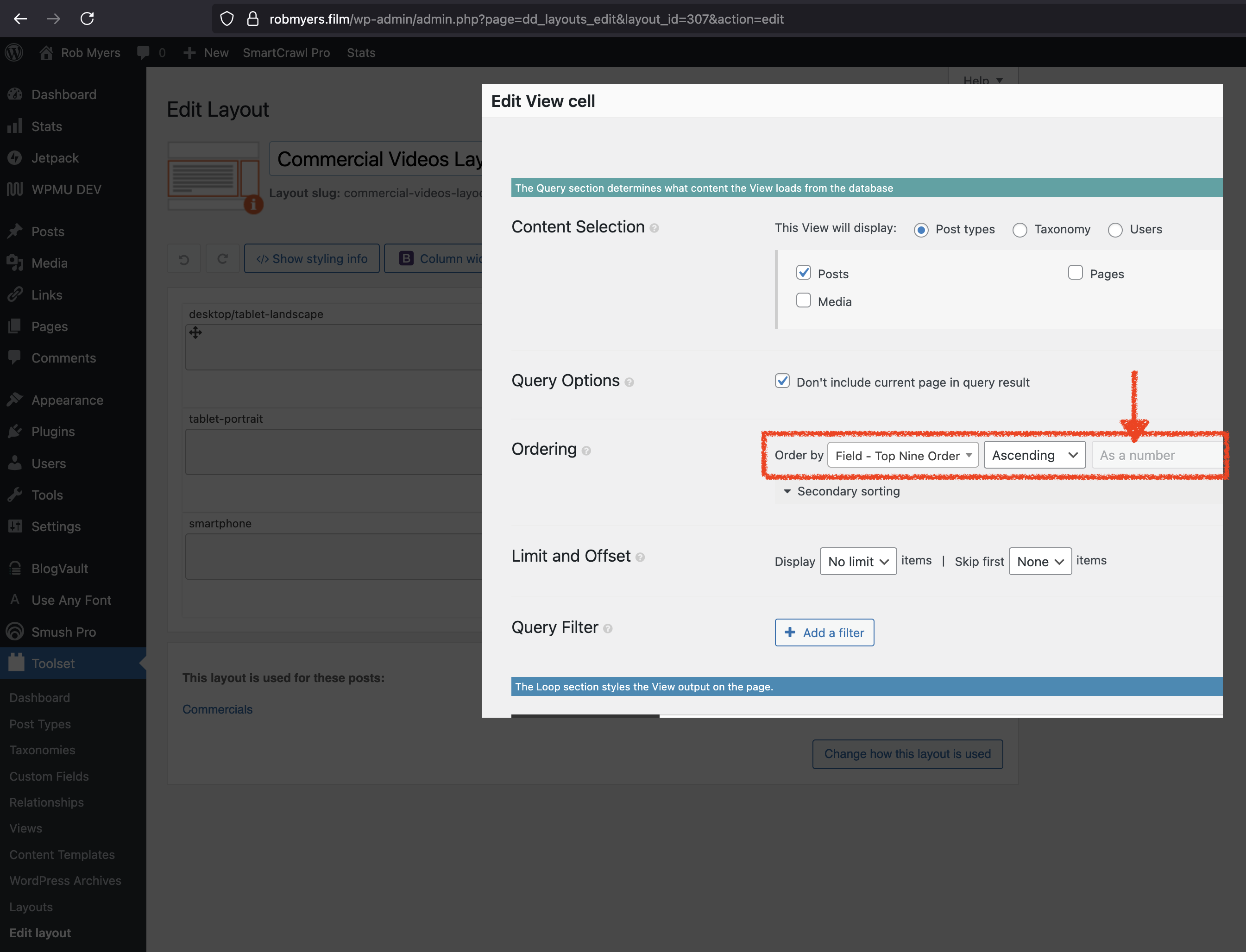
On a legacy Toolset site using Layouts + Views, several Views were ordered by a custom number field. Recently, posts stopped displaying in the expected numeric order. In the View editor, the “As a number” ordering option appeared greyed out. Disabling all non-Toolset plugins did not resolve the issue, indicating a Toolset-side regression or incompatibility.

Solution:

The numeric ordering was enforced programmatically using the wpv_filter_query hook. A custom PHP snippet was added via Toolset → Settings → Custom Code to explicitly set meta_key and meta_value_num ordering.
Because multiple Views were affected, the code was adapted to apply to a list of specific View IDs, restoring correct numeric sorting across all impacted Views.

Relevant Documentation:

https://toolset.com/documentation/programmer-reference/adding-custom-code/using-toolset-to-add-custom-code/

https://toolset.com/forums/topic/order-view-by-post-title-then-by-custom-toolset-field/

https://toolset.com/forums/topic/sorting-is-not-working-properly/

This support ticket is created Il y a 2 weeks, 1 day. There's a good chance that you are reading advice that it now obsolete.

This is the technical support forum for Toolset - a suite of plugins for developing WordPress sites without writing PHP.

Everyone can read this forum, but only Toolset clients can post in it. Toolset support works 6 days per week, 19 hours per day.

Ce sujet contient 1 reply, a 1 voix.

Dernière mise à jour par Anthony Il y a 1 week, 1 day.

Assisté par: Christopher Amirian.

Auteur
Publications
#2839590
RobMyers.film-View-ordering-by-number-broken.251211.png

This is a legacy Toolset site using Layouts, with Views ordered by a custom number field. Recently I was asked to add additional posts and noticed that posts were no longer displaying in the order specified in that custom field. You can see in the attached screenshot that when editing the View, the Ordering part of the Query section where previously "As a number" was selected is now greyed out, leading me to believe that the underlying code for the View 'has issues'...
I tested the site with all plugins except Toolset's disabled and the problem persists.

#2839867

Christopher Amirian
Supporter

Les langues: Anglais (English )

Hi,

Welcome to Toolset. Please follow the troubleshooting steps below to see what might be the problem cause:

1) Confirm the field is actually numeric

- Go to Toolset → Custom Fields and open the field used for ordering.
- Confirm it’s a Number field (not text).
- Edit a few affected posts and make sure the value is digits only (no commas/symbols/spaces). Text values will break numeric sorting.

For more information:
https://toolset.com/forums/topic/sorting-is-not-working-properly/

2) Force numeric sorting via wpv_filter_query

You can force the numeric sort via code:

- Go to Toolset → Settings → Custom Code and add a new PHP snippet.

For more information:
https://toolset.com/documentation/programmer-reference/adding-custom-code/using-toolset-to-add-custom-code

add_filter( 'wpv_filter_query', function( $query_args, $view_settings, $view_id ) {

    if ( (int) $view_id !== 1234 ) {
        return $query_args;
    }

    $query_args['meta_key'] = 'wpcf-your-number-field';
    $query_args['orderby']  = array( 'meta_value_num' => 'ASC' );

    return $query_args;

}, 999, 3 );

1234 = your View ID

wpcf-your-number-field = your field meta key (Toolset fields typically start with wpcf-)

For more information:
https://toolset.com/forums/topic/order-view-by-post-title-then-by-custom-toolset-field/

Thanks.

#2840456

Thank you for your response.

1) I had already taken the steps you mention, plus other trouble-shooting, but thanks for the due diligence.

2) Thank you even more for providing the work-around code. Because I have 12 views that are affected by the ordering problem, I adjusted your code a little bit to allow for an list of View ids:

add_filter( 'wpv_filter_query', function( $query_args, $view_settings, $view_id ) {

// List of View IDs this should apply to
$allowed_view_ids = array( n1, n2, n3, ... );

if ( ! in_array( (int) $view_id, $allowed_view_ids, true ) ) {
return $query_args;
}

$query_args['meta_key'] = 'wpcf-custom-ordering-field';
$query_args['orderby'] = array( 'meta_value_num' => 'ASC' );

return $query_args;

}, 999, 3 );