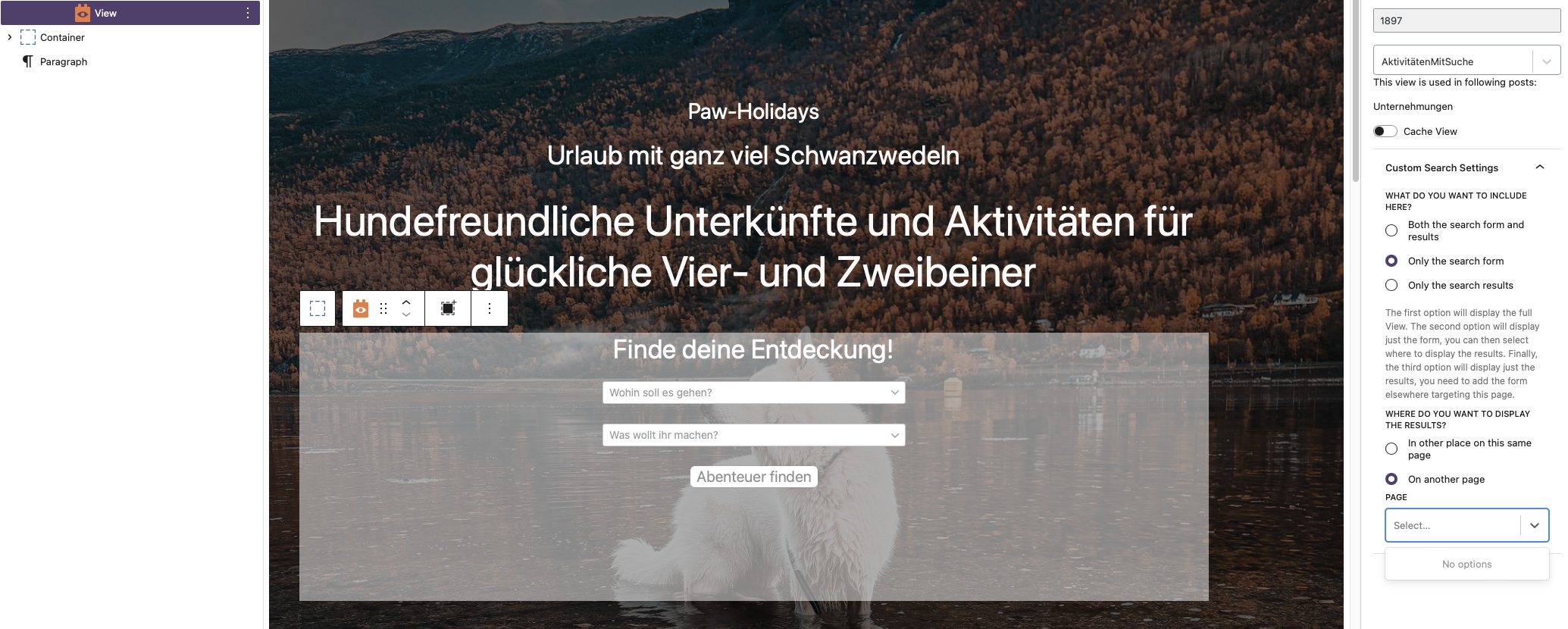
I’m trying to display my custom post search results on a separate page. However, in the Block Editor, I’m missing the option to select that page. I followed the instructions from this guide and took into account all the tips mentioned in this thread. I made sure both pages are publicly accessible, enabled Full Page Loading, and ensured I’m using the same View on the search page and the search results page. I also used a transients plugin and a caching plugin to clear the cache and other data.
As soon as I select “Another page” in the sidebar but don’t specify an option (since no page is available), the search doesn’t even show up on the frontend. (See screenshots).
Hello. Thank you for contacting the Toolset support.
What if you try to input some text in the search box and do you see any options? if no:
Can you please share problem URL on what page you are trying to add search and admin access details.
*** Please make a FULL BACKUP of your database and website.***
I would also eventually need to request temporary access (WP-Admin and FTP) to your site. Preferably to a test site where the problem has been replicated if possible in order to be of better help and check if some configurations might need to be changed.
I have set the next reply to private which means only you and I have access to it.
Oh man ... my problem was so stupid... only because there stands "No Options" I thought there is no possibility to add a page. But by entering some letters my Search Results Page was the an everything worked well...
Thank you for your Support!