Passer la navigation

[Résolu] I can’t update the plugin from my WordPress

This support ticket is created Il y a 1 year, 3 months. There's a good chance that you are reading advice that it now obsolete.

This is the technical support forum for Toolset - a suite of plugins for developing WordPress sites without writing PHP.

Everyone can read this forum, but only Toolset clients can post in it. Toolset support works 6 days per week, 19 hours per day.

Sun Mon Tue Wed Thu Fri Sat
- 10:00 – 13:00 10:00 – 13:00 10:00 – 13:00 10:00 – 13:00 10:00 – 13:00 -
- 14:00 – 18:00 14:00 – 18:00 14:00 – 18:00 14:00 – 18:00 14:00 – 18:00 -

Fuseau horaire du supporter : Asia/Kolkata (GMT+05:30)

Ce sujet contient 1 reply, a 1 voix.

Dernière mise à jour par Minesh Il y a 1 year, 3 months.

Assisté par: Minesh.

Auteur
Publications
#2801724
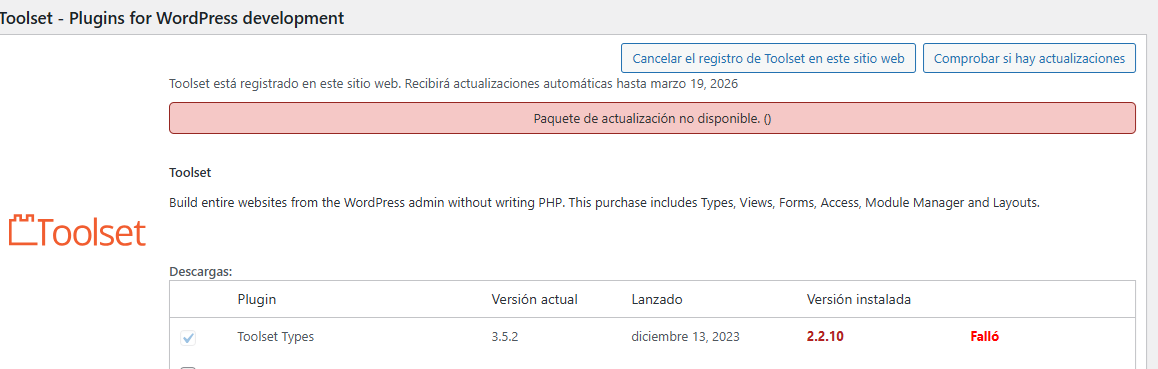
tootlset.png

I can't update the plugin from my WordPress site, neither from the plugin itself nor from the central plugin page.

#2801941

Minesh
Supporter

Les langues: Anglais (English )

Fuseau horaire: Asia/Kolkata (GMT+05:30)

Hello. Thank you for contacting the Toolset support.

I see that you are using really outdated Toolset Types plugin version.

We publish the Types 3.0 with the new many to many relationships and we have added the number of new features to this major release and that is before almost four years a go.

Please check the following blog:
=> https://toolset.com/2018/05/toolset-post-relationships-release/
=> https://toolset.com/2018/05/when-if-to-migrate-relationships-in-old-toolset-sites/

Before you update the Toolset plugins to latest official release version:
*** Please make a FULL BACKUP of your database and website.***

For now, please try to update the Toolset Types plugin manually from plugins page and then you can add/update addon Toolset plugins:
- Deactivate and Delete all Toolset plugins from plugins page
- Download Toolset Types plugin from your accounts page: https://toolset.com/account/downloads/
=> https://toolset.com/faq/how-to-install-and-register-toolset/#installing-the-toolset-types-plugin
- Upload and activate first Types plugin and then you are free to install and activate all other Toolset plugins using the installer:
- https://toolset.com/faq/how-to-install-and-register-toolset/#automatic-installation-once-you-have-types-plugin-installed