Passer la navigation

[Résolu] How to add "noindex" tag on view in toolset

This support ticket is created Il y a 1 year, 8 months. There's a good chance that you are reading advice that it now obsolete.

This is the technical support forum for Toolset - a suite of plugins for developing WordPress sites without writing PHP.

Everyone can read this forum, but only Toolset clients can post in it. Toolset support works 6 days per week, 19 hours per day.

Sun Mon Tue Wed Thu Fri Sat
- 10:00 – 13:00 10:00 – 13:00 10:00 – 13:00 10:00 – 13:00 10:00 – 13:00 -
- 14:00 – 18:00 14:00 – 18:00 14:00 – 18:00 14:00 – 18:00 14:00 – 18:00 -

Fuseau horaire du supporter : Asia/Kolkata (GMT+05:30)

Ce sujet contient 1 reply, a 2 voix.

Dernière mise à jour par Minesh Il y a 1 year, 8 months.

Assisté par: Minesh.

Auteur
Publications
#2773938
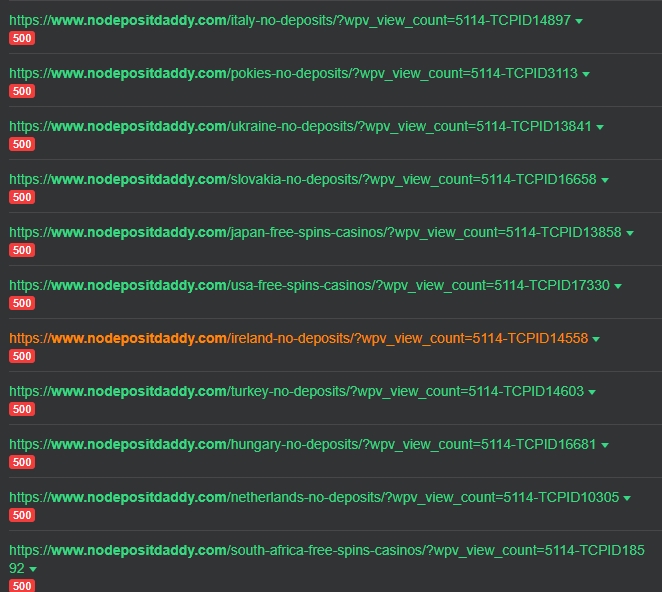
ahrefs-report.jpg

Hi, I want to ask how can I set "noindex" tag on views, but only for views not for whole page. Seems that there is not such an option in toolset settings. I uploaded image from ahrefs report. Thanks

#2774216

Minesh
Supporter

Les langues: Anglais (English )

Fuseau horaire: Asia/Kolkata (GMT+05:30)

Hello. Thank you for contacting the Toolset support.

You can add a nofollow/noindex meta tag to a page to instruct search engines not to index any of the links on that page, or you can add the rel="nofollow" attribute to an individual link to instruct search engines to not index the linked page.

However - there is no way to add noindex tag to views.

You may use the Robots.txt File:
- Use the robots.txt file to block search engines from crawling specific URLs or directories.

Following related ticket(s) may help you:
- https://toolset.com/forums/topic/personal-data-find-from-google-search/#post-2655983
- https://toolset.com/forums/topic/add-nofollow-to-custom-post-types-used-in-a-mulit-relationship/