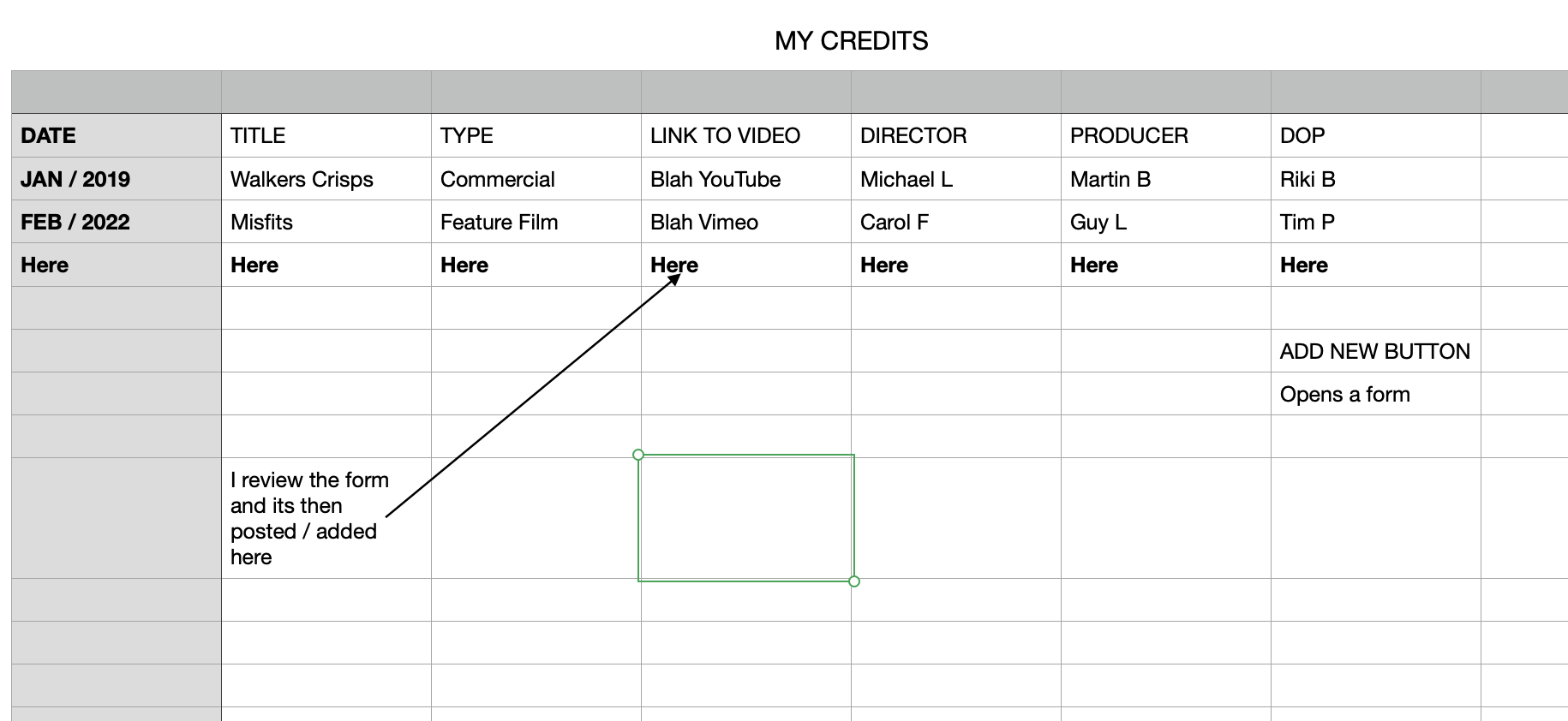
Tell us what you are trying to do?
I want to build a table where the rows are repeatable. some are std text fields, some are drop down options.
A button would allow a member to fill a form, then once reviewed I would post it to the table.
Is there any documentation that you are following?
Field groups, views, loops,
I haven't learnt short code yet. So it needs to be out of the box toolset.
Can you point me in the right direction.
versteckter Link
Hi,
Thank you for contacting us and I'd be happy to assist.
For the table layout that you're planning to achieve, you'll need to create a post using the classic/legacy view, that uses HTML and shortcodes.
The setup of the view will be quite simple and you'll create a new view and set it to show the post type that should be used to create this table.
In the view's "Loop Editor", you'll select "Table" as the loop style and the HTML structure in that section will look like this:
[wpv-layout-start]
	[wpv-items-found]
	<!-- wpv-loop-start -->
	<table width="100%">
		<thead>
			<tr>
				<th>DATE</th>
				<th>TITLE</th>
				<th>TYPE</th>
				<th>LINK TO VIDEO</th>
				<th>DIRECTOR</th>
				<th>PRODUCER</th>
				<th>DOP</th>
			<tr>
		</thead>
		<tbody class="wpv-loop js-wpv-loop">
		<wpv-loop>
			<tr>
				<th>Shortcode for DATE</th>
				<td>Shortcode for TITLE</td>
				<td>Shortcode for TYPE</td>
				<td>Shortcode for LINK TO VIDEO</td>
				<td>Shortcode for DIRECTOR</td>
				<td>Shortcode for PRODUCER</td>
				<td>Shortcode for DOP</td>
			<tr>
		</wpv-loop>
		</tbody>
	</table>
	<!-- wpv-loop-end -->
	[/wpv-items-found]
	[wpv-no-items-found]
		<strong>[wpml-string context="wpv-views"]No items found[/wpml-string]</strong>
	[/wpv-no-items-found]
[wpv-layout-end]
Note: You'll replace the text 'Shortcode for DATE', 'Shortcode for TITLE', 'Shortcode for TYPE, 'Shortcode for LINK TO VIDEO', 'Shortcode for DIRECTOR', 'Shortcode for PRODUCER', and 'Shortcode for DOP' with the actual shortcodes for the items that you'd like to show in these respective columns.
Here are some guides on using the Toolset shortcodes:
https://toolset.com/documentation/programmer-reference/views/views-shortcodes/
https://toolset.com/documentation/customizing-sites-using-php/functions/
You'll find some useful guides on the topic of using the classic/legacy views at:
https://toolset.com/documentation/legacy-features/views-plugin/
I hope this helps and please let me know if you need any further assistance around this.
regards,
Waqar
My issue is resolved now. Thank you!