Passer la navigation

[Résolu] Weird diamond shapes/grid on top of google maps

This support ticket is created Il y a 1 year, 4 months. There's a good chance that you are reading advice that it now obsolete.

This is the technical support forum for Toolset - a suite of plugins for developing WordPress sites without writing PHP.

Everyone can read this forum, but only Toolset clients can post in it. Toolset support works 6 days per week, 19 hours per day.

Sun Mon Tue Wed Thu Fri Sat
- 10:00 – 13:00 10:00 – 13:00 10:00 – 13:00 10:00 – 13:00 10:00 – 13:00 -
- 14:00 – 18:00 14:00 – 18:00 14:00 – 18:00 14:00 – 18:00 14:00 – 18:00 -

Fuseau horaire du supporter : Asia/Kolkata (GMT+05:30)

Ce sujet contient 1 reply, a 1 voix.

Dernière mise à jour par SD Il y a 1 year, 4 months.

Assisté par: Minesh.

Auteur
Publications
#2796786

SD
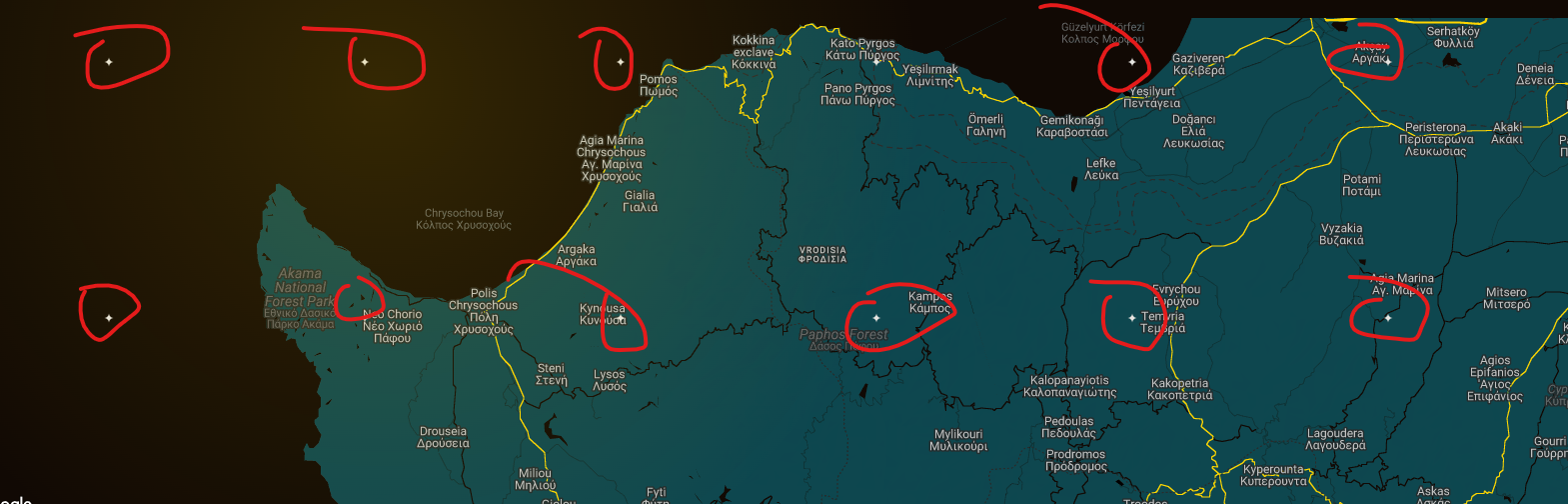
toolset-map-issue.png

Why i get this weird diamond looking grid , on top of my google maps ?

Link to a page where the issue can be seen: removed.

#2796852

Minesh
Supporter

Les langues: Anglais (English )

Fuseau horaire: Asia/Kolkata (GMT+05:30)

Hello. Thank you for contacting the Toolset support.

I suspect there must be conflict with the theme or plugin CSS you are using.

Could you please try to resolve your issue by deactivating all third-party plugins as well as the default theme to check for any possible conflicts with any of the plugins or themes?
- Do you see any difference?

#2796873

SD

Hello Minesh,

I just found the issue—it was caused by Automatic.css (lien caché). The framework was automatically adding a border-radius, which was responsible for the problem.

I was able to fix it with the following CSS:

%root% * {
border-radius: 0;
}

P.S. Can you please remove any that has removed.

Thanks