Passer la navigation

[Résolu] View contains extraneous characters on front-end

This support ticket is created Il y a 1 year, 11 months. There's a good chance that you are reading advice that it now obsolete.

This is the technical support forum for Toolset - a suite of plugins for developing WordPress sites without writing PHP.

Everyone can read this forum, but only Toolset clients can post in it. Toolset support works 6 days per week, 19 hours per day.

Sun Mon Tue Wed Thu Fri Sat
- 10:00 – 13:00 10:00 – 13:00 10:00 – 13:00 10:00 – 13:00 10:00 – 13:00 -
- 14:00 – 18:00 14:00 – 18:00 14:00 – 18:00 14:00 – 18:00 14:00 – 18:00 -

Fuseau horaire du supporter : Asia/Kolkata (GMT+05:30)

Ce sujet contient 3 réponses, a 2 voix.

Dernière mise à jour par Minesh Il y a 1 year, 11 months.

Assisté par: Minesh.

Auteur
Publications
#2704156
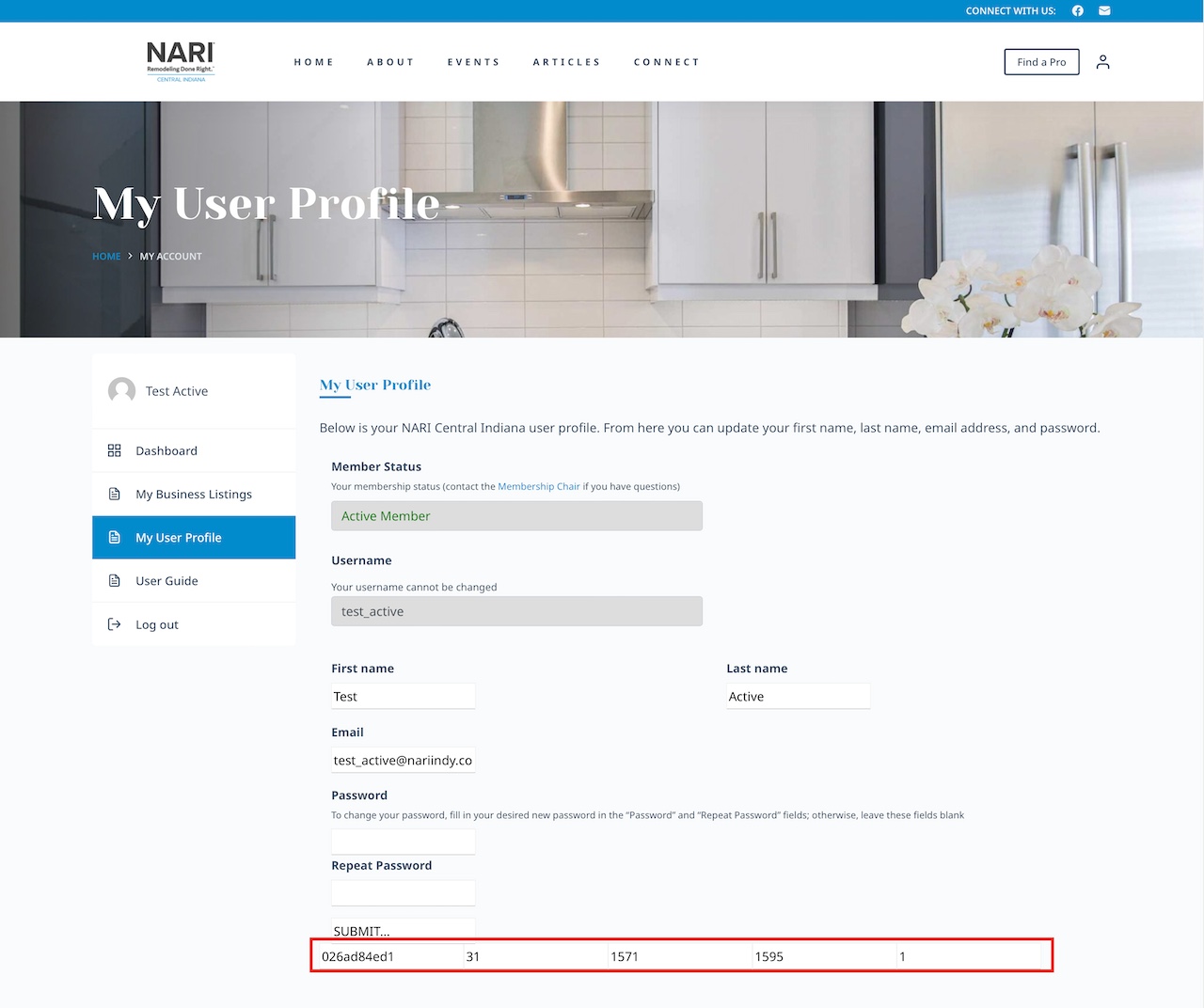
nari_user_profile.jpg

This is a follow-up to https://toolset.com/forums/topic/working-view-somehow-now-broken/.

Another view also contains extraneous characters similar to those in the view I first reported. This view is implemented on the lien caché page of the site. Please see attached screenshot.

Additionally, the lien caché page no longer displays the "Add New Business..." button for active members to add a business. I believe I had sent the credentials for a user account with the "Active Member" role assigned to it necessary to troubleshoot this issue with the previous support ticket I linked above. If not, I can easily resend.

Thanks for the help!

#2704278

Minesh
Supporter

Les langues: Anglais (English )

Fuseau horaire: Asia/Kolkata (GMT+05:30)

Hello. Thank you for contacting the Toolset support.

There must be something that conflicts and hidden inputs at it strip out type input "type" attribute from those inputs.

To fix the issue, I've added the following custom CSS to the following user form's "CSS editor":
=> lien caché

.cred-user-form  input[name='_cred_cred_wpnonce_cred_user_form_1595_1'], input[name=_cred_cred_prefix_post_id], input[name=_cred_cred_prefix_cred_container_id], input[name=_cred_cred_prefix_form_id], input[name=_cred_cred_prefix_form_count]  {
display: none !important; 
}

I've added the following code to "JS editor" of the above form:

jQuery(document).ready(function($){
  
  $(".cred-user-form  input[name='form_submit_1']").attr('type','submit');

});

Regarding:

Additionally, the lien caché page no longer displays the "Add New Business..." button for active members to add a business. I believe I had sent the credentials for a user account with the "Active Member" role assigned to it necessary to troubleshoot this issue with the previous support ticket I linked above. If not, I can easily resend.
===>
I can see the "Add New Business..." button as you can see with the following screenshot.
- lien caché

#2704414

This used to all work without issue or custom programming like you've done. I'll try to do some more troubleshooting on a copy of this website to see if I can figure out what is causing the problems...

Thanks for the help...

#2704652

Minesh
Supporter

Les langues: Anglais (English )

Fuseau horaire: Asia/Kolkata (GMT+05:30)

Great - thanks.








