Passer la navigation

[En attente du retour de l'utilisateur] Use address typed by user to center a maps

This support ticket is created Il y a 1 week, 1 day. There's a good chance that you are reading advice that it now obsolete.

This is the technical support forum for Toolset - a suite of plugins for developing WordPress sites without writing PHP.

Everyone can read this forum, but only Toolset clients can post in it. Toolset support works 6 days per week, 19 hours per day.

Ce sujet contient 3 réponses, a 1 voix.

Dernière mise à jour par Christopher Amirian Il y a 3 days, 18 hours.

Assisté par: Christopher Amirian.

Auteur
Publications
#2870263

Hi all,
In a legacy view Toolset offers the option "Show posts within 50km radius of the viewing user's location.". Is it possible to do the same but instead of using the user's location use any address typed by the user in a text field instead ? for example, if I live in NY and type an LA address to see the LA map with its markers within 50km ? I tried creating an address-temp filter that was supposed to create an URL parameter, but it didn't work. Any clue ? thanks
Regards
Nicola

#2870456

Christopher Amirian
Supporter

Les langues: Anglais (English )

Hi,

Welcome to Toolset support. This is exactly what the Distance filter in Toolset Maps does, and it's a different thing from the "within 50 km of the viewing user's location" option you found. Using the user's own location is just one of its options; by default, the visitor types the address themselves.

The filter adds front-end controls where the visitor enters a location and a radius, and the View then shows only markers within that radius of the address they typed. So a visitor in NY can type an LA address and get the LA results.

To set it up in your legacy View:

1. Edit the View and scroll to the Filter Editor section.
2. Click New filter and choose Distance (it's listed at the start of the filter list, under Toolset Maps).
3. In the dialog, set the Comparison field — this is the custom field the filter uses to get each marker's location, and it must be an Address type field, so the posts you're listing need an Address field.
4. Set your default radius and the control labels. Choose Inside of radius.
5. Leave the "distance center is set from user location" option off, since you want the visitor to type an address instead.
6. If you're combining the Distance filter with other filters in the same search, set Should distance center input be required to No.

Note that the "set from user location" option requires HTTPS, but the typed-address route does not.

This also explains why your `address-temp` filter approach didn't work — you don't need to build a custom text field and URL parameter, as the Distance filter generates its own address input and handles the geocoding.

For more information:
https://toolset.com/course-lesson/filtering-and-ordering-map-markers-by-distance/

Thanks.

#2870956
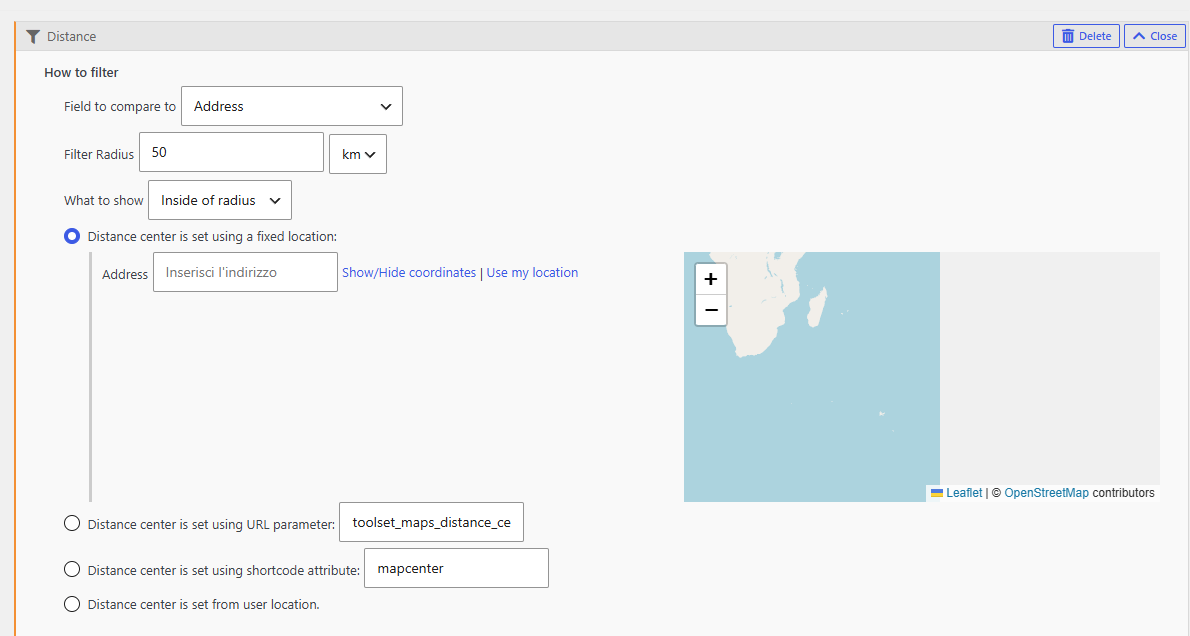
Screenshot 2026-07-29 142107.png

Hello Christopher,
in a legacy view I can only select one radio butto. If I select "Distance center is set using a fixed location:" I can type ONE address that will become the map center, save the view, that's it. This is not what I am trying to achieve. I would like to have a front end field to let the user to type any temp address or, alternatively, create a one field (address) form that passes the input to a map. Not sure if it's possible. thanks

#2871081

Christopher Amirian
Supporter

Les langues: Anglais (English )

Okay, now I understand what you mean. I think this is possible by combining the URL parameter with the user interface input field.

Instead of using the "Fixed location" radio button, you can do the following:

1. In the Query Filter dialog shown in your screenshot

Select the third option: Distance center is set using URL parameter, and leave the value as toolset_maps_distance_center.

This is the parameter name used to pass a center location to a distance filter, so it must be exactly the same.

2. In the Search and Pagination section

Click New filter and add the Distance filter.

This renders the front-end address field and radius control that visitors can use. It submits the address using the toolset_maps_distance_center parameter, which the Query Filter configured above will use.

If you do not see the Search and Pagination or Filter Editor sections, open Screen Options in the top-right corner of the View editing screen and enable them.

3. View settings

Set the View to Display the results as a custom search.

In Custom Search Settings, enable AJAX results update when visitors change any filter values. This will refresh the results and the map as soon as a visitor enters a new address, without reloading the page.

4. If you combine this with other filters

Set Should distance center input be required to No.

I believe this should provide the functionality you described.

Please review the following documentation about maps first:

https://toolset.com/documentation/legacy-features/maps-plugin/filtering-and-ordering-map-markers-by-distance/

Then review this documentation about Views:

https://toolset.com/documentation/legacy-features/maps-plugin/how-to-display-custom-search-results-on-a-map/

Thanks.