Passer la navigation

[Résolu] Unable to select criteria for Custom Search when building a View

This support ticket is created Il y a 1 year, 11 months. There's a good chance that you are reading advice that it now obsolete.

This is the technical support forum for Toolset - a suite of plugins for developing WordPress sites without writing PHP.

Everyone can read this forum, but only Toolset clients can post in it. Toolset support works 6 days per week, 19 hours per day.

Sun Mon Tue Wed Thu Fri Sat
- 10:00 – 13:00 10:00 – 13:00 10:00 – 13:00 10:00 – 13:00 10:00 – 13:00 -
- 14:00 – 18:00 14:00 – 18:00 14:00 – 18:00 14:00 – 18:00 14:00 – 18:00 -

Fuseau horaire du supporter : Asia/Kolkata (GMT+05:30)

Ce sujet contient 4 réponses, a 2 voix.

Dernière mise à jour par Minesh Il y a 1 year, 11 months.

Assisté par: Minesh.

Auteur
Publications
#2709179
Views plugin search.PNG
Linear.PNG

I am trying to build a simple directory, like I have on multiple other sites in the past using Toolset.

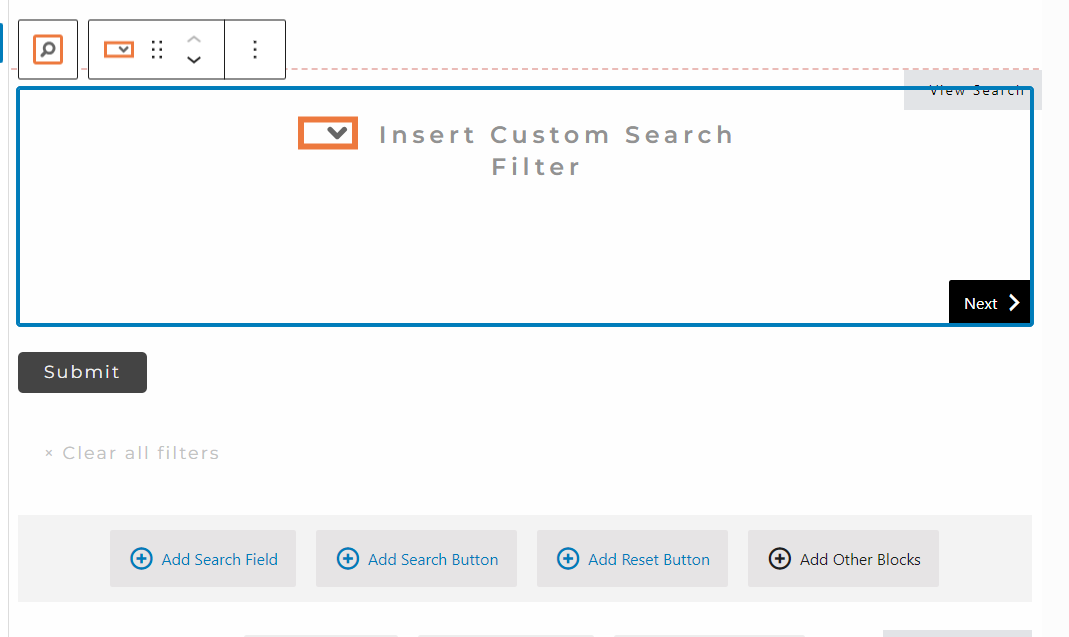
However when I try to insert the Custom Search Filter no options to select are shown. The Submit and Reset buttons show correctly. But not the filter dropdown.

I installed the old Views plugin and was able to build a search with the criteria I wanted using that. So it isn't a Taxonomy issue or anything like that. I have tried disabling caching for the site and deactivating all non Toolset plugins to check for conflicts, neither made any difference.

Website link is lien caché

#2709286

Minesh
Supporter

Les langues: Anglais (English )

Fuseau horaire: Asia/Kolkata (GMT+05:30)

Hello. Thank you for contacting the Toolset support.

That is really strange.

Do you see any JavaScript/jQuery error with your browser's console?

Can you please share problem URL and admin access details.

*** Please make a FULL BACKUP of your database and website.***
I would also eventually need to request temporary access (WP-Admin and FTP) to your site. Preferably to a test site where the problem has been replicated if possible in order to be of better help and check if some configurations might need to be changed.

I have set the next reply to private which means only you and I have access to it.

#2709419

Thank you Minesh. In order to grant you the above I will need to clear it with our Cybersecurity team. Which may take a few days.

Please keep this ticket open whilst I do so.

#2709420

And no, there are no relevant javascript errors thay I can see.

#2710414

Minesh
Supporter

Les langues: Anglais (English )

Fuseau horaire: Asia/Kolkata (GMT+05:30)

Ok - it seems there must be firewall or something that should block the request or could possibly something else.

What if you try to check on another server and by testing this way we will have confirmation the issue is on the current server or on different server as well.


In addition to that:

Could you please send me debug information that will help us to investigate your issue.
=> https://toolset.com/faq/provide-debug-information-faster-support/