Passer la navigation

[Résolu] Translation "Show results within"

This support ticket is created Il y a 3 years. There's a good chance that you are reading advice that it now obsolete.

This is the technical support forum for Toolset - a suite of plugins for developing WordPress sites without writing PHP.

Everyone can read this forum, but only Toolset clients can post in it. Toolset support works 6 days per week, 19 hours per day.

Sun Mon Tue Wed Thu Fri Sat
- 9:00 – 13:00 9:00 – 13:00 9:00 – 13:00 9:00 – 13:00 9:00 – 13:00 -
- 14:00 – 18:00 14:00 – 18:00 14:00 – 18:00 14:00 – 18:00 14:00 – 18:00 -

Fuseau horaire du supporter : Asia/Hong_Kong (GMT+08:00)

Ce sujet contient 2 réponses, a 2 voix.

Dernière mise à jour par dirkF-2 Il y a 3 years.

Assisté par: Luo Yang.

Auteur
Publications
#2609469
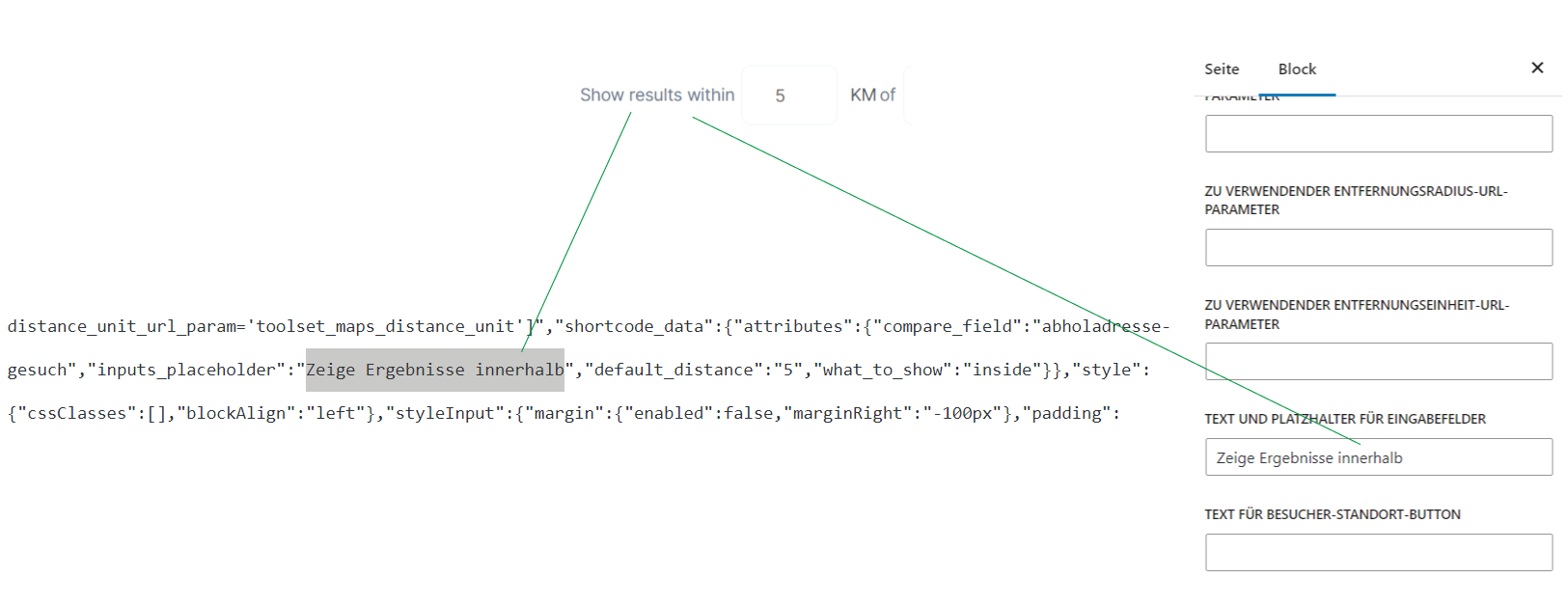
Untitled-6.png

I have already looked at various treats on the subject of translating "Show results within" in the search filter.
https://toolset.com/forums/topic/help-with-translation-with-distance-filter/
https://toolset.com/forums/topic/not-possible-to-translate-inputs_placeholder-of-wpv-control-distance-shortcode/

However, I still could not do the translation.

I have (as shown in the picture) entered the placeholder text (in html mode as well as in the block settings). However, the placeholder is not displayed in the frontend.

Thanks for the help!

#2609511

Hello,

You will need to setup the option "TEXT AND PLACEHOLDERS FOR INPUT FIELDS" value with placeholders, for example:

[wpml-string context="wpv-views"]<label>City</label>%%CENTER%%<label>Show results within</label>%%DISTANCE%%[/wpml-string]

See below sandbox website:
Login URL: lien caché

Page with view block:
lien caché
find and select "Distance" block, in the block setting panel, you can see the option "TEXT AND PLACEHOLDERS FOR INPUT FIELDS" value

Test it in frontend:
lien caché
It works fine.

#2609545

Thank you! My issue is resolved now.