This is the technical support forum for Toolset - a suite of plugins for developing WordPress sites without writing PHP.
Everyone can read this forum, but only Toolset clients can post in it. Toolset support works 6 days per week, 19 hours per day.
| Sun | Mon | Tue | Wed | Thu | Fri | Sat |
|---|---|---|---|---|---|---|
| - | 10:00 – 13:00 | 10:00 – 13:00 | 10:00 – 13:00 | 10:00 – 13:00 | 10:00 – 13:00 | - |
| - | 14:00 – 18:00 | 14:00 – 18:00 | 14:00 – 18:00 | 14:00 – 18:00 | 14:00 – 18:00 | - |
Fuseau horaire du supporter : Asia/Kolkata (GMT+05:30)
Ce sujet contient 7 réponses, a 1 voix.
Dernière mise à jour par Stephen Vaughan Il y a 4 weeks.
Assisté par: Minesh.

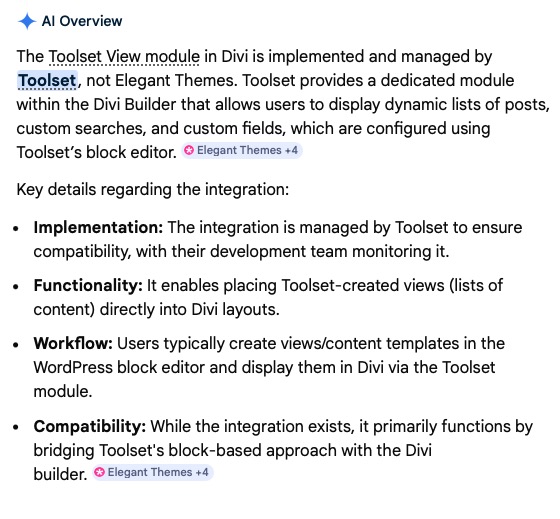
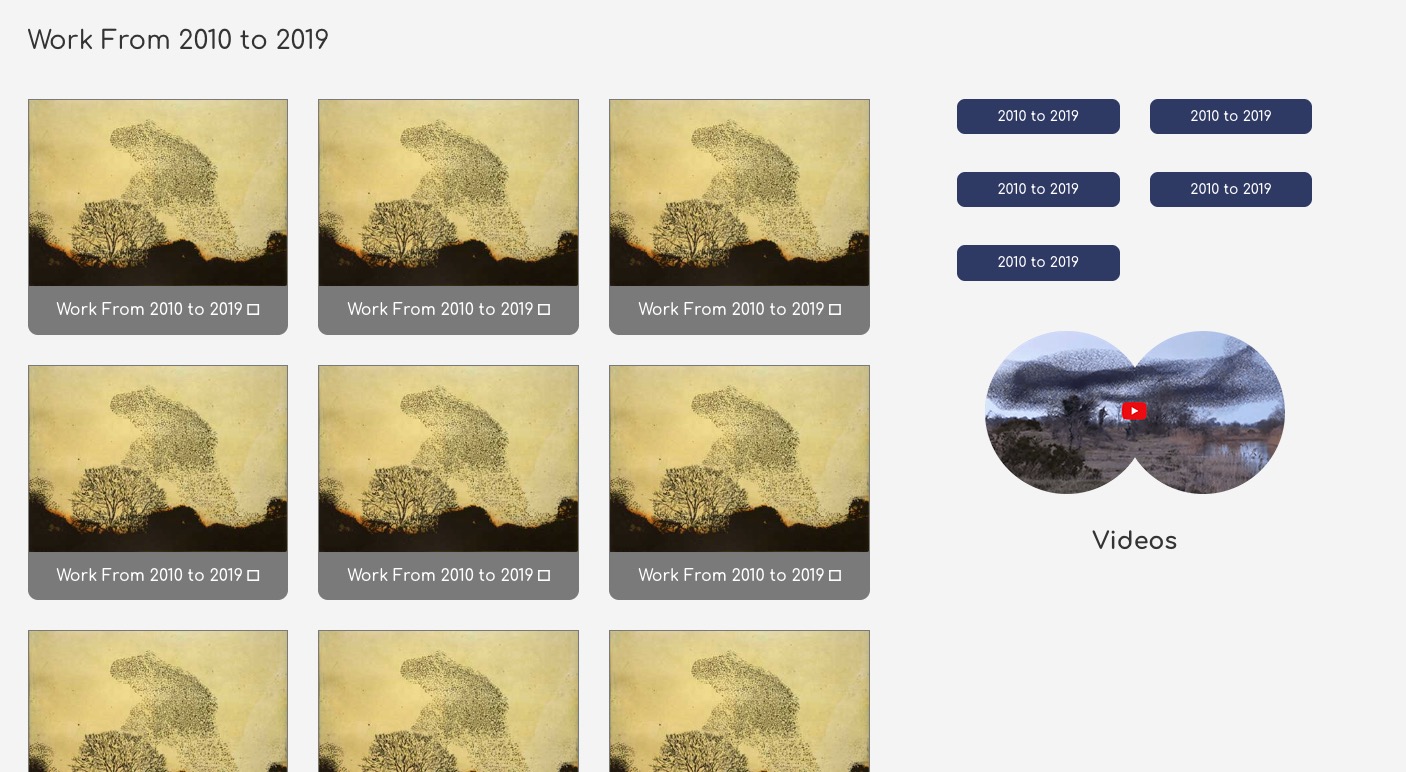
From testing (on the listed site), migrated to Divi 5, the Toolset Views module (and shortcodes) for views configured on a relationship between two post types has stopped working. NOTE: the live site is still on Divi 4. I have been testing sites locally with the Divi 5 migration process. There are up to four sites where this will be an issue.
As you can see from the screenshot the loop is rendering the same instance over and over, instead of the filtered result.
I know from expereince that finding who claims ownership of the Toolset View module can be a bit of a mystery so include a screenshot from GHoogle AI stating that it is Toolset's module.
Can you indicate wethere Toolset will work with Elegant themes to resulve this issue? I can pass on a Duplicator backup of the site as is on Divi 5.







Hello. Thank you for contacting the Toolset support.
The thing is that - with the release of Toolset Blocks we shifted the focus in support of working with the native WordPress block editor instead of providing and maintaining support for a different page builders, and for now that will continue to be the case with Divi builder as well.
The issue has been arise with the release of Divi 5.
We don't expect to do specialised work to integrate with Divi 5, but it could be possible only when given that version 5 will see Divi shift to work with the block editor and that Divi 5 and Toolset co-exist more comfortably than was the case with the changes in Divi 4. So, honestly it will be matter of choice for you but you can use native block editor and Toolset offers also legacy editor to build views/content templates/archives.
It was really challenging task to offer workaround in this case and fortunately I've working workaround to share.
You can add the following code to "Custom Code" section offered by Toolset:
=> https://toolset.com/documentation/programmer-reference/adding-custom-code/using-toolset-to-add-custom-code/
function toolset_loop_index_divi5_fix($increment = false) {
    global $WP_Views;

    static $custom_loop_index = -1;
    if($increment) {
      $custom_loop_index++;
    }

    return $custom_loop_index;

}


function func_get_current_post_id_divi5_fix($atts = array()) {
    global $post;
   global $WP_Views;

  if(isset($atts['increment_loop_index']) and $atts['increment_loop_index']=='yes'){
    $index =  toolset_loop_index_divi5_fix(true);
  } else {
   $index = toolset_loop_index_divi5_fix();
  }

     $result_posts = $WP_Views->post_query->posts;

     $element = $result_posts[$index];


    return $element->ID;

}
add_shortcode('toolset_post_id', 'func_get_current_post_id_divi5_fix');
And within yoru view' Loop Editor you can adjusted the code as given under for your Loop template "Loop item":
For the vary first field added within your view's loop - you should use like:
[types field="your-field-slug" output="raw" item="[toolset_post_id increment_loop_index='yes']"][/types]
And for other fields, you can use the the shortcode as given under:
[types field="your-field-slug" item="[toolset_post_id]"][/types]
Thanks MInesh,
It looks like the never the twain will meet as the old saying goes.
To be honest the road that WordPress has taken with the Gutenburg has been a bit of a hot mess, where users are now expected to be backed into its own definition of web develoment, which by the way is miles of proper web practices, html markup standards and a complete abstaction away from a true understanding of CSS.
Matt Mullenweg and his Gutenburg team missed a big trick by not basing the develpoment side of WordPress .org on a proper IDE environment, where all html, CSS and JS is accessible to developers via third prty builder tools, all of whom need to conform to propre standards and conventions. Turn off one tool, turn on another and all layouts, content and styling is intact. In fact the block editor as we know it would be the WordPress default, for beginers and to have something in place until thied party tools are activated. There would be no more themes as they are not required. No more where did my site go, with all the content when themes are swapped. But I guess Matt just really doesn't think about the end user. He's made his deals and money and now sits on his jazz laurels.
But, there is some light at the end of the tunnel when we look over to Etch WP. Check it out, because this is the answer to all the half concieved builders like Elementor, and Divi for that matter. This is a full on development environment where we do get access to the html, CSS and JS and therefore a lot more fleinilty than the restrucctions and in retrospect terrible workflows of older offerings in the page builder space.
There is also Bricks builder and while not as advanced as Etch, it does allow to put together loops directly in its builder interface. So, for filtered views, based on relationships, I am able to use the following to set this up and structure styled cards directly in Bricks:
return [
'post_type' => 'print',
'orderby' => 'desc',
'posts_per_page' => '-1',
'paged' => 1,
'suppress_filters' => true,
'toolset_relationships' => [
'role' => 'child',
'related_to' => get_the_ID(),
'relationship' => 'print-year_print',
]
];
And this is the thing, by investing in time learning these things porperly, as any professional web developer should, we gain better insights into how to do these things properly. The hand held nature of the block editor is not the answer to doing serious work. It has its uses but is misplaced in the develpers toolbox. In fact if we look at the original HTML/CSS/JS UIfor views in Toolset, these were more in the spirit of direct web development.
I'll add that the above snippet is something that I had to hunt down in Toolset's documentation but it is buried behind a lot of other documentation focuesed on the block editor approach. It does a diservice to what can be done with Toolset, becauseI I am pretty certain that I am one of the rare users of this approach in Bricks.
I'll certainly test out your suggestion, but, more than likely I will be suggesting theme rebuilds (as in the builder used) in Bricks or Etch over the next few years, for client's sites built on Divi 4.
Hi,
Just coming back to you on the code snippet you provided. I have added this to Toolset's custom code and gave it a slug of divi-loops.
I am not very clear in how and where the fields in the View template are supposed to be configures.
You have suggested:
[types field="your-field-slug" output="raw" item="[toolset_post_id increment_loop_index='yes']"][/types]
&
[types field="your-field-slug" item="[toolset_post_id]"][/types]
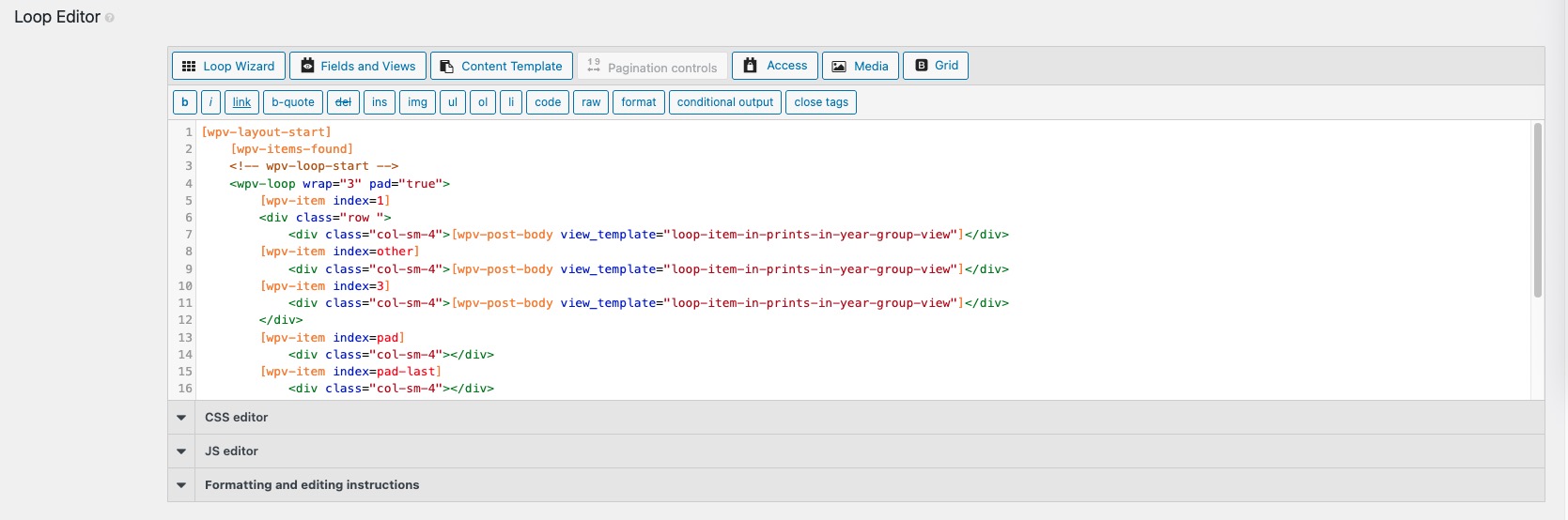
In my view I have the Loop Editor configured, as per the attached screenshot
Then further down the template for the items in the loop is as follows:
<div class="print-image-for-archive">
[wpv-post-featured-image size="full"]
<div class="print-link-for-archive">
[wpv-post-link]
</div>
</div>
I don't see any fields as per the {types][/types] format.
Hi just looking again at the output, and were it is going wrong, I don't think that this is an issue with loops per say. It's just where the view is being configured to be filtered based on the relationship between two post types, in this case, all the prints associated with a particular year. what the loop seems to be outputting is the post title and featured image of the parent year.


Hi there,
Minesh will be with you tomorrow to continue the ticket.
Thank you for your patience.
Can you please share problem URL where you added your view as well as admin access details.
*** Please make a FULL BACKUP of your database and website.***
I would also eventually need to request temporary access (WP-Admin and FTP) to your site. Preferably to a test site where the problem has been replicated if possible in order to be of better help and check if some configurations might need to be changed.
I have set the next reply to private which means only you and I have access to it.
I've added the following code to "Custom Code" seciton offered by Toolset:
=> lien caché
function toolset_loop_index_divi5_fix($increment = false) {
    global $WP_Views;

    static $custom_loop_index = -1;

    if($increment) {
      $custom_loop_index++;
    }

    return $custom_loop_index;

}

function toolset_loop_index_divi5_fix_2nd_view($increment = false) {
    global $WP_Views;

    static $custom_loop_index_2nd_view = -1;

    if($increment) {
      $custom_loop_index_2nd_view++;
    }

    return $custom_loop_index_2nd_view;

}


function func_get_current_post_id_divi5_fix($atts = array()) {
    global $post;
   global $WP_Views;

  if(isset($atts['increment_loop_index']) and $atts['increment_loop_index']=='yes'){
    $index =  toolset_loop_index_divi5_fix(true);
  } else {
   $index = toolset_loop_index_divi5_fix();
  }


     $result_posts = $WP_Views->post_query->posts;

     $element = $result_posts[$index];


    return $element->ID;

}
add_shortcode('toolset_post_id', 'func_get_current_post_id_divi5_fix');


function func_get_current_post_id_divi5_fix_2nd_view($atts = array()) {
    global $post;
   global $WP_Views;

  if(isset($atts['increment_loop_index']) and $atts['increment_loop_index']=='yes'){
    $index =  toolset_loop_index_divi5_fix_2nd_view(true);
  } else {
   $index = toolset_loop_index_divi5_fix_2nd_view();
  }


     $result_posts = get_view_query_results(159);  /// print-year-buttons-view

     $element = $result_posts[$index];


    return $element->ID;

}
add_shortcode('get_ts_post_id', 'func_get_current_post_id_divi5_fix_2nd_view');


add_filter( 'wpv_view_settings', 'func_filter_by_current_post_relation', 101, 2 );
  function func_filter_by_current_post_relation( $view_settings, $view_id ) {
  global $post;
    if ( $view_id == 1494 ) {


      $view_settings['post_relationship_slug'] = 'print-year_print';
      $view_settings['post_relationship_role'] = 'child';
      $view_settings['post_relationship_mode'] = array('0' => 'this_page');
      $view_settings['post_relationship_id'] = $post->ID;


    }
    return $view_settings;
}
I've also added the shortcode names toolset_post_id and get_ts_post_id to Toolset => Settings => Front-end Content => Third-party shortcode arguments section.
Can you please confirm it works as expected:
- lien caché
Thanks Minesh,
I can see that the code you applied has resolved the issue. I will go and study what you did and revert, but it looks promising. I see I have another little related view on the prints template that shows the siblings as per their year grouping. I will see if I can clean that one up too.
Hi Minesh.
I have all that working now and will take note for other projects that are using similar configurations.
Hopefully something more solid in terms of Divi updates will resovle this fully.


