Tell us what you are trying to do?
I have a custom post type astrofotos, where members can upload their astro images with different infos. Now I would like to get working the following:
- uploaded post image should be linked to the media file itself in order to get a fancybox working - popup with the big image
- I would like to link to the author archive: see all posts (astrofotos) from this author.
- How can I display the time when a date field is filled out?
- How can I ensure, that the post image (astro foto) is uploaded before the user form is submitted
What is the link to your site?
lien caché
Hello,
Those requests you mentioned above can be done within Toolset plugins.
See below test site, login URL:
lien caché
Here are detail steps:
1) Setup a custom multiple instance image field for post type "astrofotos":
lien caché
2) Setup a post form for creating new "astrofotos" post:
lien caché
enable option "Use the WordPress Media Library manager for image, video, audio, or file fields"
Display above post form in a page:
lien caché
3) Setup a content template for single "astrofotos" post:
lien caché
There are two kinds block can display custom multiple instances image field:
- Toolset Gallery block
- Toolset Image Slider block
4) Setup a WordPress Archive for post type "astrofotos" using classic editor:
lien caché
in section "Loops Selection", enable option: Author archives, and display posts of post type "astrofotos"
In view's loop display a content template, and design the content template with Blocks editor, display what you want:
see the demo author archive page:
lien caché
It is just a demo for your reference.
Hi,
thanks, my questions were a little bit specific:
- how can I add a link within the single post template "astrofotos" to the post image in order to get a lightbox popup? I Would like to use the post image, which is uploaded - there is no gallery block.
- Can I make default fields at the content form required, e.g. the post image?
Regards
I´ve seen your examples. I need to attach the uploaded photo as featured post image.
You can try these:
1) edit the custom post type "astrofotos":
lien caché
in section "Sections to display when editing", enable option: Featured Image
2) Edit the post form for creating new "astrofotos" post:
lien caché
Add the "Featured Image" field
3) So users can submit image in frontend
4) Edit the content template forsingle "astrofotos" post:
lien caché
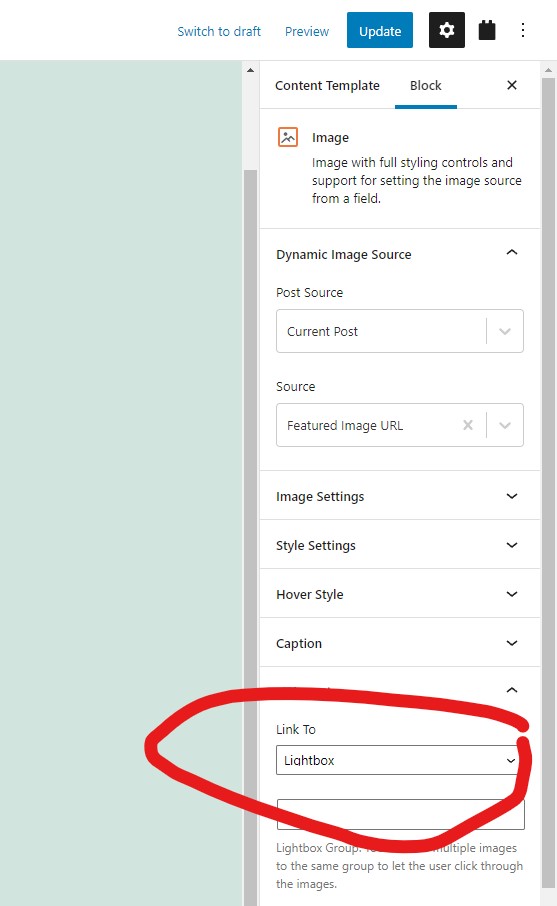
display a Toolset image block, choose the source from featured image, and in option "Link To" use option: lightbox, see my screenshot lightbox2.jpg
See the result here:
lien caché
And author archive page:
lien caché
5) You can use filter hook "cred_form_validate" to make featured image field of Toolset post forms to be required
https://toolset.com/documentation/programmer-reference/cred-api/#cred_form_validate
click link "Usage examples", the first example codes can validate the feature image field.
Thanks, I could solve the missing image problem at the user frontend form and I could solve the featured image lightbox.
I think, the author archive I can fix also - I need some time.
Another question I came over: can I limit / select, which categories are selectable at the user post form?
According to our support policy, we prefer one ticket one question, for other new questions, please check the new thread here:
https://toolset.com/forums/topic/another-question-i-came-over/
My issue is resolved now. Thank you!