On our site, 2 types of users can create job listings. Logged in as an administrator, you can use the link here: lien caché to create your own if needed.
Once that "Listing" CPT is created, it is normally displayed using a Layout (Legacy). It worked find until the end of June we just found out. After that, any new Job "Listing" created ends up not displaying, since it appears to be trying to use the wrong layout.
This has been running for 3 years and we have no idea why it would have suddenly changed. Are Layouts broken or abandoned now?
To fix it, we can go in WP Edit mode, on the listing, and reconnect the layout here: lien caché selecting Alternate Listing Single as the layout.
Link to a page where the issue can be seen: lien caché (Click on the GG TEST, or GG TEST 2)
I expected to see: The proper Layout being used.
Instead, I got: A blank, wrong layout.
Hello,
I assume we are talking about the problem post:
lien caché
Please edit it:
lien caché
In section "Template Layout", you are using option "Layout for Listings", click button "Edit this layout", it is an empty layout:
lien caché
If you want to apply layout "Alternate Listing Single" to all listing posts, please try these:
1) Trash and remove layout "Layout for Listings"
2) Edit layout "Alternate Listing Single":
lien caché
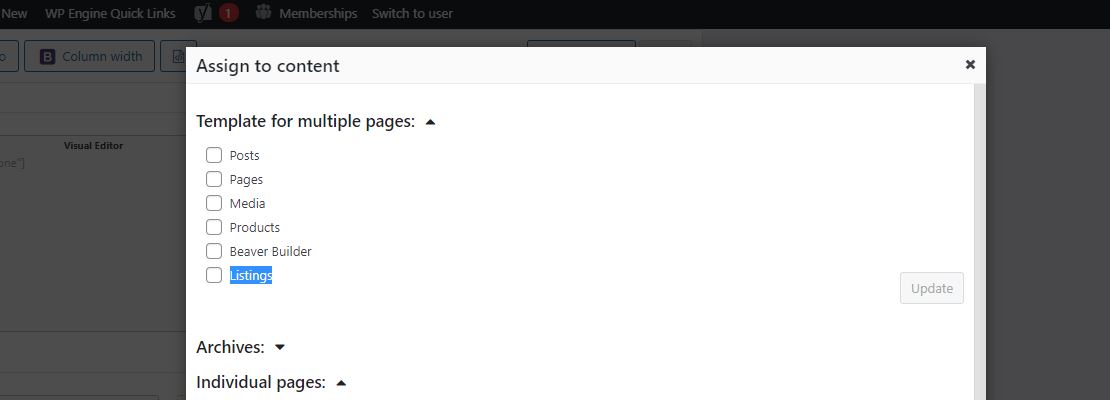
click button "Change how this layout is used", in section "Template for multiple pages", enable option "Listings", and test again, see my screenshot Listings.JPG