Passer la navigation

[Résolu] Split: Filter view by related CPT and display on map – distance filter shows empty results

This support ticket is created Il y a 1 year, 7 months. There's a good chance that you are reading advice that it now obsolete.

This is the technical support forum for Toolset - a suite of plugins for developing WordPress sites without writing PHP.

Everyone can read this forum, but only Toolset clients can post in it. Toolset support works 6 days per week, 19 hours per day.

Sun Mon Tue Wed Thu Fri Sat
- 10:00 – 13:00 10:00 – 13:00 10:00 – 13:00 10:00 – 13:00 10:00 – 13:00 -
- 14:00 – 18:00 14:00 – 18:00 14:00 – 18:00 14:00 – 18:00 14:00 – 18:00 -

Fuseau horaire du supporter : Asia/Kolkata (GMT+05:30)

Ce sujet contient 21 réponses, a 2 voix.

Dernière mise à jour par Minesh Il y a 1 year, 7 months.

Assisté par: Minesh.

Auteur
Publications
#2778346

Minesh
Supporter

Les langues: Anglais (English )

Fuseau horaire: Asia/Kolkata (GMT+05:30)

Ok - so as per your requirement, as we need to query the parent address field.

I've created the following views:

The following view is used to get Dealers based on the distance search address string and the view will return IDs of found posts and we used that further with "wpv_filter_query" hook.
- lien caché

The following view is used to get Building post IDs based on the found Dealers using the distance search address (The Dealer IDs we get from above view ID: 13885) string and the view will return IDs of Building posts and we used that further with "wpv_filter_query" hook.
- lien caché

I've adjusted the code added to "Custom Code" section offered by Toolset:
- lien caché

add_filter('wpv_filter_query', 'func_hookin_shortcode_attribute_value', 99, 3);
function func_hookin_shortcode_attribute_value ( $query_args, $view_settings, $view_id ) {
    global $WP_Views;
  //  $relationship_filter_ids = array();
    $category_filter_values = array();
    $distance_address = '';
     if( $view_id == 13392 ) {
         
  
       if(isset($_POST['search']['dps_general'])){
        
        foreach($_POST['search']['dps_general'] as $k=>$v):
        		 if($v['name'] == 'wpv-wpcf-category[]' and !empty($v['value'])){
                    $category_filter_values[]=$v['value'];
                 }
        
        		   if($v['name'] == 'toolset_maps_distance_center' and !empty($v['value'])){
                     		$distance_address = $v['value'];
                   }
        endforeach;
        
       }
       
       if(!isset($_POST['search']['dps_general'])) {
       
   
       if(isset($_GET['wpv-wpcf-category']) and !empty($_GET['wpv-wpcf-category'])){
                    $category_filter_values=$_GET['wpv-wpcf-category'];
         }
        
       if(isset($_GET['toolset_maps_distance_center']) and !empty($_GET['toolset_maps_distance_center'])){
                     		$distance_address = $_GET['toolset_maps_distance_center'];
                   }
     }
  
   }


        if($distance_address!='') {
        		$distance_parents = do_shortcode('[wpv-view name="distance-search-get-dealers" mapcenter="'.$distance_address.'" cached="off"]');
              $distance_parents = explode(",",trim($distance_parents));
          
          
              if(!empty($distance_parents)){
                		
                	$selected_cats = join(",",$category_filter_values);
                	$final_result = array();
              		foreach($distance_parents as $k=>$v):
                		$building_result = do_shortcode('[wpv-view name="related-buildings-parent-dealer-address"  wpvrelatedto="'.$v.'" category="'.$selected_cats.'"  cached="off"]');
                		$building_result = explode(",",trim($building_result));
                		$final_result = array_merge($final_result,$building_result);
                	endforeach;
                
                   $query_args['post__in'] = $final_result;


              }
         
        }


    return $query_args;
}

Can you please check now the distance filter works:
- lien caché

More info:
- https://toolset.com/documentation/programmer-reference/adding-custom-code/using-toolset-to-add-custom-code/
- https://toolset.com/documentation/programmer-reference/views-filters/#wpv_filter_query

#2778352

Wow, thanks for doing all that work, Minesh. I tested the distance filter and it seems to work partially. It is including some buildings outside of the 50 mile radius, though. If I use the address
3506 GA HWY 224, Montezuma, GA 31063
it should not include the 3 results in Thomaston, GA because it is 61 miles from the entered address. If I change the radius to 5 miles it shows 3 locations and there should only be 1.

I tried another address:
519 W Adair St, Valdosta, GA 31601, USA
And it returned results that seemed correct.

#2778690

Minesh
Supporter

Les langues: Anglais (English )

Fuseau horaire: Asia/Kolkata (GMT+05:30)

Well - I've created the simple distance search test view as you can see with the following link:
- lien caché

As you can see I've only added the distance search for the Dealers post type and I'm displaying the Post IDs with the above view loop.

When I search for the address string "3506 GA HWY 224, Montezuma, GA 31063"
- lien caché

I can see it does display the result that is post ID "6916" and that post ID has the address "629 N Church St, Thomaston, Georgia, 30286" but that address has the Distance value 43.8 Miles.

Can you confirm this, maybe you confuse between miles and kilometers. or am I missing anything here?

#2778706
toolset map directions.png

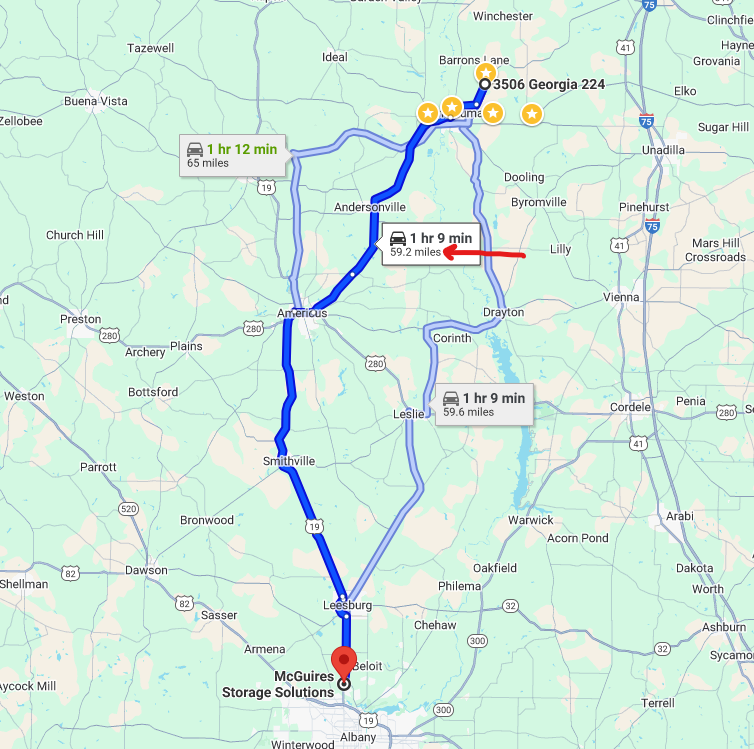
I just realized something. Toolset by default calculates the distance by a radius from a set of coordinates calculated from an address. It doesn't use the road distance as determined by getting directions. Is Toolset capable of displaying posts by calculating the distance according to directions from the entered address to the dealer address?

Also, the live page lien caché is now just spinning when I enter an address. It never finishes loading. I haven't done anything since Friday.

Thanks for all your help on this. I'm trying to make this page for my boss so we can market our inventory, but it's been more of a challenge than I thought it would be.

#2778744

Minesh
Supporter

Les langues: Anglais (English )

Fuseau horaire: Asia/Kolkata (GMT+05:30)

I just realized something. Toolset by default calculates the distance by a radius from a set of coordinates calculated from an address. It doesn't use the road distance as determined by getting directions. Is Toolset capable of displaying posts by calculating the distance according to directions from the entered address to the dealer address?
===>
No - there is no such feature available.

Also, the live page lien caché is now just spinning when I enter an address. It never finishes loading. I haven't done anything since Friday.
==>
it's fixed.


#2778846

I'm sorry to bug you one last time, but the map is now not working.

#2778981

Minesh
Supporter

Les langues: Anglais (English )

Fuseau horaire: Asia/Kolkata (GMT+05:30)

Ok - it should be ok now. It was as I commented out the unwanted field due to testing:

<!---[wpv-post-id]==[types field='address' item="@dealers-building.parent"][/types]-->
#2779064

It looks great. Thank you VERY MUCH for all you help on this Minesh!