Passer la navigation

[Remonté au deuxième échelon] New Flex setting in Admin messes up layout of custom fields

This support ticket is created Il y a 7 years. There's a good chance that you are reading advice that it now obsolete.

This is the technical support forum for Toolset - a suite of plugins for developing WordPress sites without writing PHP.

Everyone can read this forum, but only Toolset clients can post in it. Toolset support works 6 days per week, 19 hours per day.

Sun Mon Tue Wed Thu Fri Sat
- 7:00 – 14:00 7:00 – 14:00 7:00 – 14:00 7:00 – 14:00 7:00 – 14:00 -
- 15:00 – 16:00 15:00 – 16:00 15:00 – 16:00 15:00 – 16:00 15:00 – 16:00 -

Fuseau horaire du supporter : Europe/London (GMT+01:00)

Marqué : 

Ce sujet contient 2 réponses, a 2 voix.

Dernière mise à jour par Bente Il y a 7 years.

Assisté par: Nigel.

Auteur
Publications
#1244881
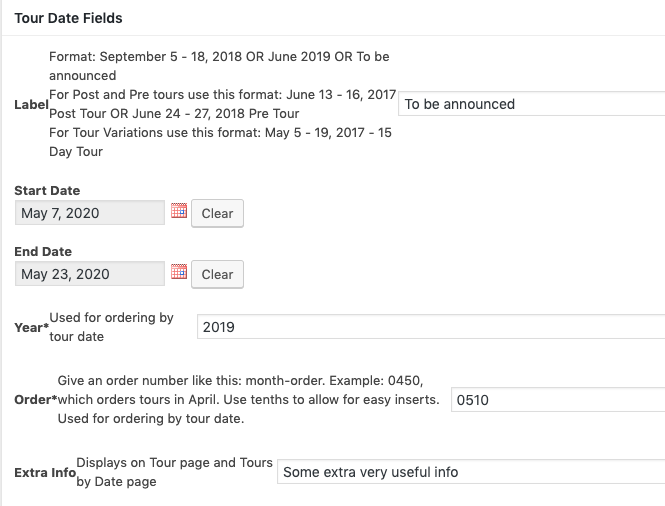
Screen Shot 2019-05-16 at 7.58.04 PM.png

Layout of the custom fields and descriptions are messed up due to new setting for wpt-form-item.
See screenshot.

I had to add an admin stylesheet to remove the 'flex' setting for .wpt-form-item.

#1244947

Nigel
Supporter

Les langues: Anglais (English ) Espagnol (Español )

Fuseau horaire: Europe/London (GMT+01:00)

Hi there

We've already had a similar report and identified the same cause, it looks like an unintended side effect of a change introduced elsewhere.

I'll escalate this to the same internal ticket, we should hopefully have a fix for it before too long and I'll keep you posted.

#1245149

Thanks.

Let me put the workaround here for others to use for the meantime.

1. Create an admin.css and enqueue it in functions.php
function admin_style() {
wp_enqueue_style('admin-styles', get_template_directory_uri().'/admin.css');
}
add_action('admin_enqueue_scripts', 'admin_style');

2. Add this to the admin.css:

body .wpt-form-item {
display: block !important;
}