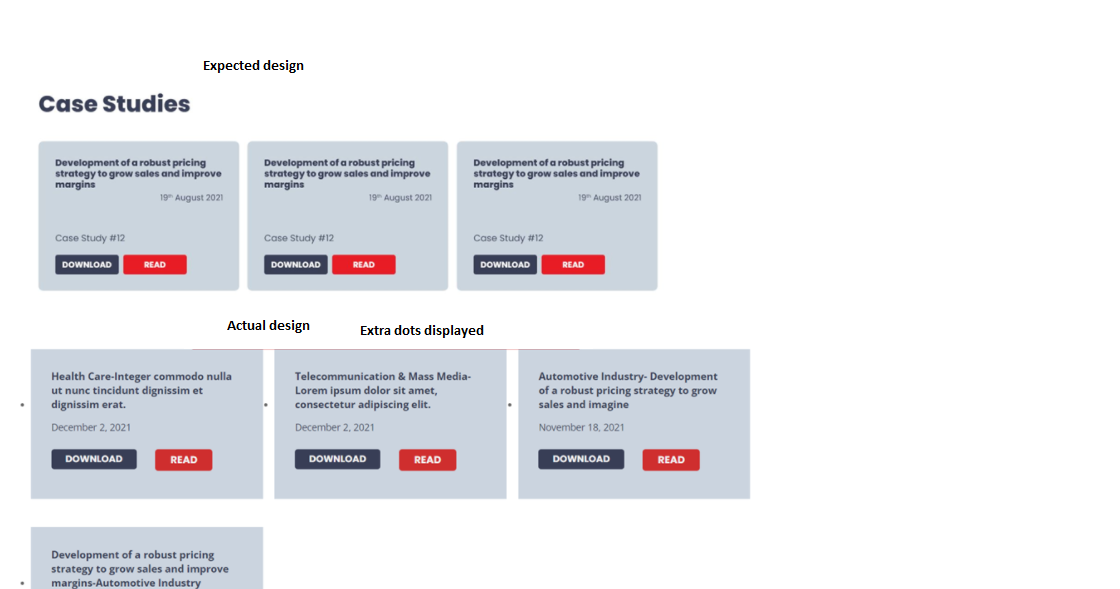
Ce fil est résolu. Voici une description du problème et la solution proposée.
Problem:
Need to help with CSS & remove extra dots displayed
Solution:
The dots displayed by li tag and we will require to set li tag's list-style to none.
You can find proposed solution, in this case with the following reply:
https://toolset.com/forums/topic/need-to-help-with-css-remove-extra-dots-displayed/#post-2236147
Relevant Documentation:
=> https://toolset.com/course-lesson/adding-custom-css-to-templates-archives-and-views/
This is the technical support forum for Toolset - a suite of plugins for developing WordPress sites without writing PHP.
Everyone can read this forum, but only Toolset clients can post in it. Toolset support works 6 days per week, 19 hours per day.
| Sun | Mon | Tue | Wed | Thu | Fri | Sat |
|---|---|---|---|---|---|---|
| - | 10:00 – 13:00 | 10:00 – 13:00 | 10:00 – 13:00 | 10:00 – 13:00 | 10:00 – 13:00 | - |
| - | 14:00 – 18:00 | 14:00 – 18:00 | 14:00 – 18:00 | 14:00 – 18:00 | 14:00 – 18:00 | - |
Fuseau horaire du supporter : Asia/Kolkata (GMT+05:30)
Ce sujet contient 2 réponses, a 2 voix.
Dernière mise à jour par Il y a 4 years, 9 months.
Assisté par: Minesh.