Hello,
I have a map with a distance filter on lien caché.
It worked previously, but after making some changes, it stopped functioning. Could you help me find the correct settings?"
[wpv-filter-start hide="false"]
[wpv-filter-controls]
[wpv-control-distance default_distance="5" compare_field="adres" distance_center_url_param="toolset_maps_distance_center" distance_radius_url_param="toolset_maps_distance_radius" distance_unit_url_param="toolset_maps_distance_unit" inputs_placeholder="Toon de resultaten binnen %%DISTANCE%% KM van de volgende plaats of postcode: %%CENTER%%"]
<p>Onder de kaart vindt je een lijstweergave van de zoekresultaten.</p>
<p class="tel">[wpv-found-count] NEI therapeuten gevonden</p>
[/wpv-filter-controls]
[wpv-filter-end]
kind regards

Minesh
Supporter
Les langues:
Anglais (English )
Fuseau horaire:
Asia/Kolkata (GMT+05:30)
Hello. Thank you for contacting the Toolset support.
I would like to know what exactly the modifications you made?
Can you please share admin access details.
*** Please make a FULL BACKUP of your database and website.***
I would also eventually need to request temporary access (WP-Admin and FTP) to your site. Preferably to a test site where the problem has been replicated if possible in order to be of better help and check if some configurations might need to be changed.
I have set the next reply to private which means only you and I have access to it.
Well - it was missing the submit button.
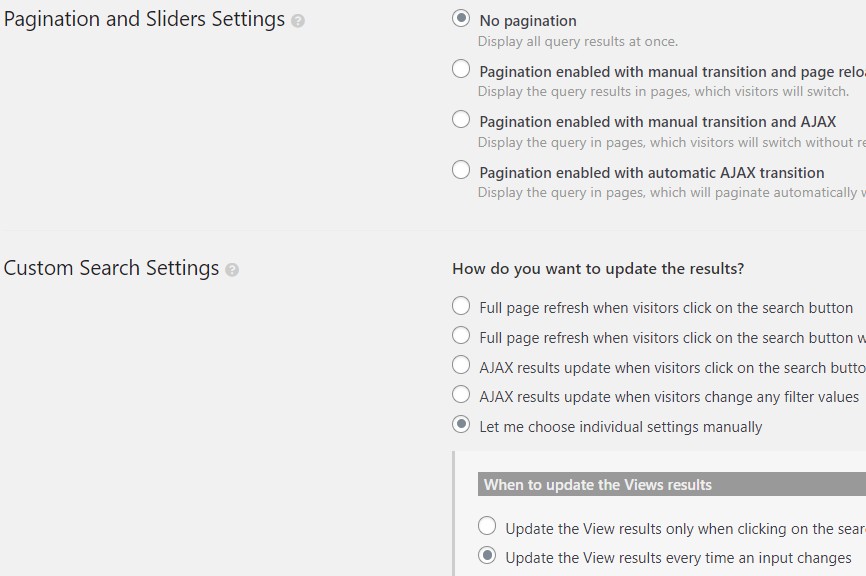
I've just added the submit button and set the "Custom Search Settings" option to "Full page refresh when visitors click on the search button".
More info:
- https://toolset.com/documentation/legacy-features/maps-plugin/filtering-and-ordering-map-markers-by-distance/
Can you please confirm you able to filter the results now.
Hi Minesh,
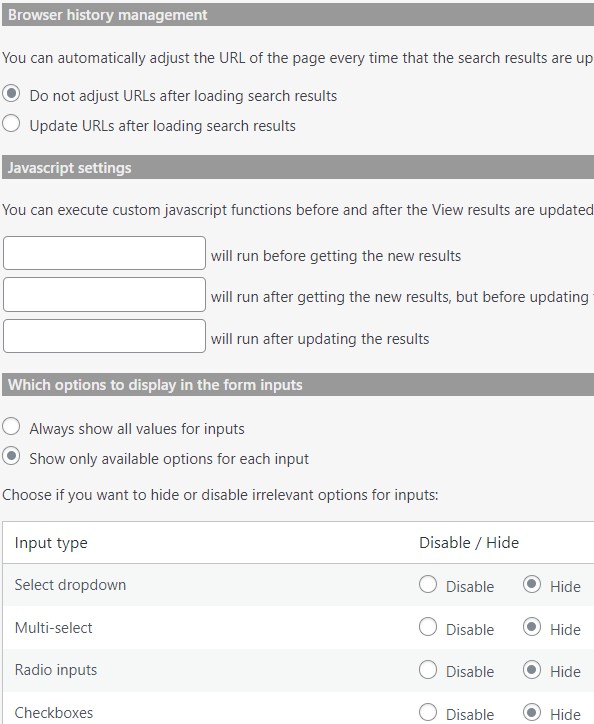
It works, but I would like it to function differently, without updating the URL, as shown in this example: lien caché.
I used the same options, but it is not working on the vvnt website.
Can you please check now: lien caché
With your view:
=> lien caché
I've adjusted the closing div where I closed the div just after the map shortcode which was before added after the [wpv-items-found] shortcode like ([wpv-items-found] </div>):
[wpv-map-render map_id="overzicht" map_height="600px"][/wpv-map-render]</div></div>
I've adjusted the map marker shortcode as given under within "Loop Editor" section and within the view's loop:
[wpv-map-marker map_id='overzicht' marker_id='marker-[wpv-post-id]' marker_icon='' address="[types field='adres'][/types] [types field='stad'][/types]"]
Thank you Minesh for helping me again.